Page 1 of 1
Texture stretched ingame and ZE but not Blender/Msh Viewer
Posted: Fri Jul 23, 2010 5:15 am
by lucasfart
As the title says, half of the faces on my model are stretched beyond recognition ingame and in ZE, whilst in Blender and upon being imported into MshViewer, they show up as being textured perfectly! I was wondering how i would fix this, as it seems more of an issue with the mshviewers ability to save .wrl as a msh.
Re: Texture stretched ingame and ZE but not Blender/Msh View
Posted: Fri Jul 23, 2010 3:45 pm
by FragMe!
Post a picture (with wireframe) of an offending textured bit.
Re: Texture stretched ingame and ZE but not Blender/Msh View
Posted: Sat Jul 24, 2010 5:13 am
by lucasfart
Here's a ZE pic:
Do you mean a wireframe in Blender? Because i can't get one ingame or in ZE.
Wireframe:
In BFViewer:
Re: Texture stretched ingame and ZE but not Blender/Msh View
Posted: Sat Jul 24, 2010 11:05 am
by FragMe!
It is hard to tell but make sure you don't have any polygons with more than 4 sides.
Example big wall on the right there looks to be a point halfway down but there is no edge running along that wall to connect it to anything so try to either connect to a point on the other vertical edge that can't be seen in the pic. Or connect to one on the corner points on the aforementioned edge.
Re: Texture stretched ingame and ZE but not Blender/Msh View
Posted: Sat Jul 24, 2010 11:25 am
by Culvar
I had a similar problem awhile back. Make sure each object has only one texture projection.
Re: Texture stretched ingame and ZE but not Blender/Msh View
Posted: Mon Jul 26, 2010 7:22 am
by lucasfart
Culvar wrote:I had a similar problem awhile back. Make sure each object has only one texture projection.
I'm not sure exactly what you mean, but i've only got one texture applied to the whole thing, which is tiled over and over all over the place.
FragMe! wrote:It is hard to tell but make sure you don't have any polygons with more than 4 sides.
Example big wall on the right there looks to be a point halfway down but there is no edge running along that wall to connect it to anything so try to either connect to a point on the other vertical edge that can't be seen in the pic. Or connect to one on the corner points on the aforementioned edge.
By polygons do you mean faces? Because most of the faces are quads. I'm sorry but you'll need to talk in pretty simple terms for me to understand you. And if that is put simply, I'm lost anyway

.
Re: Texture stretched ingame and ZE but not Blender/Msh View
Posted: Mon Jul 26, 2010 8:23 am
by FragMe!
Yes by polygons I mean faces, should try to keep all faces to 3 or 4 sides, add edges in if you need to split them.
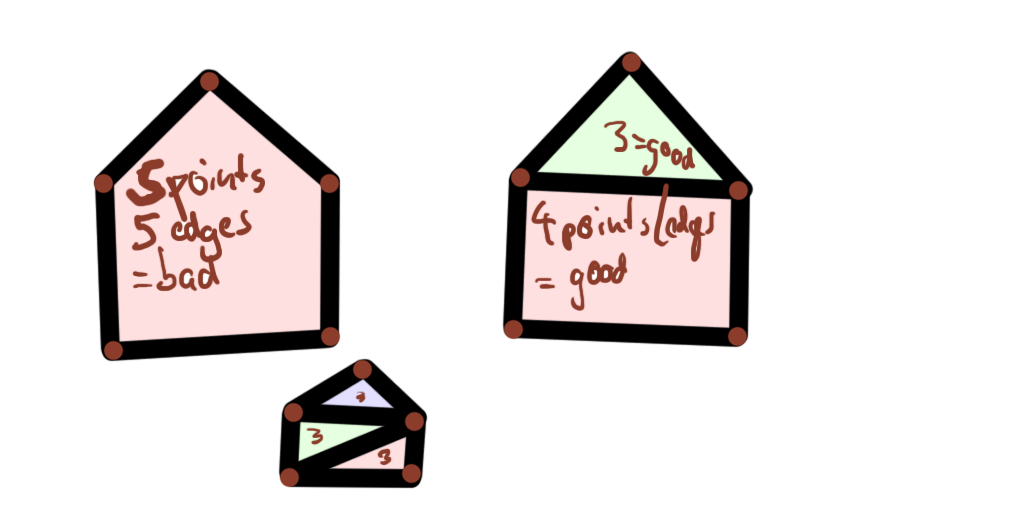
So rectangle that has 5 points (vertices) even though it looks like it only has 4 edges actually has 5. It counts an edge that has a point in the middle (not connected to anything) as 2 edges and therefore is a 5 sided polygon (face) to make it 4 sided you would need to add an edge.
Would draw a picture but I am at work and they don't let me play.

Re: Texture stretched ingame and ZE but not Blender/Msh View
Posted: Mon Jul 26, 2010 8:48 am
by DarthD.U.C.K.
lucasfart wrote:Culvar wrote:I had a similar problem awhile back. Make sure each object has only one texture projection.
I'm not sure exactly what you mean, but i've only got one texture applied to the whole thing, which is tiled over and over all over the place.

check if you have multiple textureprojection entrys there (nevermind the tangentsentry)
Re: Texture stretched ingame and ZE but not Blender/Msh View
Posted: Sat Jul 31, 2010 9:00 am
by lucasfart
I'm using blender, so i' not sure how to check for that....
Sorry Fragme, but would you be able to make that diagram? I'm getting a little bit confused by your explanations..
Re: Texture stretched ingame and ZE but not Blender/Msh View
Posted: Sat Jul 31, 2010 9:58 am
by ANDEWEGET
Something like this?:(red dots are points)
Re: Texture stretched ingame and ZE but not Blender/Msh View
Posted: Sun Aug 08, 2010 7:41 am
by lucasfart
Old Post wrote:Ahh. I just realised what Fragme said about the 5th point. I was looking along the lower and right hand sides of the pic. Thanks for that Ande as well

.
But that won't change a thing i don't think. There are plenty of other faces with only 4 vertices per face which are stuffing up as well.
EDIT:Ok. So i fixed that one, but there are still plenty of sides which are stuffing up when they definitely shouldn't be. I'd be really greatful if somebody could fix this up for me, as the model involved is literally my whole map. Without it working i can't finish my map...
Ok. I've just come to understand that it works fine on my old, 2003 model computer, but is stuffing up as you've seen above on my newer 2008 model computer. I have no idea why this is happening and any tips are appreciated.
Re: Texture stretched ingame and ZE but not Blender/Msh View
Posted: Sun Aug 08, 2010 8:24 pm
by Culvar
Does it work ingame? Or is it the same as ZE?
Re: Texture stretched ingame and ZE but not Blender/Msh View
Posted: Sun Aug 08, 2010 11:07 pm
by RepSharpshooter
I have been fighting this stupid b****** for a long time. In the modeling software, it looks perfect. Ingame, it's all stretched and ew. I can see it around DMI with pandemic's exporter, and with mshex.
As far as I can tell, it has something to do with bad UV coordinates, or bad float numbers for those uv coordinates. I would try several things:
-move all uv coordinates out of negative ranges (make sure all uv coords are greater than 0, up and to the right of the uv origin).
-scale down uvs if possible and avoid areas around u = 16 or v = 16 for some reason.
-If still messing up, tweak offending areas slighting, or re-map that certain face within u = 0 to 1, v = 0 to 1 (the standard box of 1 bitmap)
-Chop up large bits and move them closer to origin (within the standard box is best)
-I even had issues with POSITION coordinates being large negative numbers. Try moving the entire model into positive coordinates as a last resort.
UV mapping within u,v = 0 to 1 seems to be OK as far as I know. Trouble starts when you make a large object that repeats over and over in the uvmap, and the coordinates go far away from u = 1 etc.
Re: Texture stretched ingame and ZE but not Blender/Msh View
Posted: Mon Aug 09, 2010 7:45 am
by lucasfart
Thanks for the detailed reply Rep! I'll have to look into all your suggestions, although I've already tried the first one without success. Are your issues with one computer, or across all the computers its played on?
At Culvar - It looks fine in ZE now, but when i go ingame, blergh. Stretched pixels all over the place.
Re: Texture stretched ingame and ZE but not Blender/Msh View
Posted: Mon Aug 09, 2010 11:43 am
by RepSharpshooter
It happens everywhere to everyone, including pandemic (you can see some stretched textures in some of the stock models). That's why it's an issue inherent to the munging of the msh file, not having to do with a specific modeling software.
And I don't really know the cause. The suggestions above are more like superstitions than actual solutions. One time my Battle Arena 2 model was all stretchy, and I had to do suggestion #3, and it worked after that. So I'm just saying things that I've done in the past.