Page 1 of 1
Localize Question... [Solved]
Posted: Sat Jun 19, 2010 9:26 pm
by SW_elite
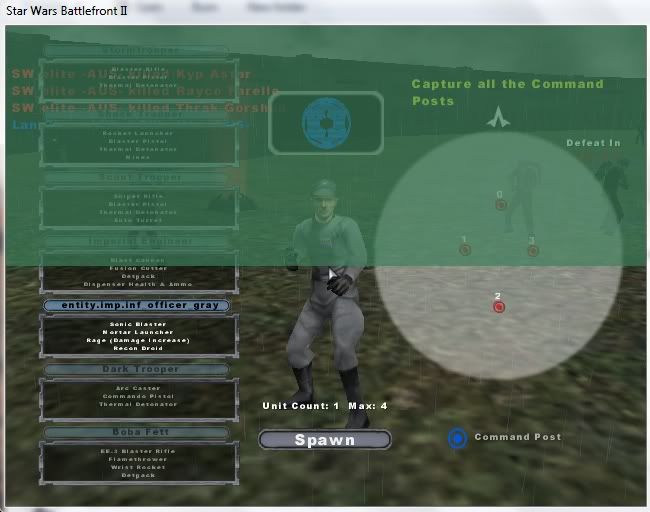
I have changed the Imperial Officer from the atatcommander to the officer... The one that looks like this.
I need to know what this unit's localize path is... And I've allready tried entity.imp.inf_officer_gray .
Also, is there any easy way to find out what the localize path is for unit's that haven't already been added?
Re: Localize Question...
Posted: Sun Jun 20, 2010 9:19 am
by lucasfart
SW_elite wrote:I have changed the Imperial Officer from the atatcommander to the officer... The one that looks like this.
I need to know what this unit's localize path is... And I've allready tried entity.imp.inf_officer_gray .
Judging from the pic, it should be what you've already tried......entity/imp/inf_officer_gray or entity/imp_inf_officer_gray, either one should work.
SW_elite wrote:
Also, is there any easy way to find out what the localize path is for unit's that haven't already been added?
Sory but i don't get you. If you mean units that haven't yet been localised, just localise their .odf name minus the .odf on the end, into the entity path...
Re: Localize Question...
Posted: Mon Jun 21, 2010 1:23 am
by SW_elite
Ah, allright... In that case it isnt working... I wonder why?
Re: Localize Question...
Posted: Mon Jun 21, 2010 8:23 am
by mswf
Have you localized it for all languages?
Re: Localize Question...
Posted: Tue Jun 22, 2010 1:17 am
by SW_elite
In the localize tool it's allready on my language...
And no, I dont know how to do them all.
Re: Localize Question...
Posted: Tue Jun 22, 2010 4:58 am
by mswf
If I remember this correctly (can't check it right now), you can choose which language you want to localize through a drop down menu, or a list that'll always be displayed in the localize editor. Look for it, then try changing the name for your unit in all languages.
Re: Localize Question...
Posted: Tue Jun 22, 2010 7:22 am
by lucasfart
mswf wrote:If I remember this correctly (can't check it right now), you can choose which language you want to localize through a drop down menu, or a list that'll always be displayed in the localize editor. Look for it, then try changing the name for your unit in all languages.
That is correct. It should be underneath the main english editor, in a slightly smaller box. Give all the languages localization, do a manual clean, and then tell us if it still doesn't work...
Re: Localize Question...
Posted: Tue Jun 22, 2010 8:42 am
by SW_elite
Okay, I made the localizations in UK English as well as standard English and........ IT WORKS!!! Thanks a lot guys!