Page 1 of 1
Spyware Attack!
Posted: Wed Nov 22, 2006 6:47 pm
by Darth_Z13
My computer is infected with spyware. I get multiple warnings that I should download new software to stop spyware but I see through the hoax. Unfortunately, my computer doesn't. I have many pictures of the warnings that pop up every couple of seconds which I will post. I have Norton Internet Security installed and it reports NO problems neither does Windows Defender. I can't take it. WHAT THE [wordnotallowed] IS WRONG WITH MY COMPUTER AND HOW DO I FIX IT??????


NOTE: I have removed some things from the warning messages like my IP address. Do I need to do that?
Annoying Warning Box

Pick in Toolbar....

...that displays this message:

RE: Spyware Attack!
Posted: Wed Nov 22, 2006 7:26 pm
by 2_lowiq_clone
And that's why I have McAfee on mine. You can try to isolate and potentially delete the infected file, or running a virus check on your comp. (note, mine does that, so hopefully yours either has an equivalent)
What were you doing at the time of infection, or do you even know??
RE: Spyware Attack!
Posted: Wed Nov 22, 2006 9:09 pm
by guru
zonelabs.com has app called zone alarm, blocks and displays all trojans.
Norton. best virus scanner.
Google "spybot search destroy" it free, it removes all spyware and fast. adware = removed .
if these dont help you, reformat your pc and reinstall windows xp.
RE: Spyware Attack!
Posted: Wed Nov 22, 2006 9:21 pm
by yankeefan05
I had something similar to that problem, except it was worse. My comp got really messed up and i shut down my computer by holding the power button for many secs. When i turned it back on it, i got an error problem, and i couldnt get Windows to start up. I was told it was a Hard Drive crash or problem. That event happened in June and my thread is still here somewhere in the Tech section.
RE: Spyware Attack!
Posted: Thu Nov 23, 2006 12:21 pm
by The_Emperor
Ah yes, spyware. I've removed much of it, on several computers. Including this one

(like Lop.com, persistant annoying malware, that one was pretty hard. And a friend of mine had 7 different trojans and LOTS of junk. The ignorant fool
)
You should get Ad-Aware (freeware) it's pretty good, Spybot S&D like Guru mentioned, and if those don't fully get rid of the problem, use a program called Hijack This!.
Hijack This!:
As a last resort, if the Ad-aware and Spybot S&D fail:
Hijack this makes a list of things happening on your PC, both harmless programs and harmfull ones.
Run it, save the log and post it here, I'll tell ya what shouldn't be there on your pc. DON'T just remove things with Hijack this, you need to know what you CAN remove and what you CAN'T
RE: Spyware Attack!
Posted: Thu Nov 23, 2006 12:40 pm
by Hebes24
spybot search destroy
= Best spyware eliminator ever. I have it on this Computer
Posted: Thu Nov 23, 2006 1:48 pm
by Razorpig
I personally have 4 different Adware/Spyware programs running on my computer at any one time. The reason? Because each and every one of them detects something that the others do not. In todays day and age where trojans are far more prolific than your average virus, most virus scanners do little to get rid of them. Todays Trojans are somewhere between Spyware-Adware and a virus. I would suggest the 2 biggies (adaware, and spybot search and destroy), plus ewido antispy, and avg antispy (both free), also a-squared antispyware is very good. Then I would look into getting a dedicated TROJAN scanner, such as The Cleaner, (a-squared is pretty good as well), or Trojan Hunter...
Trojans are malicious little bastards that can be difficult to get rid of. I had one a few months ago that I had received by d'ling less than dubious software, and this trojan was actually protected with anti-cracking software!! I couldn't delete it, I couldn't remove it with ANY removal tool. I was finally able to disable it long enough that I could back everything up that was important, and then I had to format the Hard Drive. Hijack this wouldn't allow me to do anything with the file either.
I guess if I had one warning for all you kiddies out there it would be to put a raincoat on your jimmy, and to make sure you have multiple protections for your computer. When you download something, scan it with your antivirus, and at LEAST 2 different antispyware programs BEFORE you install or uncompress (unrar or unzip) the file. You'll save yourself ALOT of headaches.
The good thing about trojans (if you can call it a good thing) is that at least they don't infect other files like many of the polymorphing viruses do. Most Trojans are dialers or something like that, so if you do have a high speed connection, at least you don't have to worry about long distance charges being run up on your computer. Many trojans are also back door type programs that allow others access to your sensitive information either by logging keystrokes, or by exploiting security loopholes.
Play safe folks
Posted: Thu Nov 23, 2006 8:46 pm
by -_-
Spybot search and destroy like guru said. If some of the things wont delete, go in and do in manually.
Posted: Thu Nov 23, 2006 9:49 pm
by DarthMan
Okay I already have abunch of anti-(bad stuffs) things on my comp but for safety sake i'm downloading spybot s&d. And you should too Darth_Z13.
Posted: Fri Nov 24, 2006 7:26 pm
by Penguin
if you can't afford Nortans then use AVG
Posted: Fri Nov 24, 2006 9:58 pm
by Darth_Z13
Thing is, I already have Norton Internet Security and Spybot plus Windows Defender. None of them detected it. No problem though 'cause it's in being fixed right now. When I started this topic I was wondering if aybody had had a similar problem.
Posted: Fri Nov 24, 2006 11:27 pm
by -_-
Do you update your spybot?
Posted: Fri Nov 24, 2006 11:34 pm
by Penguin
I was talking about Nortan AntiVirus, not Nortan Internet Security :p
Posted: Fri Nov 24, 2006 11:49 pm
by Darth_Z13
Penguin wrote:I was talking about Nortan AntiVirus, not Nortan Internet Security :p
:p to you Penguin. Norton Internet Security includes Norton AntiVirus and Norton AntiSpam.
@-_-, no I hadn't. It's in beig fixed now anyways so the problems solved. I thought that maybe I could get help here but the problem was too severe. I should have it back by tomorrow.
Posted: Sat Nov 25, 2006 12:27 am
by Delta_57_Dash
AVG + Ad-aware + Spybot S&D + SpyBlaster should keep you squeeky clean...
has done me well for years (although I used to have Norton in place of AVG for a while)
Posted: Tue Nov 28, 2006 3:32 pm
by Adreniline
Boot in safe mode, use anti-virus and anti-spyware while in safemode. Also use hijack this to kill off any stragglers.
To get the boot-up options, press F8 during the boot process (every computer has a different screen when you need to push this)
Then select the option with the word "safemode" should look something like this:
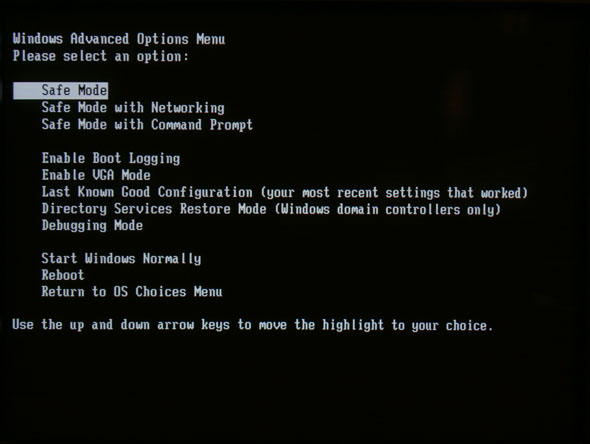
after you boot into safemode, "gun down" the spyware/viruses