Page 2 of 3
Re: how do I import files into xsi
Posted: Sun Mar 29, 2015 4:31 pm
by jedimoose32
You can pretty much install Python wherever can't you? I don't remember ever having to put any thought into that installation process... for the record mine is just in C:\Python[version#] (which is probably the default)...
I checked my environment variables, Marth, and I couldn't find anything related to Softimage.
Re: how do I import files into xsi
Posted: Sun Mar 29, 2015 4:33 pm
by Marth8880
jedimoose32 wrote:You can pretty much install Python wherever can't you? I don't remember ever having to put any thought into that installation process... for the record mine is just in C:\Python[version#] (which is probably the default)...
Yeah, probably. Though to avoid any possible errors with programs that use it it's probably best to just leave it in its default location.
Re: how do I import files into xsi
Posted: Sun Mar 29, 2015 5:03 pm
by jojo3450
is there any other way to export it and covert it in msh.
Re: how do I import files into xsi
Posted: Sun Mar 29, 2015 5:43 pm
by Marth8880
Not really. There's MshEx but that's *extremely* limited in terms of functionality and it doesn't work very well.
Let's try this a third time, and this time, please at least try to answer the question - I can't help you if you don't help me. What's the full path of your XSIZETools folder? It should be something along the lines of C:\Users\username\Autodesk\Softimage_Mod_Tool_7.5\Addons\XSIZETools.
If you don't know how to find out, follow these steps:
1. Press Windows+R (the Windows key is the key with the flag icon and is located between Ctrl and Alt)
2. Type or copy/paste in the following: %USERPROFILE%
3. Press the Enter key
4. In the new window that opens, double-click the folder called "Autodesk".
5. In the Autodesk folder, double-click the folder called "Softimage_Mod_Tool_7.5".
6. In the Softimage_Mod_Tool_7.5 folder, double-click the folder called "Addons".
In this folder is where the XSIZETools folder should have been pasted.
Re: how do I import files into xsi
Posted: Sun Mar 29, 2015 5:56 pm
by jojo3450
C:\Users\Gilbert\Autodesk\Softimage_Mod_Tool_7.5\Addons\xsizetools-master
it is here
also when i installed pywin32-217.win32-py2.6 it said error
thanks for ur help
Re: how do I import files into xsi
Posted: Sun Mar 29, 2015 6:02 pm
by Marth8880
There you go, thanks.

Hmm. That's not just the zip file, is it? You actually extracted it, right?

Also, did you download and install pywin32 as well?
http://sourceforge.net/projects/pywin32 ... e/download
Re: how do I import files into xsi
Posted: Sun Mar 29, 2015 6:22 pm
by jojo3450
first i downloaded python 2.6.6 as it said then i installed pywin32
and yes i extracted it
the error said
Code: Select all
close failed in file object destructor:
Error in sys.excepthook:

Original exception was:
Re: how do I import files into xsi
Posted: Sun Mar 29, 2015 6:32 pm
by Marth8880
Odd. Did you install the Visual C++ 2010 redist like it says to do on the page?
Also, could you go into Softimage, go to File, Preferences, Scripting, and then take a screenshot of the window and post it here? The window should look something like this:
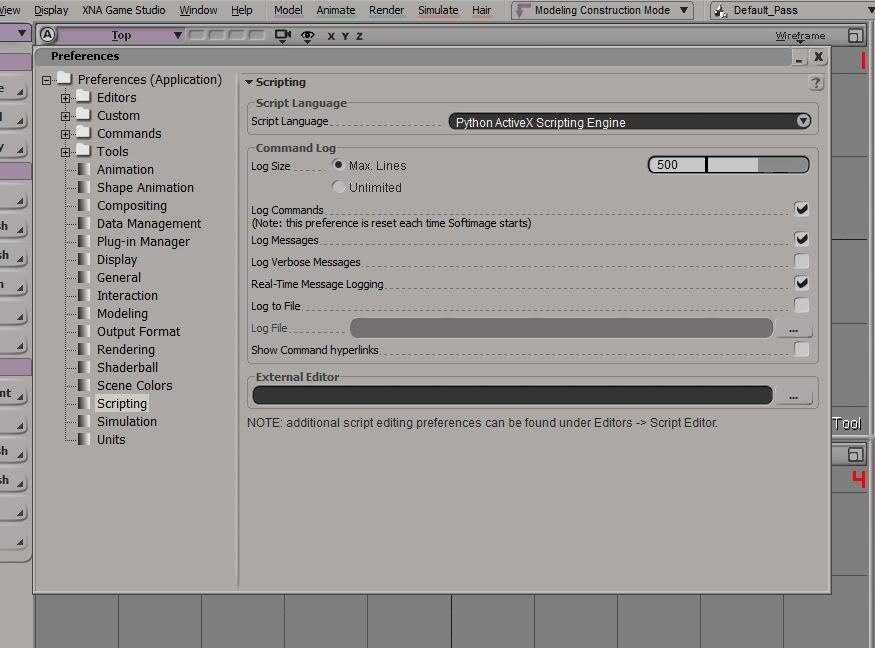
By the way, your issue is that you don't see the ZE Tools menu like shown below, right?

Re: how do I import files into xsi
Posted: Sun Mar 29, 2015 6:41 pm
by jojo3450
yes zetools isn't shown
i took a screen shot but i dont know how to upload it to here
Re: how do I import files into xsi
Posted: Sun Mar 29, 2015 6:44 pm
by Marth8880
Upload to
http://imgur.com/
Then copy the "Linked BBCode (message boards)" link and paste it into your post.
Re: how do I import files into xsi
Posted: Sun Mar 29, 2015 6:48 pm
by jojo3450

also i didnt sign in to imgur and is it free?
Re: how do I import files into xsi
Posted: Sun Mar 29, 2015 6:48 pm
by Marth8880
Ah-ha! What are the other options listed in the Scripting Language menu?
Re: how do I import files into xsi
Posted: Sun Mar 29, 2015 6:50 pm
by jojo3450
wont let me click anything else
also i didnt sign in to imgur and is it free?
edit: I downloaded Visual C++ 2010 but it said my computer already had a newer version?
edit: do i need to install the addon
Re: how do I import files into xsi
Posted: Tue Mar 31, 2015 7:58 am
by GAB
jojo3450 wrote:edit: do i need to install the addon
By addon you mean ZETools?
Re: how do I import files into xsi
Posted: Tue Mar 31, 2015 11:01 pm
by jojo3450
yes
Re: how do I import files into xsi
Posted: Wed Apr 01, 2015 12:15 am
by jedimoose32
Only if you want to be able to export custom models to use in Battlefront 2. As Marth said, there is also MeshEx, and that lets you convert obj files to msh. But it doesn't do cloth or animation, and some other stuff (material flags?). So it's not the greatest, and when I used it back in the old days before ZETools, I found it messed up my models sometimes.
Re: how do I import files into xsi
Posted: Wed Apr 01, 2015 12:35 am
by jojo3450
so i download crosswalk do i put it in addons
Re: how do I import files into xsi
Posted: Wed Apr 01, 2015 2:19 am
by jedimoose32
Isn't it a standalone installation? I haven't used it in ages but I seem to remember it installing from a .msi or .exe...
Re: how do I import files into xsi
Posted: Wed Apr 01, 2015 6:52 pm
by jojo3450
ok there is ZEtools-master and ZEtools_src which is it?
Re: how do I import files into xsi
Posted: Wed Apr 01, 2015 7:00 pm
by jedimoose32
Master, unless you want to compile the source code yourself, which you definitely do not.
Installation, from the README: