Page 1 of 1

Using two skins [SOLVED]

Posted: Mon May 17, 2010 7:00 am
by CressAlbane
I have a model I'm using, and I want to have two versions. One young, one old.
However, I can't get each skin to load, it's always either both young or both old. I know I could fix this with the override texture line, but I'm not sure how to use that. Help?

Re: Using two skins

Posted: Mon May 17, 2010 8:13 am
by Darth_Spiderpig
If the model is override texture capable, add this to your units odfs:

Code: Select all

OverrideTexture         = "old"

Code: Select all

OverrideTexture         = "young"

Re: Using two skins

Posted: Mon May 17, 2010 8:49 am
by AgentSmith_#27
Aha! I just had this problem yesterday! For convenience's sake I'll post the tut from the FAQ thread here:
Hidden/Spoiler:
[quote="Archer01"]I hope I'm not wasting space with this but here goes...

I've been reading about skinning here on the forums, but every solution I've seen so far seems to make the game replace the existing texture of a unit causing all classes that use that model to have the new texture instead of just a single one. I have my own way of getting around this that also uses minimal HD space to accomplish, but I don't want to "jump-the-gun" explaining it if it's already been done (ie I want to avoid sounding like an idiot :P ). So has this problem already been addressed? A couple screenshots are below to show what I mean:

Regular blue trooper and my Green Shield Breaker. Same model different texture:
Image


*Added:
Okay, I'm going to elaborate on what Schizo said below since some hex editing experience is required (and not everyone has worked with hex editors before)…

Step 1: Get the files you need and copy them into the “msh” folder of the side you are creating.
Image

Step 2: Rename the files to something new. For the sake of avoiding errors later on, make sure the new name is EXACTLY the same number of characters as the old one. Example: all_inf_tantive4trooper.msh and all_inf_moddedt4trooper.msh both have 23 character names.
Image

Step 3: Load up the “.msh” file in a hex editor (you should see something like the screen below). Now go through and find all instances of the ‘tga’ file name and change it to your new name. (You can change every other reference of the old name too, but I don’t think it’s necessary)
Image

Image

Step 4: If the model also has a low resolution geometry mesh (ending in “_low.msh”) repeat step three on it as well.

Step 5: After finishing with the ‘.msh’ files, load up the ‘odf’ file of the trooper you want to have the new skin (make sure this odf is in the same side as the msh files you modified). Add/Change the geometry names to your new geometry.
Image

Step 6: Edit/Replace the ‘tga’ file you copied earlier with that of your new texture.

Step 7: Munge your side and try it out.

If you don't have a hex editor, do a search on the net. I'm sure you'll find a free one somewhere.[/quote]
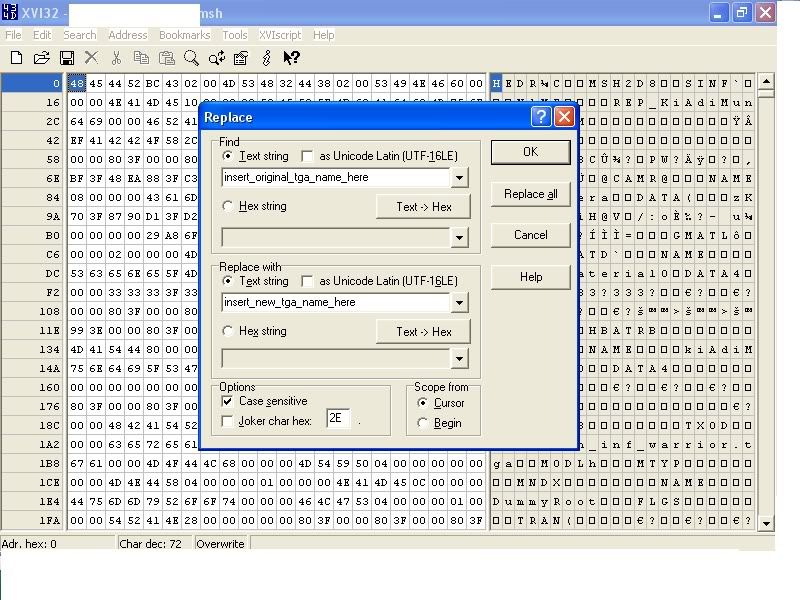
Now, in case you don't get the hex editing deal I'll make it simple for you, as I had a teeny bit of trouble myself:

1. Download, install, and/or open up XVI32.

2. Open up the msh file you need to hex-edit.

3. Press ctrl+r, and it should look like this:
Hidden/Spoiler:
Image
4. Press replace all, hit OK, save and close.

Re: Using two skins

Posted: Mon May 17, 2010 8:53 am
by Deviss
AgentSmith_#27 wrote:Aha! I just had this problem yesterday! For convenience's sake I'll post the tut from the FAQ thread here:
Hidden/Spoiler:
[quote="Archer01"]I hope I'm not wasting space with this but here goes...

I've been reading about skinning here on the forums, but every solution I've seen so far seems to make the game replace the existing texture of a unit causing all classes that use that model to have the new texture instead of just a single one. I have my own way of getting around this that also uses minimal HD space to accomplish, but I don't want to "jump-the-gun" explaining it if it's already been done (ie I want to avoid sounding like an idiot :P ). So has this problem already been addressed? A couple screenshots are below to show what I mean:

Regular blue trooper and my Green Shield Breaker. Same model different texture:
Image


*Added:
Okay, I'm going to elaborate on what Schizo said below since some hex editing experience is required (and not everyone has worked with hex editors before)…

Step 1: Get the files you need and copy them into the “msh” folder of the side you are creating.
Image

Step 2: Rename the files to something new. For the sake of avoiding errors later on, make sure the new name is EXACTLY the same number of characters as the old one. Example: all_inf_tantive4trooper.msh and all_inf_moddedt4trooper.msh both have 23 character names.
Image

Step 3: Load up the “.msh” file in a hex editor (you should see something like the screen below). Now go through and find all instances of the ‘tga’ file name and change it to your new name. (You can change every other reference of the old name too, but I don’t think it’s necessary)
Image

Image

Step 4: If the model also has a low resolution geometry mesh (ending in “_low.msh”) repeat step three on it as well.

Step 5: After finishing with the ‘.msh’ files, load up the ‘odf’ file of the trooper you want to have the new skin (make sure this odf is in the same side as the msh files you modified). Add/Change the geometry names to your new geometry.
Image

Step 6: Edit/Replace the ‘tga’ file you copied earlier with that of your new texture.

Step 7: Munge your side and try it out.

If you don't have a hex editor, do a search on the net. I'm sure you'll find a free one somewhere.


Now, in case you don't get the hex editing deal I'll make it simple for you, as I had a teeny bit of trouble myself:

1. Download, install, and/or open up XVI32.

2. Open up the msh file you need to hex-edit.

3. Press ctrl+r, and it should look like this:
Hidden/Spoiler:
Image
4. Press replace all, hit OK, save and close.[/quote]
he want use overridetexture (1 model) no 2 models XD

Re: Using two skins

Posted: Mon May 17, 2010 9:07 am
by AgentSmith_#27
Deviss wrote:he want use overridetexture (1 model) no 2 models XD
Rekubot wrote:Can't you just use the OverrideTexture line in the soldier's ODF file for this?
Darth_Spiderpig wrote:If the model is override texture capable
Teancum wrote:
Yes, but only about 1/2 the player models are set up to work with OverrideTexture. The model had to be exported right to do it.
I'd think then it'd be better to learn how to do it in a way that should work 100% of the time, as opposed to something that would work maybe 50%

I'm not sure what you mean Deviss, but the post I quoted explains how to do the same thing that Override Texture does, albeit taking a little longer, but I've never heard of it not working.

Could be wrong though, I'm just a newbie compared you guys :cpu:

Re: Using two skins

Posted: Mon May 17, 2010 10:06 am
by DarthD.U.C.K.
override_texture only works on some models, to find out if it works for your model first look if the ,msh has a msh.option.
then open it with a texteditor and look for a "keepmaterial override_texture". if its not there or the model ha sno msh.option file, the odf-line wont work and you have to use the tutorial quoted above

Re: Using two skins

Posted: Mon May 17, 2010 3:06 pm
by CressAlbane
Uh oh.
That's bad, I don't have a hex editor. Google, here I come...
AFTER A FEW MINUTES OF WORK: Okay, I chose the second option and now, Mshveiwer won't even open the file. Stackoverflow or something?

Re: Using two skins

Posted: Mon May 17, 2010 3:11 pm
by theultimat
CressAlbane wrote:Uh oh.
That's bad, I don't have a hex editor. Google, here I come...
XVI32 is the one recommended in the FAQ thread, and has always worked perfectly for me.

Re: Using two skins

Posted: Mon May 17, 2010 3:22 pm
by CressAlbane
Above post edited.

Re: Using two skins

Posted: Mon May 17, 2010 4:22 pm
by AgentSmith_#27
CressAlbane wrote:Uh oh.
That's bad, I don't have a hex editor. Google, here I come...
AFTER A FEW MINUTES OF WORK: Okay, I chose the second option and now, Mshveiwer won't even open the file. Stackoverflow or something?
What was the second option? make sure when you rename the TGA+MSH it has the same # of characters, and that you make any changes with hex editor.

Re: Using two skins

Posted: Mon May 17, 2010 4:42 pm
by CressAlbane
aha!
Eureka, it works.
I thought the XVI32 was another method, didn't realize it was just an easier hex-edit. (Duh.)
*Thanks you for your help* :P