HowTo: Attach an Effect to an Object W/O Hardpoints (FAQ)
Posted: Sun Sep 30, 2007 10:33 am
Ever wanted to attach an effect to an object, but it didn't have a hard point, or hard point where you wanted it to be? Just want the effect on one object?
Don't want to mass with effect spawner mshs?
Well, here's a solution using some of the games lua commands an the particle editor.
Its all based on these two simple lines of code:
This is my code to attach a custom effect to the Bespin street lantern.
Obviously "bes2_bldg_street_lamp" is the ODF and "blue_light" is the FX file.
Note the LUA specifies an instance of the object, in ZE, and not just the ODF.
Get your own effect and Object, place this in your LUA under ScriptPostLoad, and you'd be done...but the problem is, the game isn't loading your effect. Check, and you'll see it is munged, but still not in game. For some reason, you have to create an object - odf and msh - that references your effect. It has to have hard points. Sneak it somewhere in your map. The effects will then be loaded.
Heres an example of 'REQ Object'
EffectReq.odf
O.K. Now you're effect is in game and attached to the object. Just one problem....its in the totally wrong place. Now, their are two ways to fix this, editing the FX's offests using particle editor, and using the Effect Path method.
1. Particle Editor:
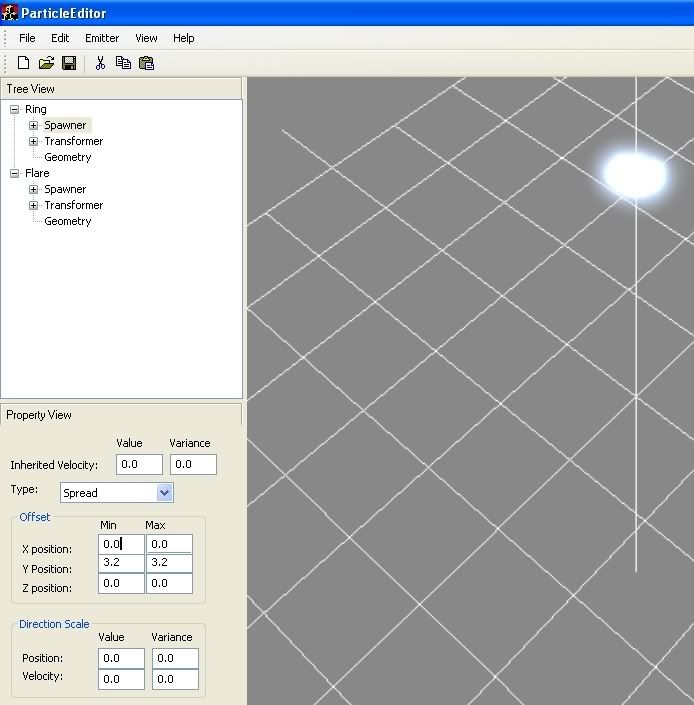
Follow the Particle Editor Tutorial, and then open your effect. Expand each section of the effect, and repeat these steps: Click on 'Spawner'. Alter the series of boxes under 'Offset' to your preference. To stop the effect from 'wobbling' keep the min and max values the same.
Particle Editor Reference ScreenShot
What are your preferences? Just mess around in here until effect is where you want it in game.
2. The effect Path Method.
Place a path, with one node, in ZE where you want the Effect to originate. Then, use this code instead of the above.
Note: FecLoc is just a chosen variable name, you could call them both "CheeseCube", as long as they were the same and not already being used.
Note2: Unfortunately, in trying to loop through an entire path, adding an effect to each node, I noticed that it looks like the "node_#" info is sort of...ignored.
And that concludes this tutorial. I hope this is useful to someone and hasn't already been mentioned (or tut-ified at least) on GT.
Feed back welcome, be specific.
Don't want to mass with effect spawner mshs?
Well, here's a solution using some of the games lua commands an the particle editor.
Its all based on these two simple lines of code:
Code: Select all
FecLoc = GetEntityMatrix("bes2_bldg_street_lamp17")
AttachEffectToMatrix(CreateEffect("blue_light"), FecLoc)
Obviously "bes2_bldg_street_lamp" is the ODF and "blue_light" is the FX file.
Note the LUA specifies an instance of the object, in ZE, and not just the ODF.
Get your own effect and Object, place this in your LUA under ScriptPostLoad, and you'd be done...but the problem is, the game isn't loading your effect. Check, and you'll see it is munged, but still not in game. For some reason, you have to create an object - odf and msh - that references your effect. It has to have hard points. Sneak it somewhere in your map. The effects will then be loaded.
Heres an example of 'REQ Object'
EffectReq.odf
Hidden/Spoiler:
1. Particle Editor:
Follow the Particle Editor Tutorial, and then open your effect. Expand each section of the effect, and repeat these steps: Click on 'Spawner'. Alter the series of boxes under 'Offset' to your preference. To stop the effect from 'wobbling' keep the min and max values the same.
Particle Editor Reference ScreenShot
Hidden/Spoiler:
2. The effect Path Method.
Place a path, with one node, in ZE where you want the Effect to originate. Then, use this code instead of the above.
Code: Select all
FecLoc = GetPathPoint("Effect_Path", "node 0")
AttachEffectToMatrix(CreateEffect("Effect_Name"), FecLoc)
Note2: Unfortunately, in trying to loop through an entire path, adding an effect to each node, I noticed that it looks like the "node_#" info is sort of...ignored.
And that concludes this tutorial. I hope this is useful to someone and hasn't already been mentioned (or tut-ified at least) on GT.
Feed back welcome, be specific.