Page 2 of 2
Re: What Parts?
Posted: Sun Nov 16, 2008 7:13 pm
by Fluffy_the_ic
Well, I know that my comp that I'm gonna build will have PCIe, so I'll prolly still get it.
Re: What Parts?
Posted: Sun Nov 16, 2008 8:20 pm
by Teancum
Just so you know, PCI and PCIe aren't compatible.
Re: What Parts?
Posted: Sun Nov 16, 2008 8:26 pm
by Fluffy_the_ic
Well, yeah, I knew that, and there's two things about that.
1: This comp is just using a PCI card. I have no idea if it has a PCIe port of not.
2: Once I have gotten all of the parts for the comp, I'm assured that my parents will make sure that the graphics card port it PCIe.
Re: What Parts?
Posted: Sun Nov 16, 2008 8:39 pm
by Teancum
Fluffy_the_ic wrote:Well, yeah, I knew that, and there's two things about that.
1: This comp is just using a PCI card. I have no idea if it has a PCIe port of not.
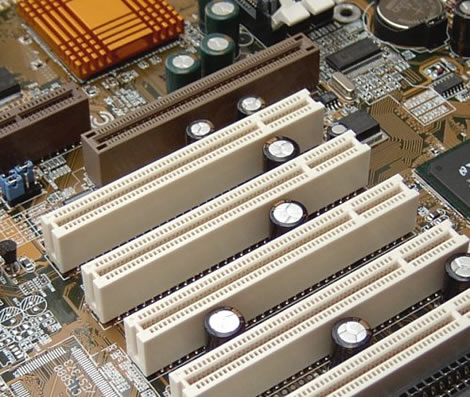
I dunno if you've opened the comp or not, but just about every comp has 1-3 regular PCI slots. They are tan in color and have a long section and a shorter section combined into one. You can see them below (the brown slot is an AGP slot)
The easiest way to tell if you have PCIe is to look at the slot closest to the center of the board. If it matches the tan slots above (or the tan slots in your PC) it's regular PCI. If it is different then you have PCIe. There's no set color for PCIe slots, I've seen them orange, green and black before depending on the manufacturer. The picture below shows two graphics PCIe slots (the blue and the black one). **the really small slots are also PCIe, but are for things like modems and whatnot.
Re: What Parts?
Posted: Sun Nov 16, 2008 8:43 pm
by Fluffy_the_ic
Yeah, I've already seen a PCIe slot on the side of the graphics card's box at circuit city, so I'm gonna check to see if it's PCIe or not once I turn this comp off for the night.