Lite Menu for ZETools
Posted: Sat Mar 05, 2016 10:17 pm
This is just a modified menu arrangement that only displays essential parts of the plugin.
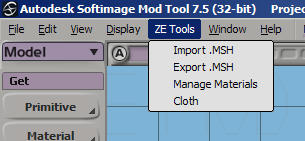
To install it go to:
C:\users\[username]\Autodesk\Softimage_Mod_Tool_7.5\Addons\xsizetools-1.3.0020\Application\Plugins
and backup the original XSIZETools.py by appending .bak to the file name.
Then extract the modified XSIZETools.py to that same location and you're done.
To uninstall it:
just delete the modified file and rename the original from XSIZETools.py.bak to XSIZETools.py
Download:
http://www.mediafire.com/download/dkiid ... ETools.zip
To install it go to:
C:\users\[username]\Autodesk\Softimage_Mod_Tool_7.5\Addons\xsizetools-1.3.0020\Application\Plugins
and backup the original XSIZETools.py by appending .bak to the file name.
Then extract the modified XSIZETools.py to that same location and you're done.
To uninstall it:
just delete the modified file and rename the original from XSIZETools.py.bak to XSIZETools.py
Download:
http://www.mediafire.com/download/dkiid ... ETools.zip