Page 1 of 2
Flashlights - How-to.
Posted: Mon Jun 08, 2009 3:59 pm
by Fiodis
I think I've found a way to make a good flashlight. I remember a while back Fragme got close with his bouncing orbs of light, but they weren't that convincing flashlights. Still good if you wanted a light, of course.
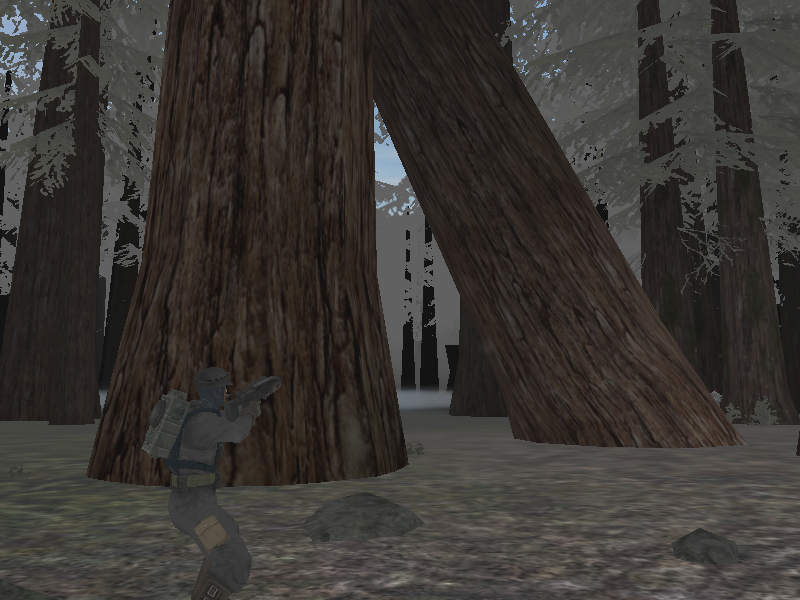
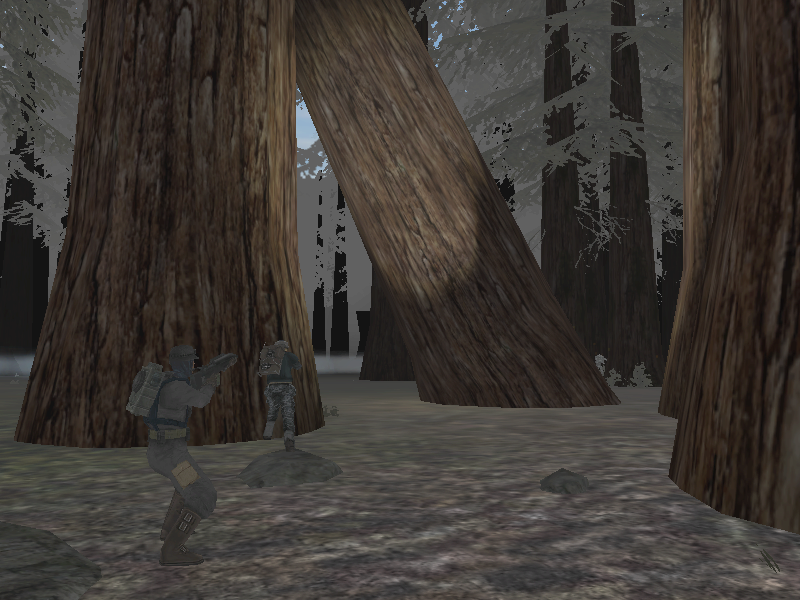
Anyway, my flashlight:
Exhibit A:
Exhibit B:
I noticed that with my light settings on high, laser bolts would throw light on nearby objects and terrain as they passed them, as well as the flash of the weapon's firing throwing light on things. I experimented a bit and discovered that I could alter the light's color as well as its size, and have different settings for the muzzle flash.
I thought of the quest to make a flashlight, realized that I don't think this was tried before, and found that I was actually on to something.
I set up a "dummy" effect, one that didn't actually show up as anything visible, and set this as the ordance's collision effect.
Created a clear texture, and set this as the ordance's texture.
Then I set the bolt's lightcolor value to 224 224 160 150 (yellowish). I set the lightradius to 6.0 (very, very large compared to most stock ones). I also set the damage to 0.0 (no sense getting shot by a flashlight). I set the muzzleflash to have an extremely small radius.
I got a rifle that shot light which slowly illuminated trees as the invisible bolt passed them.
Well, how did I get rid of that? I changed the velocity to 2000.0, very high, so it reached the target fairly instantaneously, so that you wouldn't see a ghost circle of light pass by the trees slowly.
All right, this resulted in a rapid flash followed by darkness. No good.
In the flashlight weapon's ODF, I set the shot delay to 0.07, making for extremely rapidfire shots, to get rid of the quick-flash effect. Then I gave it infinite ammo and no overheat.
Result: hold secondary fire key, and point. An even circle of nice, flashlight-esque light appears where ever you point. Since it's not an effect, it actually lights stuff up. Release secondary fire, and it shuts off.
I'm content with this, I'll use it in many dark maps where something like this can be employed very strategically. Any thoughts? I'll upload the actual ODFs, tgas, and .fx's tomorrow, for reference and use.
Re: Flashlights - How-to.
Posted: Mon Jun 08, 2009 4:26 pm
by GangsterJawa
Cool! Can't wait to see it in those maps!
Re: Flashlights - How-to.
Posted: Mon Jun 08, 2009 4:35 pm
by Maveritchell
Nice work - if it works for what you intend then that's super. However, FragMe! had already mentioned doing this:
DarthD.U.C.K. wrote:directional light, commandpostlight, and maybe another i dont know of
@fragme: cant you simply attach the light as damage effect??
it would go away if the unit dies then
FragMe! wrote:Tried that too, it is great for showing other people where you are, especially if you have lens flare on but it still doesn't light things up the way people would like. Closest I ever got was the light grenade which will light up the area it is passing though until it finally hits the ground and explodes.
BTW just in case you are interested here is the discussion for the Light grenade and other flashlight attempts.
Light Grenade
Of course the video link to FF doesn't work. Might upload the video to my Photobucket account when I get home.
The rub here is that no one really "needs" a flashlight, it's basically an aesthetic effect that can be used to make something look like something else. You've made something functional, but that wasn't the aim before - before FragMe! had just been trying to make something look like a flashlight.
Re: Flashlights - How-to.
Posted: Mon Jun 08, 2009 6:31 pm
by [RDH]Zerted
Fiodis wrote:...I noticed that with my light settings on high, laser bolts would throw light...
Does the flashlight only work on high settings?
Re: Flashlights - How-to.
Posted: Mon Jun 08, 2009 7:13 pm
by Fiodis
Most lights only work on high settings, don't they? With low, all you get is ambient and directional, nothing else, I think. This included, unfortunately. I've actually never gotten around to trying "medium" settings.
And Fragme mentioned lightgrenades, the bouncing orbs of light. This method gives you more control over the area you want to light and when the light should be on and off.
I agree that no one "needs" a flashlight like they do command posts, or good ZE placements. But it's gravy, so to speak; something that can work quite well on certain maps.
Oh -
Fragme! wrote:So once again I decide to foolishly attempt to make a functioning flashlight.
That's why he made the lightgrenades, I suppose, even though they didn't look like flashlights. That's what made me think he was trying to make a functional flashlight.
Re: Flashlights - How-to.
Posted: Mon Jun 08, 2009 8:05 pm
by FragMe!
I was trying to make a functional flashlight yes, it was going to be for the sewers map but after trying many things (other than what you did obviously or if I did I just didn't carry it far enough) I did give up as I wouldn't be adding anything to sewers anyway. I still may try what I mentioned in the PM though but don't tell anyone because it would be cool if it works.
The lightgrenade evolved during tinkering with flashlights.
BTW one thing that does light up your local environment is a shield, go into a dark place as a droideka and turn on your shield you can then see quite well, you have to be in first person though.
Re: Flashlights - How-to.
Posted: Mon Jun 08, 2009 8:14 pm
by Fiodis
I'll keep the secret.

That would be cool if it works.
Really? I thought the Droideka's shield was an effect, and effects don't light up anything....maybe there's something about it that makes it appear to light things up in first person. I'll have to try it.
Off-topic - Until three days ago I didn't know Droidekas
had a first-person. It's strange, lol.
Re: Flashlights - How-to.
Posted: Mon Jun 08, 2009 8:33 pm
by Maveritchell
Fiodis wrote:Really? I thought the Droideka's shield was an effect, and effects don't light up anything....maybe there's something about it that makes it appear to light things up in first person. I'll have to try it.
It interposes a transparent mesh between the view and the unit. I don't think it lights anything up so much as it recolors it.
Re: Flashlights - How-to.
Posted: Mon Jun 08, 2009 8:55 pm
by Fiodis
Ah, I saw it now. Big blue screen. Yes, it doesn't seem to light anything up.
Re: Flashlights - How-to.
Posted: Mon Jun 08, 2009 9:28 pm
by Eggman
I've never thought much on the methods to creating flashlights, but reading through your post gave me a similar idea - explosion effects for ordnance can also have a lighting effect, and I think it might even work in medium lighting. To avoid having to hold down the fire button, you could set the weapon type to a beam weapon and give the ordnance however long a lifespan you want the beam to last for. Whenever the beam hits something, it emits the explosion effect and subsequently, the light. Having never tested this myself, I don't know for sure if it would look any good (in fact, it could look completely horrible), but I just thought I'd throw the idea out there.
Re: Flashlights - How-to.
Posted: Mon Jun 08, 2009 9:46 pm
by Fiodis
Explosion effects are just that, effects; they don't light anything up.
Explosions do have a light that can be set via ODF parameters, but really all you'd end up doing would be exactly what I did, except with a rocket instead of a laser.
Beams can have explosion effects, but don't actually emit light upon hitting something. Unless what they hit is itself explosive and goes boom.
The whole idea of holding down the fire button is so that you have greater control over when the light is on and off.
Re: Flashlights - How-to.
Posted: Tue Jun 09, 2009 12:03 am
by MetalcoreRancor
I experimented with the light functions on meleethrow, primarily saber throw. You can set a light on it. I set it to 12 and had lag on my screen. it was fun lol
Re: Flashlights - How-to.
Posted: Tue Jun 09, 2009 1:14 pm
by Eggman
Fiodis wrote:Explosion effects are just that, effects; they don't light anything up.
Explosions do have a light that can be set via ODF parameters, but really all you'd end up doing would be exactly what I did, except with a rocket instead of a laser.
Beams can have explosion effects, but don't actually emit light upon hitting something. Unless what they hit is itself explosive and goes boom.
The whole idea of holding down the fire button is so that you have greater control over when the light is on and off.
That's what I was saying - you use the light that is set up in the explosion's odf. And it doesn't apply to just rockets. I know for a fact that bolt ordnances can have explosions - just look at the AT-TE - and I'm almost certain any other type of ordnance can have an explosion effect.
Re: Flashlights - How-to.
Posted: Tue Jun 09, 2009 4:22 pm
by Fiodis
Maybe; but you have the holding thing, less control over when it's on and off.
In any case, the assets I promised, containing the odfs and effects, as well as the .tga for the lasertexture.
Flashlight Assets - Fixed.
Enjoy.
Re: Flashlights - How-to.
Posted: Tue Jun 09, 2009 4:27 pm
by Super_Clone
Fiodis wrote:Maybe; but you have the holding thing, less control over when it's on and off.
In any case, the assets I promised, containing the odfs and effects, as well as the .tga for the lasertexture.
Flashlight Assets
Enjoy.
ermmm. the link is broken... already...
Re: Flashlights - How-to.
Posted: Wed Jun 10, 2009 12:03 am
by FragMe!
Yes it just takes you to FF quick upload page.
Oh and this is what I was talking about with shield providing light "sort of"
Shield Off
Shield On
Re: Flashlights - How-to.
Posted: Fri Jun 12, 2009 5:01 pm
by Fiodis
Ah, I see what you mean....I get a different effect on my PC, but whatever. It certaintly is interesting how a simple reshade of your view can make things appear brighter.
Here's an idea: would a custom scope with a texture like that produce a similar effect? If so, you could have some pretty nice night-vision snipers made.
I've had some files of mine deleted from lack of use. But never has one of my files barely stood for a day. Strange. In any case, link fixed (hopefully). Get 'em while they're hot; I don't know when they'll vanish again.
Re: Flashlights - How-to.
Posted: Fri Jun 12, 2009 5:51 pm
by Super_Clone
Still nota workin'
EDIT: I click the link in my quote last time

Re: Flashlights - How-to.
Posted: Tue Jun 16, 2009 11:40 pm
by myers73
for a flashlight, couldnt you use a flame thrower, with a cone, use a different texture, and ajust the light parameters, give it infi ammo and no heat. this way you can have a cone length, flashlights dont eluminate forever, and a cone width.
Re: Flashlights - How-to.
Posted: Wed Jun 17, 2009 11:31 am
by Fiodis
I'm not sure if emitterordance lights work the same way as other weapon lights. For one thing, whenever I used a flamethrower, it light up the area whether or not it was actually hitting anything.