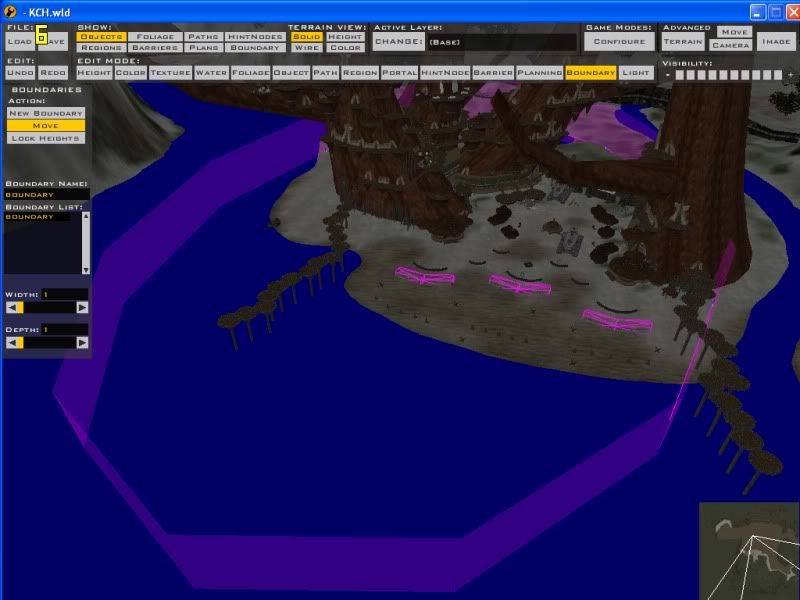
I have read and re-read the thread in the FAQ section, and I can find no reason why my boundary isn't working. I've checked my .req file, my .pth file, and my .BND file. They all have correct information. It looks fine in ZE, too. Yet, whenever I go out of bounds, nothing happens. I even tried naming my boundary "boundary" on the off chance that Mavritchell was right. Cleaning didn't help.
Has anyone encountered this problem before? Is it like my recent problem with spawn paths not wanting to update at all after a while in that it is just a bug that crops up randomly and cannot be fixed?
Re: Boundary is not working
Posted: Thu Oct 08, 2009 6:51 pm
by Maveritchell
jangoisbaddest wrote:I've checked my .req file, my .pth file, and my .BND file.
Please post those files and if possible, a screenshot of your boundary in ZE. There is no chance that my post in that thread was correct as I was ignorant to how a .req file should have worked when I posted that, and you can safely ignore it.
jangoisbaddest wrote:Has anyone encountered this problem before?
You're the 3rd that I know of
jangoisbaddest wrote:Is it like my recent problem with spawn paths not wanting to update at all after a while in that it is just a bug that crops up randomly and cannot be fixed?
It's very possible
Give your boundary in ZE a different name like "starwars" or whatever then save and check your BND and PTH file to confirm the change then do a manual clean and re-munge.
AceMastermind wrote:Give your boundary in ZE a different name like "starwars" or whatever then save and check your BND and PTH file to confirm the change then do a manual clean and re-munge.
Tried it just now. No luck. I guess I'll have to live without it.
At least the path problem didn't crop up till it wasn't a big deal anymore.
Re: Boundary is not working
Posted: Fri Oct 09, 2009 12:02 am
by AceMastermind
I've had a map that quit munging entirely before and another map where the wld file was somehow corrupted by a ZE save after only moving a simple prop so I guess strange things do happen sometimes. Just out of curiosity how many paths do you currently have in your map?
AceMastermind wrote:Just out of curiosity how many paths do you currently have in your map?
Not that many, I don't think. I have six gamemodes with associated spawn paths, as well as about eight teleportation paths (with a single node) in the base layer. Then there's the boundary...and that's about it. But this happened early on in one of my older, terrible maps that I never finished. Only a few hours into development, and with only a single path on the map, moving that path didn't work. Though at least there, I was able to create a new path with a different name to work around the issue. Here, that doesn't even work.
Re: Boundary is not working
Posted: Fri Oct 09, 2009 11:30 am
by FragMe!
It is hard to tell from the ZE pic but is the boundry actually touching and or going though the land/water part, meaning is the bottom on the boundry below ground?
Oh as for mapbounds I keep getting that confused, that is a region that is used to set the map boundries for the minimap.
Re: Boundary is not working
Posted: Fri Oct 09, 2009 11:54 am
by jangoisbaddest
FragMe! wrote:It is hard to tell from the ZE pic but is the boundry actually touching and or going though the land/water part, meaning is the bottom on the boundry below ground?
Some of it is underwater, but not underground (I have a CIS Command Post that is slightly underwater). Why, would that cause a problem? Should I see if I can raise the boundary path? Or, perhaps I should create a path instead of a boundary in ZE, then just set it up as a boundary in the appropriate files. Could that possibly work?
Oh! And another thing that just occured to me: I have two world files in this map. One is for daytime, and one is for nighttime. The daytime modes (the ones I have been testing the boundary in) only use the world 1 files and layers. The nighttime ones use the world 2 world file, but loads layers from the world 1 folder. Now, I've already tried adding a boundary in the nighttime version as well, and that hasn't produced any meaningful results (nor did I expect it to for the daytime version). But maybe this has something to do with the problem somehow. Just thought I'd mention it.
FragMe! wrote:Oh as for mapbounds I keep getting that confused, that is a region that is used to set the map boundries for the minimap.
I figured that is not what you meant. In fact, I just got my minimap and mapbounds regions squared away before I tried to set the boundary, and it works great!
Re: Boundary is not working
Posted: Fri Oct 09, 2009 12:39 pm
by FragMe!
Going through the ground and water is a good thing.
What I do not know is if the boundry has to be on the base layer (or associated with the common layers) instead of in a mode layer. Not sure if that is where you are putting it or not.
Re: Boundary is not working
Posted: Fri Oct 09, 2009 1:42 pm
by jangoisbaddest
FragMe! wrote:Going through the ground and water is a good thing.
What I do not know is if the boundry has to be on the base layer (or associated with the common layers) instead of in a mode layer. Not sure if that is where you are putting it or not.
The tut says it has to be in the base layer, and that is where it is. I suppose I could try putting it elsewhere.
Re: Boundary is not working
Posted: Fri Oct 09, 2009 2:38 pm
by FragMe!
leave it on the base layer
Re: Boundary is not working
Posted: Fri Oct 09, 2009 6:16 pm
by AceMastermind
@jangoisbaddest
Create a fresh new map and do nothing but put a boundary in it and test it out.
For your project map's boundary problem open your world req then Save As and overwrite it just to update the time stamp and re-munge then inspect the Munge Output window to see if your world req did indeed get munged again, try the same with your pth file as well.
Re: Boundary is not working
Posted: Fri Oct 09, 2009 7:11 pm
by jangoisbaddest
AceMastermind wrote:@jangoisbaddest
Create a fresh new map and do nothing but put a boundary in it and test it out.
For your project map's boundary problem open your world req then Save As and overwrite it just to update the time stamp and re-munge then inspect the Munge Output window to see if your world req did indeed get munged again, try the same with your pth file as well.
Aha. The BND and PTH files munge just fine, but then there is this (twice even):
Munging KCH.req
The system cannot find the path specified.
I'm guessing this is the problem: it can't figure out how to get the updated req file into the lvl file, so the old one remains. Hence, no boundary. Unless this is normal...but since it's there twice, and states that it can't find the path...it looks pretty suspicious to me.
By the way, the boundary worked fine on a new map and even the test map I had created many months ago.
Re: Boundary is not working
Posted: Fri Oct 09, 2009 8:40 pm
by Aman/Pinguin
jangoisbaddest wrote:Aha. The BND and PTH files munge just fine, but then there is this (twice even):
Munging KCH.req
The system cannot find the path specified.
I'm guessing this is the problem: it can't figure out how to get the updated req file into the lvl file, so the old one remains. Hence, no boundary. Unless this is normal...but since it's there twice, and states that it can't find the path...it looks pretty suspicious to me.
Nope, I'm having those errors always and my boundarys work fine. I don't think that's your problem.
Re: Boundary is not working
Posted: Fri Oct 09, 2009 8:57 pm
by AceMastermind
jangoisbaddest wrote:Munging KCH.req
The system cannot find the path specified.
Yeah that's normal, if the boundary works in your new map but not in your existing map then there must be a conflict somewhere.
Let's try something else, in your world req file try moving your boundary section to the bottom of the list then munge again and see if it works ingame.
I've always added that section to the bottom and never had a problem getting it to work, i'm just trying to rule out any form of order for boundaries in the world req.
Re: Boundary is not working
Posted: Fri Oct 09, 2009 11:22 pm
by jangoisbaddest
AceMastermind wrote:
jangoisbaddest wrote:Munging KCH.req
The system cannot find the path specified.
Yeah that's normal, if the boundary works in your new map but not in your existing map then there must be a conflict somewhere.
Let's try something else, in your world req file try moving your boundary section to the bottom of the list then munge again and see if it works ingame.
I've always added that section to the bottom and never had a problem getting it to work, i'm just trying to rule out any form of order for boundaries in the world req.
Wow. That did it. It works perfectly now. I don't see why it would have made a difference, but there you go. Thank you very much!
Re: Boundary is not working
Posted: Sat Oct 10, 2009 12:09 am
by AceMastermind
jangoisbaddest wrote:Wow. That did it. It works perfectly now. I don't see why it would have made a difference, but there you go. Thank you very much!
Awesome, i'm glad you got it working because I was running out of ideas, but it still might not be what fixed it and we won't really know until more testing is done.
My theory for the order thing was because if you look through all of the shipped world req files for worlds that have boundaries then you'll notice that the boundary section always comes somewhere after the path section, this could determine the order in which sections get packed into the lvl file and are read by the game engine kind of like how certain properties in ODF files must be in order, but like I said more testing is needed to confirm this for the world req.
Re: Boundary is not working
Posted: Sat Oct 10, 2009 1:29 am
by jangoisbaddest
It's a good theory. In fact, a similar thing happened earlier on when I set up my XL mode. I had a layer that contained vehicle spawns for my bigger gamemodes. When XL loaded, no vehicles appeared, and I got a host of errors that read "vehicle spawn missing command post!" The reference was right, but that wasn't the issue. Turns out that the game loaded the vehicle spawn layer BEFORE the gamemode layer that contained the CPs. They couldn't find those cps because they hadn't been loaded yet. It is not unreasonable to theorize that a similar issue was taking place here.