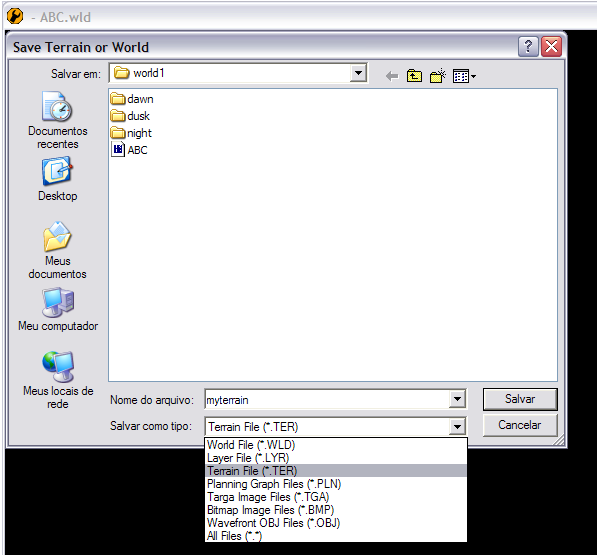
Indeed that tutorial is not as clear as it could, so here's a (hopefully) better version.
In this I'll be using ABC as the mod ID. This tutorial assumes that you already have your variants'
.fx,
.sky,
.ter, and
.lgt files or that you at least know what they are and how to create them. Strictly speaking, steps 1 and 2 of part 1 are not necessary but they'll help you to organize your files better.
Part 1 - Setting Up Your Folders and Files
1. Go to
data_ABC/Worlds/ABC/world1, create one folder for each variant you intend to have in your map. These folders will contain your variant specific files.
2. Paste each variant's
.fx,
.sky,
.lgt and
.ter files into their corresponding folders. Generally,
.fx and
.sky files may also require some extra textures and models, so make sure these are moved to their appropriate folders as well. You may not want to use multiple terrains. If that's the case, don't worry about
.ter files.
3. Now, go to
data_ABC/Worlds/ABC, create a new folder there and name it "
sky".
4. Inside it, create a new folder and name it "
REQ".
5. Now, open this new folder and create one
.req file for each variant you intend to have in your map. Then, give each
.req a unique variant name.
6. Open up one of the
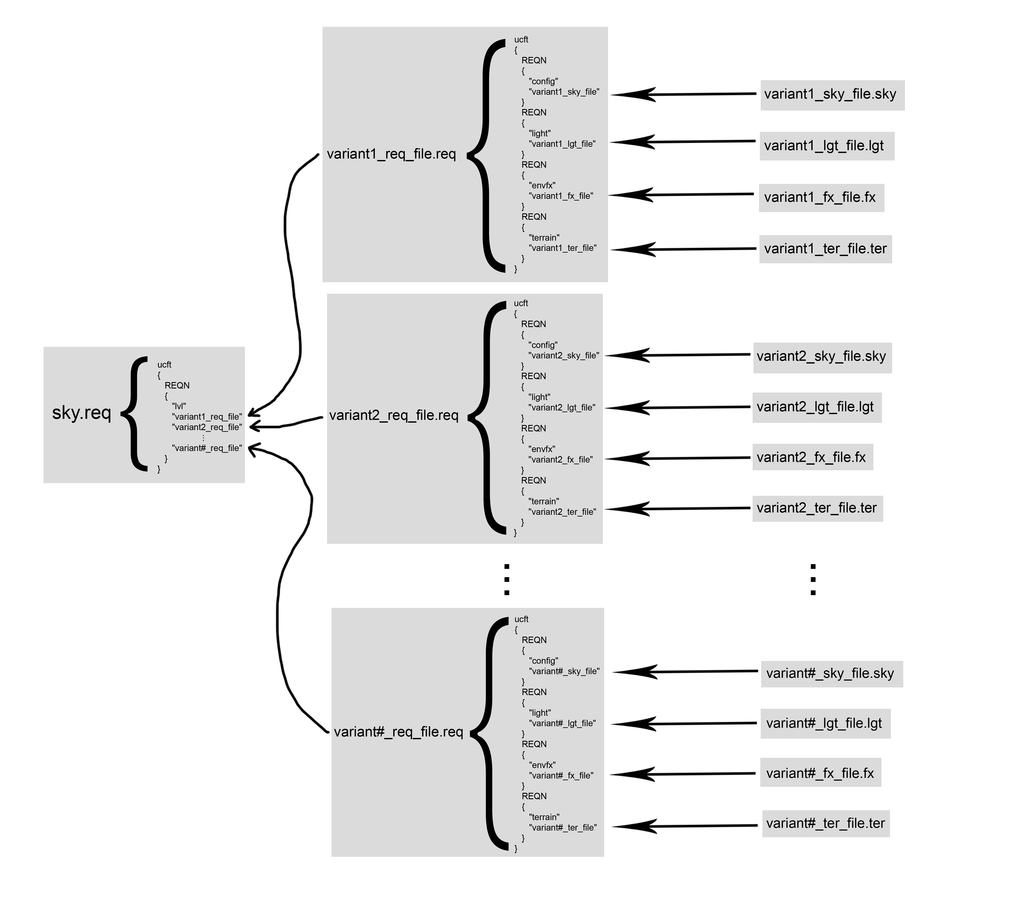
.reqs you created and put the following code in it:
Repeat this step for each
.req you created in step 5.
7. Go back to
data_ABC/Worlds/ABC/sky, create a new
.req file and name it "
sky". Put the following code in it:
Part 2 - Setting Up Your Lua
1. Open your map's Lua and find this line:
function ScriptInit()
2. Below that, add the following code:
x = Number of variants you intend to have in your map.
3. Now, find this line:
ReadDataFile("dc:ABC\\ABC.lvl", "ABC_conquest")
4. Below that, add the following code:
Part 3 - Getting Ready to Munge
1. Open your map's world file (
.wld) with a text editor.
2. Find the line
LightName("ABC.lgt"); and remove it. this is necessary for the game to be able to load your variants' lighting files.
3. Still in your map's world file, find the line SkyName("ABC.sky") and remove it as well so that the game can load your variants' sky files.
4. Now, open your map's
.req (which should be named
ABC.req), located in the
world1 folder and find and remove this section:
5.
(Only if you're using multiple terrains) In your
world1 folder, delete your map's terrain file (it should be named
ABC.ter). This is necessary because if this terrain is munged, it will be loaded at all times insted of your variants' terrains. Alternatively, removing the
TerrainName("ABC.ter") line from the world file has the same practical effects but it causes the minimap to not appear, for some reason.
And that's it. If I didn't miss anything you should be ready to munge.
Some Very Important Notes
SWBF2's mod tools weren't desinged for all of this, which means there are some things you need to be aware of:
First, when you open your map in ZeroEditor, it will load a sort of generic ambient lighting due to what we did in step 2 of part 3 of this tutorial. In order to remedy this, do the following:
1. Open the map's world file (
.wld) with a text editor:
2. Look for the following line
ScriptName("DummyScript.dll");
3. Above that, add
LightName("ABC.lgt"); (Don't forget the semicolon at the end of the line)
4. Go to the folder which contains the files of the variant you want the lighting to be loaded in the editor.
5. Copy the
.lgt file in that folder and paste it in the
world1 folder.
6. Rename the file you have just pasted to
ABC. If you are asked if you wish to overwrite any file, do it.
7. Open the world in ZE and the variant's lighting should be loaded in the editor.
This is only really needed if you want to edit a variant's lighting. If you are going to do anything else, don't worry about the lighting.
Second and most important:
ZeroEditor can't open world files (.wld) which do not have a terrain assigned to them. This is really important if you are working with multiple terrains because, since you have to do step 5 of part 3 every time you munge, you have to essentially to the oposite whenever you want to open you map in ZE (i.e. copying one of your variant's terrains to the
world1 folder and renaming it to ABC). That's why I whenever I'm not working on map aesthetics I generally skip step 5 of part 3.
That's it. I tried to make this tutorial as comprehensible as possible but like Sky_216 said in his original tut, this is for fairly experienced modders. In my opinion, this is as almost as complicated as Battlefront 2 mapping gets, so be patient and try to understand what you're doing.
I wrote this tutorial a little bit in a hurry and then the lights went out and I had to write part of it again, so if someone finds a mistake, please tell so that I can edit it.
EDIT:
Here's part 1 of this tutorial sumarized in a single diagram:
 That part seems unclear. This is how I currently understand it based on what you're saying: