Page 2 of 4
Re: Tears2Roses tech questions
Posted: Mon Apr 23, 2012 8:42 pm
by Tears2Roses
Alright, I can try lowering resolution in fullscreen.
Also, after google searching and youtube I found lots of results on how to clean fans, and I think I did a good job cleaning them. sorry for all the confusion... I should really search tech related things before posting. Anyhow, cleaning the fans has made a difference. I should be good to go.
Re: Tears2Roses tech questions
Posted: Tue Apr 24, 2012 8:47 am
by Cerfon Rournes
Tears2Roses wrote:cleaning the fans has made a difference. I should be good to go.
Good to hear. I was running my laptop at 79 degrees C while
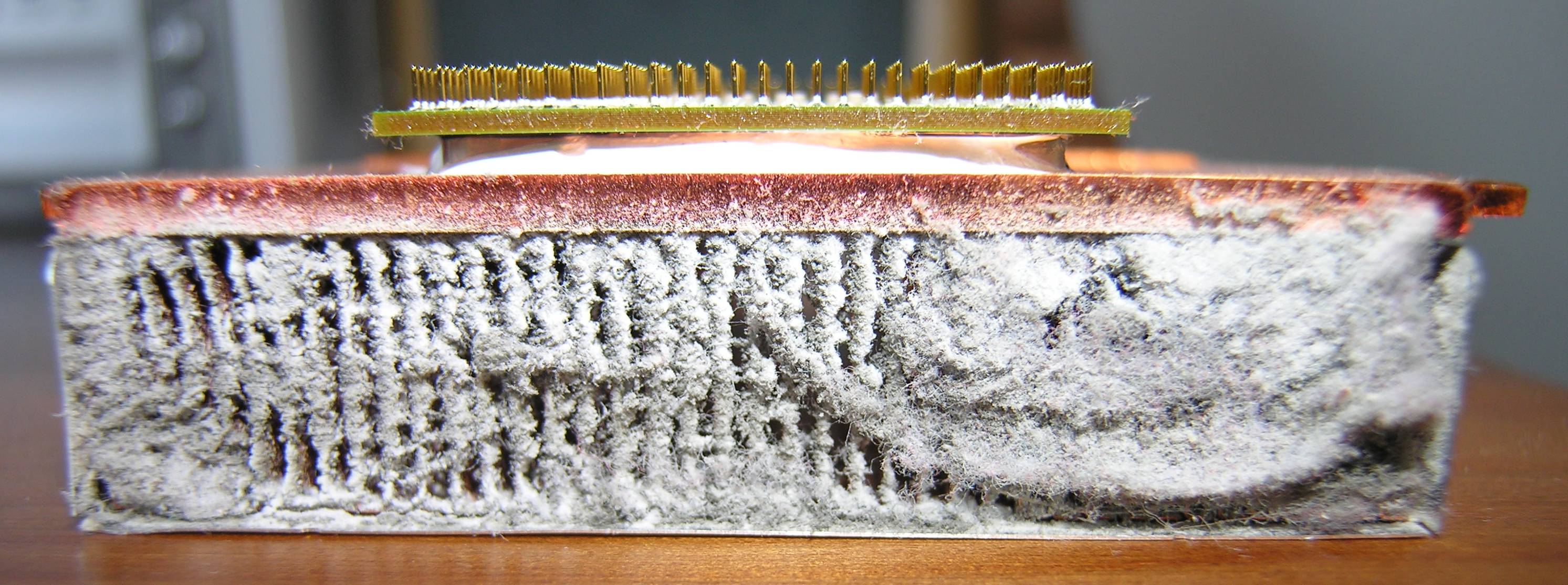
idle. I could not run anything at high settings without a fan. The problem looked somewhat like
THIS.
Now, after I cleaned it out, I get normal temps and can run any game I have at high settings.

Re: Tears2Roses tech questions
Posted: Tue Apr 24, 2012 10:19 am
by THEWULFMAN
79°? Dang Cerfon. I freak out when my HDD hits 68°, and try to keep it at 60° as best I can. I'm not worried about the HDD itself at those temperatures, as that won't shorten it's life, I'm worried about the capacitors in my power system popping from the heat.
Re: Tears2Roses tech questions
Posted: Tue Apr 24, 2012 5:45 pm
by Cerfon Rournes
THEWULFMAN wrote:79°? Dang Cerfon.
Yup. Now it runs at 57-61 while idle.
Re: Tears2Roses tech questions
Posted: Wed Apr 25, 2012 10:02 am
by Tears2Roses
Ok recently my computer has been doing really weird things. For once, it displays the origin login and steam screenshot manager when I shut down, and it takes a while to shut down. Also while playing battlefield 3 the game kicked me out of fullscreen on a lower resolution. I ran out of compressed air before I could actually clean out the graphics card fan really good, and that might be to blame. As I said before the graphics card is what clicks (stopped clicking now) and the fan *might* actually be completely plugged, im going to look into it. However, could there be any other underlying causes as to weird computer behaviour? Also, is there a program or something I can use to see how much heat my graphics card is making?
Re: Tears2Roses tech questions
Posted: Wed Apr 25, 2012 11:45 am
by Twilight_Warrior
Tears2Roses wrote:Ok recently my computer has been doing really weird things. For once, it displays the origin login and steam screenshot manager when I shut down, and it takes a while to shut down.
I don't know about your other issues, but this one can easily be solved by making sure you completely exit out of Origin and Steam before shutting down. Just right-click the toolbar icon and click "Exit" rather than just closing down the window.
Re: Tears2Roses tech questions
Posted: Wed Apr 25, 2012 12:09 pm
by Cerfon Rournes
Tears2Roses wrote:Also, is there a program or something I can use to see how much heat my graphics card is making?
MSI AfterBurner
Speed Fan
To see how hot your PC is while gaming, run any game with AfterBurner on. After you are done playing, close the game and check the Max temp. Also make sure you run MSI for a bit while doing random tasks to determine how hot the PC is while idle.
Speed Fan is also good for finding out the GPU and core temps.
Re: Tears2Roses tech questions
Posted: Wed Apr 25, 2012 1:24 pm
by THEWULFMAN
I suggest Speed Fan, in concurrence with Cerfon. It's what I use, and it can be plugged into Rainmeter like this!
If you look to the right you can see my HDD temp, and to the left is my CPU temp. My HDD is running a tad higher than I like, I always want no higher than 141°F (60°C).
Re: Tears2Roses tech questions
Posted: Wed Apr 25, 2012 3:06 pm
by Cerfon Rournes
Nice setup WULF.
Re: Tears2Roses tech questions
Posted: Wed Apr 25, 2012 7:14 pm
by Tears2Roses
Ok, my GPU seems to idle at about 43 degrees C. While playing it got up to about 60-65. The GPU usage maxed out while playing too. I think me pressing buttons accidently causes it to go out of fullscreen. This was while playing on lowest settings. Beyond that everything else looks ok. I didnt hear any loud fans while playing, in fact my computer is pretty quiet. The game does lag slightly still, and im certain thats because my graphics card only has 512mb of memory.
Twilight_Warrior wrote:Tears2Roses wrote:Ok recently my computer has been doing really weird things. For once, it displays the origin login and steam screenshot manager when I shut down, and it takes a while to shut down.
I don't know about your other issues, but this one can easily be solved by making sure you completely exit out of Origin and Steam before shutting down. Just right-click the toolbar icon and click "Exit" rather than just closing down the window.
I think that would be why it was showing those when I tried to shut down, I will try closing them and see what that does.
Re: Tears2Roses tech questions
Posted: Wed Apr 25, 2012 7:27 pm
by Cerfon Rournes
Tears2Roses wrote:Ok, my GPU seems to idle at about 43 degrees C. While playing it got up to about 60-65.
These are excellent temperatures.
Tears2Roses wrote: The game does lag slightly still, and im certain thats because my graphics card only has 512mb of memory.
You're right, that could be the problem. Is your computer a desktop?
Re: Tears2Roses tech questions
Posted: Wed Apr 25, 2012 7:31 pm
by Marth8880
512 megabytes of graphics memory actually isn't bad at all; it's just not *quite* enough for a game as intensive as Battlefield 3, for example.
Re: Tears2Roses tech questions
Posted: Wed Apr 25, 2012 7:37 pm
by Cerfon Rournes
Gotta be something else then.

Re: Tears2Roses tech questions
Posted: Wed Apr 25, 2012 7:48 pm
by Marth8880
It's probably the core or shader clock of his graphics card.
Re: Tears2Roses tech questions
Posted: Thu Apr 26, 2012 9:10 pm
by Tears2Roses
Core clock is currently set at 550 mhz and shader clock is set at 1400. I can play it just *seems* like it lags. It probably isn't lagging, but a little performance boost won't hurt. Are the above clocks ok? should they be upped?
Re: Tears2Roses tech questions
Posted: Thu Apr 26, 2012 10:25 pm
by Marth8880
If you know what they are by looking at the overclock settings in Afterburner, those are just most likely just the default settings, and probably not your graphics card's actual clock speeds.
Re: Tears2Roses tech questions
Posted: Thu Apr 26, 2012 10:32 pm
by lucasfart
Wikipedia wrote:GeForce 9500 GS
The 9500 GS is an OEM card that's based on the 9500 GT but geared towards the mainstream audience.
65 nm G96 GPU
32 Stream Processors.
8 Raster Operations (ROP) units
550 MHz Core, with a 1375 MHz unified shader clock.
8.8 billion texels/s Fillrate.
128/512 MB 1000 MHz DDR2 memory with a 128-bit memory bus.
16.0 GB/s memory bandwidth.
Supports DirectX 10, Shader Model 4.0, OpenGL 3.3, and PCI-Express 2.0
Supports 2nd generation PureVideo HD technology with partial VC1 decoding.
NVIDIA SLI - ready technology
HDMI technology Support
Re: Tears2Roses tech questions
Posted: Thu Apr 26, 2012 11:12 pm
by Marth8880
Ah, alright then. Now, only do this if you are absolutely sure you
need it: Increase the core clock by very small increments (like, 5-10 mHz) at a time, rebooting your computer and
testing after each increment in order to make sure the change is stable and your GPU doesn't overheat and become collaterally damaged. Also be sure to monitor your GPU's temperature, making sure it doesn't rise too much over ~85-90 degrees Celsius.
Re: Tears2Roses tech questions
Posted: Thu Apr 26, 2012 11:51 pm
by lucasfart
Marth8880 wrote:Ah, alright then. Now, only do this if you are absolutely sure you
need it: Increase the core clock by very small increments (like, 5-10 mHz) at a time, rebooting your computer and
testing after each increment in order to make sure the change is stable and your GPU doesn't overheat and become collaterally damaged. Also be sure to monitor your GPU's temperature, making sure it doesn't rise too much over ~85-90 degrees Celsius.
Erm. I'd be stopping at 80, not 90, but I guess it's all a matter of opinion.
Re: Tears2Roses tech questions
Posted: Fri Apr 27, 2012 1:19 am
by Marth8880
65-85 degrees Celsius is pretty average under a heavy load with more modern graphics cards like Rosy's GeForce 9500 GS. Keep in mind that GPUs normally have a much higher temperature than CPUs, so people tend to try to shift more towards average CPU temperatures.