Page 1 of 1
Three questions.
Posted: Mon Feb 08, 2010 12:13 pm
by ForceMaster
Hi, I have this questions to solve some stuff in my maps.
1) How can I change the view distance in effects. (I tried MaxLodDistance in .fx files and nothing happend) It need some .sky code? Particle editor fix it?
2) How can I change the chunks spawn time. I mean increase the time of the chunks can appears.
(I hope this question can be post here)
3) Is possible make an flyer with mobile wings? I mean move the wing when fly like insect or bird.
Thanks again friends!
Re: Three questions.
Posted: Mon Feb 08, 2010 1:12 pm
by mswf
I only know the answers to two of your questions:
2) No, unfortunately not. The time "dead" stuff remains on the field is hardcoded. If it's very important for them to stay, you could also place chunks in the place of your object that's going to get destroyed. The script it that as soon as the object gets destroyed, the chunks spawn and the animations (that you'd have to have made in zeroeditor for them) start.
3) No, but you can make a custom .fx with geometry to simulate the effect. (not as accurate, nor as controlable)
Re: Three questions.
Posted: Mon Feb 08, 2010 4:24 pm
by Executer94
For question one:
Just add the the com_sfx_explosion_xl to your effect with Add Emitter.
Leave only shockwave from the new emitters there and delete the new ones.
Now set the particlecount from shockwave to 0.
And move shockwave up to the top of the emitters with Move emitter up.
Save and munge

Re: Three questions.
Posted: Thu Feb 11, 2010 12:13 pm
by ForceMaster
mswf wrote:2) No, unfortunately not. The time "dead" stuff remains on the field is hardcoded. If it's very important for them to stay, you could also place chunks in the place of your object that's going to get destroyed. The script it that as soon as the object gets destroyed, the chunks spawn and the animations (that you'd have to have made in zeroeditor for them) start.
Thanks for the idea!
mswf wrote:3) No, but you can make a custom .fx with geometry to simulate the effect. (not as accurate, nor as controlable)
here is any tut for it?
Many thanks!
Executer94 wrote:For question one:
Just add the the com_sfx_explosion_xl to your effect with Add Emitter.
Leave only shockwave from the new emitters there and delete the new ones.
Now set the particlecount from shockwave to 0.
And move shockwave up to the top of the emitters with Move emitter up.
Save and munge
Thanks buddy! it works, but I need to have a little more view distance, it is possible to increase in PE? I mean: waht field have to change numbers?
Re: Three questions.
Posted: Thu Feb 11, 2010 1:29 pm
by mswf
There isn't a tutorial on how to put .msh's in effects that I know of, but I know of at least one person (skyhammer) who knows how to do it. You'd have to ask someone who is able to do this thing.
And I believe I can also give you the answer to your second question; No, it won't work. I believe it was discussed earlier. You can increase the numbers, but the effect would be minimal. (if I recall this correctly, of course)
Re: Three questions.
Posted: Fri Feb 12, 2010 1:36 am
by [TFA]Padawan_Fighter
3) No, but you can make a custom .fx with geometry to simulate the effect. (not as accurate, nor as controlable)
Didn't Pwnfest 3.0 include mobile wings?
Re: Three questions.
Posted: Fri Feb 12, 2010 2:10 am
by mswf
I wouldn't know to be honest. If so, I do wonder how they did it, since it was established that you can't make vehicle animations while flying come anywhere near the simulation of wings.
Re: Three questions.
Posted: Fri Feb 12, 2010 3:31 am
by Maveritchell
mswf wrote:I wouldn't know to be honest. If so, I do wonder how they did it, since it was established that you can't make vehicle animations while flying come anywhere near the simulation of wings.
Your takeoff animation would have to hide whatever the static wing meshes are, and then your thrusteffect can be whatever you need for the wings to look right. It's completely doable, it's just not something that ever really comes up.
Re: Three questions.
Posted: Fri Feb 12, 2010 3:35 am
by mswf
So the sequence would be like this?
1. While the vehicle is landed, it's "wings" are folded into the vehicle itself.
2. When your vehicle lifts, in the last part of the takeoff animation, the "wings" fold out.
3. Then the thrustereffect is one that looks like wings that are moving up and down.
Did I get that right or did I make another mistake?
Re: Three questions.
Posted: Fri Feb 12, 2010 3:42 am
by Maveritchell
mswf wrote:So the sequence would be like this?
1. While the vehicle is landed, it's "wings" are folded into the vehicle itself.
2. When your vehicle lifts, in the last part of the takeoff animation, the "wings" fold out.
3. Then the thrustereffect is one that looks like wings that are moving up and down.
Did I get that right or did I make another mistake?
That is the gist of it; it would vary depending on what you're trying to make. If it's a helicopter (or some similar vehicle) where your moving parts are simply stationary while landed, then all that needs to happen is your parts need to disappear during the takeoff animation. If it's something with flapping wings (a la a bird or insect) then you may need to animate your wings "up" and slightly delay your flying effect. Either way the wings need to disappear at the end of the takeoff animation, and not simply fold out.
Re: Three questions.
Posted: Fri Feb 12, 2010 3:51 am
by mswf
Yeah, by "fold out" I was talking about the parts that need the effect that's going to be the wings.
I had forgotten about the parts that needed to be there when stationary.
Re: Three questions.
Posted: Fri Feb 12, 2010 11:54 am
by ForceMaster
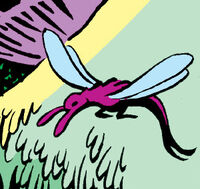
well, this is the model that i want to make:
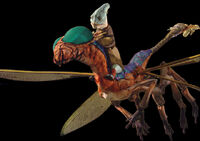

I thought it might be doable in the way that Mav says, now, if the effect can be the animation then I get the way to achieve that first, the rest will make sense later.