Well, I'm back again with more noobish questions, I'll try to make it quick and get to the point:
The hidden are solved, for now I really need the answer to #3.
Hidden/Spoiler:
*Solved*Problem 1: Grey Odf's. When I bring in stock odf's on my map, they appear to have no texture, but are simply grey (there is some slight variation) a few props are correct, others aren't. The props I am using are almost all from mygeeto/hoth. I opened up the odf's with notepad and am pretty sure I got all the msh files in place properly, it's not a big deal for my present map because I was considering trying out reskinning and maybe making some of the props look a similar way anyway, but I'd really like some help here.
Problem 2: Whenever I try to add hubs and connections between them my map crashes, nothing in the error log about it, after a certain number of barriers it seems my ai just stand around but otherwise barriers work good. Again, this isn't a huge deal for me right now because all I want to do is get the ai to a certain CP and I'm very close to that happening with just barriers.
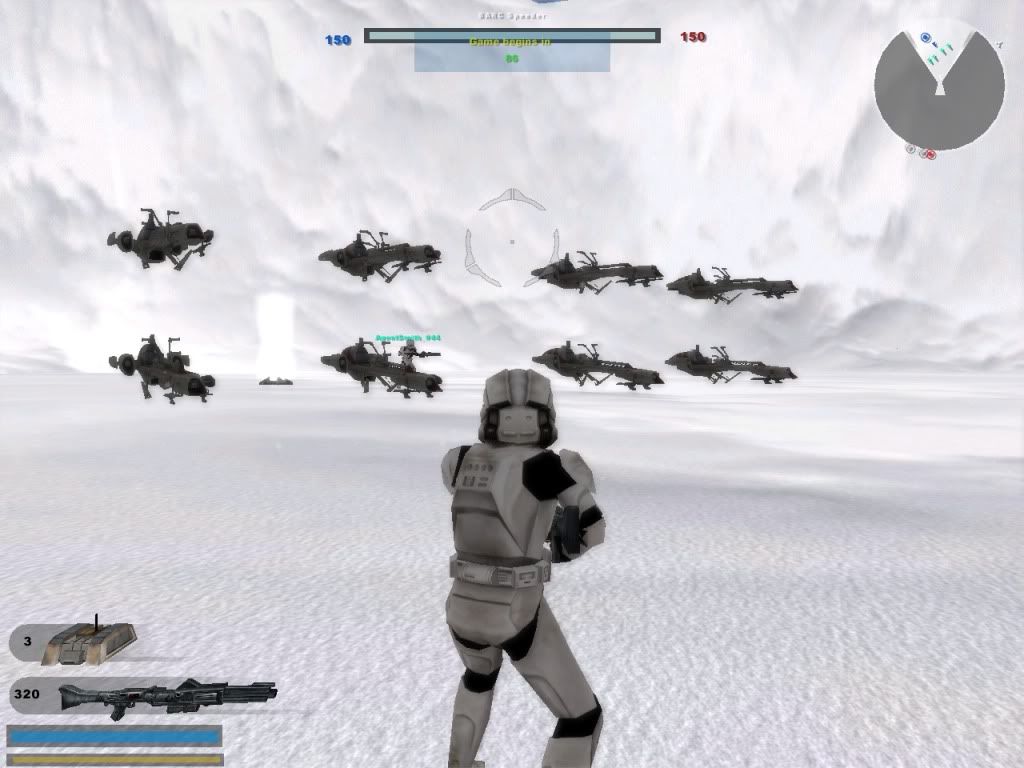
Problem 3: Now this is most definately my biggest problem, and hopefully the easiest to fix. I followed the very nice tut here on GT for adding vehicles to your map, got barc Speeders in it and single player they work 100% as they should, but when I tried Multiplayer with a few of my buddies at first in warmups they appeared, then disappeared in the actual match. (on the screens of anyone who isn't the host when there were speeders, it appeared that there were 2 for each, and they were double stacked).
My map is primarily for racing, and it definately can't be done without speeders, so any help is greatly appreciated.
P.S. I used the search bar and couldn't find what I needed
Re: Grey odf's Ai Planning, multiplayer vehicles
Posted: Fri Mar 05, 2010 4:17 pm
by genaral_mitch
This may help iwht the first question so... An odf file isn't a model, but a file that calls for a model, tells the model how much health it has, and any other information about a model. So, you say you opened an odf and (found the textures it calls for?) did you happen to find a line that is GeometryName = "modelname" and did you look for a texture that has the name of the words in GeomertyName = "modelname"? Sometimes a model uses a texture with it's name, and sometimes it uses a texture with a different name. The way to find a model's textures is by opening the msh with Notepad and scrolling along the top of it until you find words that say your_texture.tga. Then search through the msh folder and find the tga file called your_texture.tga.
Re: Grey odf's Ai Planning, multiplayer vehicles
Posted: Fri Mar 05, 2010 4:29 pm
by Fiodis
genaral_mitch wrote:An odf file isn't a model, but a file that calls for a model, tells the model how much health it has, and any other information about a model.
Correct.
general_mitch wrote: So, you say you opened an odf and (found the textures it calls for?) did you happen to find a line that is GeometryName = "modelname" and did you look for a texture that has the name of the words in GeomertyName = "modelname"? Sometimes a model uses a texture with it's name, and sometimes it uses a texture with a different name. The way to find a model's textures is by opening the msh with Notepad and scrolling along the top of it until you find words that say your_texture.tga.
Heh, I was about to type "incorrect" but then saw "sometimes it uses a texture with a different name". The thing is, rarely does an ODF call for a texture. As a note, MSH Viewer is slightly more convinient for locating textures.
AgentSmith_#27 wrote:Problem 2: Whenever I try to add hubs and connections between them my map crashes, nothing in the error log about it, after a certain number of barriers it seems my ai just stand around but otherwise barriers work good.
Really? That's odd; hubs and connection require not much past basic connect-the-dots skills. I'd recommend looking the tutorial over again.
AgentSmith_#27 wrote:Problem 3: Now this is most definately my biggest problem, and hopefully the easiest to fix. I followed the very nice tut here on GT for adding vehicles to your map, got barc Speeders in it and single player they work 100% as they should, but when I tried Multiplayer with a few of my buddies at first in warmups they appeared, then disappeared in the actual match. (on the screens of anyone who isn't the host when there were speeders, it appeared that there were 2 for each, and they were double stacked).
Unfortunately, your biggest problem is the hardest to understand. Could you explain a little more clearly what's happening? Also, is there anything in your error log about the speeders?
Re: Grey odf's Ai Planning, multiplayer vehicles
Posted: Fri Mar 05, 2010 5:57 pm
by MercuryNoodles
#2 The problem may be unrelated to planning. Check the PC_munglelog for error (not warning) messages.
Re: Grey odf's Ai Planning, multiplayer vehicles
Posted: Fri Mar 05, 2010 6:00 pm
by AgentSmith_#27
Hidden/Spoiler:
[quote="Fiodis"][quote="genaral_mitch"]An odf file isn't a model, but a file that calls for a model, tells the model how much health it has, and any other information about a model.[/quote]
Correct.
[quote="general_mitch"] So, you say you opened an odf and (found the textures it calls for?) did you happen to find a line that is GeometryName = "modelname" and did you look for a texture that has the name of the words in GeomertyName = "modelname"? Sometimes a model uses a texture with it's name, and sometimes it uses a texture with a different name. The way to find a model's textures is by opening the msh with Notepad and scrolling along the top of it until you find words that say your_texture.tga.[/quote]
Heh, I was about to type "incorrect" but then saw "sometimes it uses a texture with a different name". The thing is, rarely does an ODF call for a texture. As a note, MSH Viewer is slightly more convinient for locating textures.
[quote="AgentSmith_#27"]Problem 2: Whenever I try to add hubs and connections between them my map crashes, nothing in the error log about it, after a certain number of barriers it seems my ai just stand around but otherwise barriers work good.[/quote]
Really? That's odd; hubs and connection require not much past basic connect-the-dots skills. I'd recommend looking the tutorial over again.
[quote="AgentSmith_#27"]Problem 3: Now this is most definately my biggest problem, and hopefully the easiest to fix. I followed the very nice tut here on GT for adding vehicles to your map, got barc Speeders in it and single player they work 100% as they should, but when I tried Multiplayer with a few of my buddies at first in warmups they appeared, then disappeared in the actual match. (on the screens of anyone who isn't the host when there were speeders, it appeared that there were 2 for each, and they were double stacked). [/quote]
Unfortunately, your biggest problem is the hardest to understand. Could you explain a little more clearly what's happening? Also, is there anything in your error log about the speeders?[/quote]
@ Problem #1: Well that makes me feel pretty dumb. So you have to open up the msh files to locate the textures! I thought you could get all the file names you needed from the odf
I got msh viewer (awesome tool) and it is terrific! problem solved, Thank you so much
@ Problem #2: The thing is, I did it exactly as the tut said, then I tried again removing all barriers, etc. my error log says nothing at all about it. One of these days I'll have to make a test map and see if I do it the same way if it works, otherwise a combination of barriers and hintnodes suits my purpose just fine anyway.
@ Problem #3: For the error log, nothing in severity 3, in severity 2 there's a few in vehicle not found errors, the funny thing is it works just fine in multiplayer warmups and singleplayer, here's a screenie:
Hidden/Spoiler:
this is with my friend hosting, so you can see the speeders on top (they are solid btw) once warmup is over the bottom speeders disappear (you can't get in the top ones) The host can't see the top speeders. I know I've seen this error on other maps also