Page 1 of 1
Curving the edge of a model
Posted: Sat Jun 27, 2009 11:45 pm
by CodaRez
How would you curve the edge of a polygon?
I remember deform>bend could do it, but only for a whole polygon I believe.
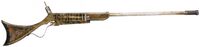
How would you curve it like in this gun?:
Thnx for help
Re: Curving the edge of a model
Posted: Sun Jun 28, 2009 2:50 am
by Splat
i dont think that swbf2 supports curvs, but you could subdivide the polys and then manulaly adjust it that way it would be linier still.
Re: Curving the edge of a model
Posted: Sun Jun 28, 2009 3:23 am
by AceMastermind
Trace the outline of the image with a linear curve
convert the curve to mesh
extrude it from the ppg for thickness
bevel the edges to round it
move the center to bounding box
reset transforms to center it on the grid
Freeze M to break the connection with the curve(if you're done with it)
Press F1 for more info on any of this.
Re: Curving the edge of a model
Posted: Sun Jun 28, 2009 10:18 pm
by minilogoguy18
OR you could use the loft function to create a bridge of polygons using the curves as inputs but that will only work good on the perimeter, you'll have to make the front face and back face yourself.
Re: Curving the edge of a model
Posted: Sun Jun 28, 2009 10:55 pm
by AceMastermind
Yep, there's a few ways it could be handled, you could also model it using the edge by edge extrusion technique or you could extrude an edge along a curve, you could add subdivisions to a box and align the vertices to the image etc etc...
Just like nearly everything else in XSI there are many ways to do it, try them all and choose whichever way is more comfortable for you and suits your modeling style.