Page 1 of 3
Hebes24's modding Questions! *Water Question! See 4th page!*
Posted: Wed Jun 14, 2006 11:18 am
by Hebes24
This is the thread that I will use to post my modding questions:
Current Question:
How do I get water to glow?? See 4th page.
RE: I need help starting a new map!
Posted: Wed Jun 14, 2006 11:31 am
by Kyross
You're a bit of a boob. When you open zeroedit, then ou have to open your world. Then you have to move the camera so that you aren't perfectly level with the terrain.
RE: I need help starting a new map!
Posted: Wed Jun 14, 2006 11:34 am
by darthpingu
Open your world: Hit the load button, browse to \BF2_ModTools\data_***\Worlds\***\world1 and open ***.wld
RE: I need help starting a new map!
Posted: Wed Jun 14, 2006 2:38 pm
by Hebes24
@darthpingu: thanks! that helps!
@Kross: yeah, i was, wasn't I. Sorry
RE: I need help starting a new map!
Posted: Wed Jun 14, 2006 2:46 pm
by Kyross
I don't know because I never had to read the docs but I doubt(guessing from how often this happens) it tells you that by default the camera view is directly in line with the ground so you have to move the camera (WASD keys) back and up so you can look down/around it.
RE: I need help starting a new map!
Posted: Wed Jun 14, 2006 3:10 pm
by fat_walrus
or use the F and G key to move up and down, or the Tab key which is really handy

RE: I need help starting a new map!
Posted: Fri Jun 16, 2006 11:24 am
by Hebes24
How do i change the sky? I think it is the Yavin sky right now, and I want to change it to the Mustafar sky.

RE: I need help starting a new map!
Posted: Fri Jun 16, 2006 11:37 am
by fat_walrus
Read that Getting Started doc. I'd post it but I'm too lazy

RE: I need help starting a new map!
Posted: Sat Jun 17, 2006 10:18 am
by Hebes24
I did what it said in the Getting Started doc. but it is still the yavin sky.

Posted: Sat Jun 17, 2006 11:11 am
by Squirrel7Hunter
the easy way it to open up the TGA file with the yavin sky in it and copy and paste what ever sky u want into the yavin sky TGA.
Posted: Sat Jun 17, 2006 12:20 pm
by Hebes24
Thanks
Squirrel7Hunter i'll try that!
I also need help with making lava, so far i have had absolutely no luck whatsoever.

Edit:
OMG! this yavin sky does not want to be changed!!!:evil:
On a friendlier note, I would like to learn how add new units to teams, how to make command posts spawn vehicles, etc.
Posted: Sat Jun 17, 2006 7:41 pm
by fat_walrus
All that is in getting started doc. Sides is in the Jedi_Creation doc, just pretend to replace it with troopers and you don't need to worry about the animations in it for troopers
Posted: Sun Jun 18, 2006 12:04 pm
by Hebes24
Thanks for the tip fat_walrus. However, I have a new problem. I added vehicle spawns to my map, using the instructions in the Getting Started doc., but no vehicles appear! is there something I fogot?:?
Posted: Sun Jun 18, 2006 12:53 pm
by Kyross
Quick list of points for spawning vehicles:
You added the appropriate lines in the lua under ReadDataFile
You have it within a control region associated to acommand post
You have its properties filled out correctly including which command post it is connected to and the vehicle name in the right box(if imperials are defending team for example click page down and put it in the impdef box, if they are attacking impatk)...
Posted: Sun Jun 18, 2006 4:23 pm
by Hebes24
What exactly are the lines that I need to put in the LUA, and you are talking about the addme LUA, right? these are the vehicles that I want to spawn:
ClassImpATK: imp_hover_fightertank
ClassRepATK: rep_hover_fightertank
ClassAllDEF: all_hover_combatspeeder
ClassCISDEF: cis_hover_aat
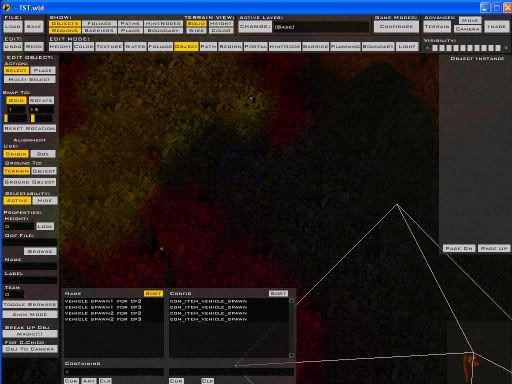
When you say control region, do you mean the Blue lined region in the image above?
Posted: Sun Jun 18, 2006 4:27 pm
by Kyross
I'm talking about the LUA for the specific era and mode of gameplay you're putting vehicles in. If you don't know what lins to put(or apparently what a lua is) clearly you haven't done it correctly. There in lies the problem. I can't see an image but the description fits. Depending on which side is set as atacker and wich is defender in your lua determines which spaces you would put the vehicle lines in for stuff like ClassImpATK.
Posted: Sun Jun 18, 2006 4:55 pm
by fat_walrus
Your basic ATT and DEF team is:
ATT=REP
DEF=CIS
unless you changed it in your LUA. If you didn't, put the rep_hover_fightertank in ClassRepATT
Posted: Sun Jun 18, 2006 5:15 pm
by Hebes24
Kyross I found the LUA (I can't believe that I was
so stupid!!!!!:evil:). so, what are those lines again? Also, the image should be there, I can see it at least...
@
fat_walrus I already did that, but thanks anyway!:)
Posted: Sun Jun 18, 2006 5:28 pm
by fat_walrus
It's:
ReadDataFile("SIDE\\rep.lvl",
"rep_inf_ep3_rifleman",
"blahblahblah",
"rep_hover_fightertank",
If you want to add more vehicles for the republic, leave the comma at the end of the fightertank and make a new line with the same setup. If that's the end of that section, replace the comma with a )
In Zeroeditor, make sure the spawn point box at the right is filled with the correct things. EX:
(The first blank which I forget exactly what its called) in this case it's cp# (replace the # with the cp#)
Then you fill what I said in the previous post that I did and fill the starting team in the lower left box under Browse ODF (In this case Team 1 for Rep, the spawn points starting team)
Sorry I don't have any pics, but I Think that covers it

Posted: Sun Jun 18, 2006 6:42 pm
by Hebes24
Wow! that's simple! idk why i didn't think of that before! thanks!:D