Page 1 of 1
Terrain transparency
Posted: Fri Feb 13, 2015 12:57 am
by ZoomV
So I am wondering if it is possible to make (large) portions of the terrain invisible,
Re: Terrain transparency
Posted: Fri Feb 13, 2015 1:26 am
by AnthonyBF2
I know it's possible... in some crazy way but I don't know how...
Re: Terrain transparency
Posted: Fri Feb 13, 2015 3:23 am
by hunpeter12
What if you gave it a fully transparent image as texture? Would it be transparent or just black?
Re: Terrain transparency
Posted: Fri Feb 13, 2015 2:36 pm
by ZoomV
hunpeter12 wrote:What if you gave it a fully transparent image as texture? Would it be transparent or just black?
Just black I just tried
anthonybf2 wrote:I know it's possible... in some crazy way but I don't know how...
If you walk off the edge of the terrain you get that effect, perhaps your PSP lost the terrain file?
I guess I'm going to need some really really big terrain cutters.
Re: Terrain transparency
Posted: Fri Feb 13, 2015 3:07 pm
by AceMastermind
ZoomV wrote:I guess I'm going to need some really really big terrain cutters.
Several years ago I was making a personal map that was going to have silos like the one seen under the Trade Federation Core ship in this image:

I was going to animate the Core ship launching from it and I needed to use a terrain cutter to make it all look right. The scale of the terrain cutter would crash terrainmunge.exe every time I munged. I reduced the scale until terrainmunge would accept it, but it was way too small to use afterward. I no longer have the asset and can't remember the exact size it ended up being, you'll have to experiment with that. I suppose you could displace large amounts of terrain, but you would likely need to use multiple smaller terrain cutters.
Re: Terrain transparency
Posted: Fri Feb 13, 2015 4:51 pm
by ZoomV
Well That's a pain. I am planning on experimenting with trying to make this environment
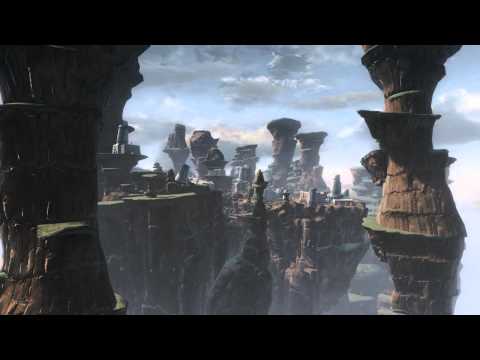
Which with my original plan would require a bazillion terraincutters.
Although is terrain one sided? I.e if you are under it you can see up through it. If it is I could have it so the terrain height shoots up at the edge of the mesa and then I would only need a couple tall terrain cutters and the player would be none the wiser.
The reason I don't want to spam cutters is because that seems like a really good way to hit object limit really fast, unless perhaps it is possible to adjust the terrain lod so it disappears, but then not affect object lod.
EDIt: well I tried doing a foliage layer of terrain cutters, but that just caused a crash. Oh well I suppose that would have been too easy.
Update: ok so raising the terrain above player level and then cutting holes in the sides does work.
Plans can now proceed.
Re: Terrain transparency
Posted: Fri Feb 13, 2015 7:53 pm
by Marth8880
Having a lot of terrain cutters is reported to cause maps to become unstable. You'd be better off modeling terrain objects instead.
To answer some of your questions, though:
ZoomV wrote:Although is terrain one sided? I.e if you are under it you can see up through it.
Yes, terrain is single-sided.
ZoomV wrote:unless perhaps it is possible to adjust the terrain lod so it disappears, but then not affect object lod.
Coincidentally, TER files apparently have .OPTION files that can go along with them. Some examples from some of the stock worlds:
geo1.ter.option
Code: Select all
-lowres_numpatches 14 -lowres_patchsize 8 -maxlayers 3
kas2.ter.option
Code: Select all
-lowres_numpatches 14 -lowres_patchsize 8 -maxlayers 3 -reducewater 4
naboo2.ter.option
Code: Select all
-lowres_numpatches 10 -lowres_patchsize 10 -maxlayers 3 -watercutter_patchsize 4
I don't know specifically what any of these parameters do, but I can guess that
-maxlayers <int> probably sets the maximum number of texture layers that can be used in Zero Editor.
You could also try toying around with some of the LowResTerrain() parameters in the map's sky file.
Code: Select all
LowResTerrain()
{
	Texture("end1_lowresterrain");
	PatchResolution(5);
	TextureScale(19.0);
	MaxDistance(1500);
	DetailTexture("kas2_far_detail");
	DetailTextureScale(0.5);
	FogNear(400.0);
	FogFar(800.0);
	FogColor(80,80,80, 128);
}
(Note that the LowResTerrain() block, if used, belongs in the DomeInfo() block.)
Re: Terrain transparency
Posted: Sat Feb 14, 2015 1:41 am
by ZoomV
I don't need to deal with the lod or the lowrez on the terrain.
Increase the terrain high and cutting holes in the side did the trick. I managed to scale the terrain cutters from the assets link thread up to approx. 40 ZE height units tall.
Although thanks for the note about potential unstability, I'll try to see how much I can limit.


