Page 2 of 3
RE: iPodLinux
Posted: Thu Mar 29, 2007 9:34 pm
by Darth_Z13
Ya theres a special way to get it working. You also need ROMs. Google it. Gameboy ONLY. I'd post the link to the easy tutorial I followed but the iPodLinux site is offline.

Now there may come a day that you
can have iPodLinux on your Nano, just gotta wait for it unfortunately.
RE: iPodLinux
Posted: Fri Mar 30, 2007 9:28 am
by Ipodzanyman
Hey, how come my 2GB of music isn't showing up?

RE: iPodLinux
Posted: Fri Mar 30, 2007 10:32 am
by Darth_Z13
That's on iPodLinux right? Start the installer and choose update. Then switch from Podzilla2 to Podzilla. I had that problem as well.
RE: iPodLinux
Posted: Sat Mar 31, 2007 11:41 am
by Ipodzanyman
My Ipod Mini won't boot up again
RE: iPodLinux
Posted: Sat Mar 31, 2007 2:16 pm
by Darth_Z13
Try reseting it, hold down menu and play.
RE: iPodLinux
Posted: Sun Apr 01, 2007 9:22 am
by Ipodzanyman
OK it keeps on loading linux, but then I hear a click sound and it crashes, what should I do?
[EDIT] Now it left a black line across the screen :evil: and it still won't properly boot up.....
RE: iPodLinux
Posted: Sun Apr 01, 2007 10:32 am
by Darth_Z13
I don't really understand.... what do you mean it crashes?
RE: iPodLinux
Posted: Sun Apr 01, 2007 5:48 pm
by Dohnutt
Heh, it seems like IpodLinux is buggy-ish.
BTW, who else thinks that 1st Generation looks better than 2nd?
RE: iPodLinux
Posted: Sun Apr 01, 2007 5:52 pm
by Darth_Z13
I like the second generation better. And yes iPodLinux is bug-ish but that is to be expected. Ipodzanyman and I have both installed iPodLinux on unsupported iPods. They work, but aren't officially supported by iPodLinux. Plus the fact that modding it from Windows is harder than modding it from Linux or Mac.
RE: iPodLinux
Posted: Sun Apr 01, 2007 10:14 pm
by Ipodzanyman
I physically cannot get it to boot up because it crashes, It has some firmware corruption, but it keeps on loading the default linux, so I cannot uninstall it D: ....

And dohnutt: I love the 2nd gen. because it looks like the mini

RE: iPodLinux
Posted: Mon Apr 02, 2007 7:56 am
by Darth_Z13
Here's how to boot into disk mode:
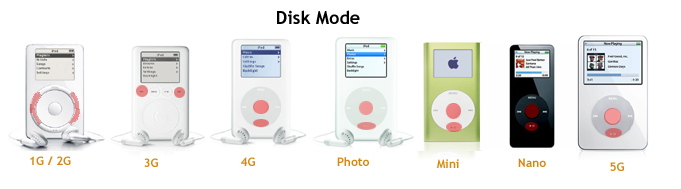
Hold down the keys as it's starting up. Make sure its plugged in or it'll reboot automatically. Then reformat normally.

RE: iPodLinux
Posted: Mon Apr 02, 2007 9:29 am
by Ipodzanyman
wow...that works..thanks
RE: iPodLinux
Posted: Mon Apr 02, 2007 3:39 pm
by Darth_Z13
No problem.
It really impossible to ruin your iPod. Apple's just got everything figured out.
-EDIT- And
here's that good iBoy tutorial I said I'd post.
RE: iPodLinux
Posted: Tue Apr 03, 2007 12:20 am
by Ipodzanyman
now I put the other installer on, but it stops at the penguin thing, and never boots...

RE: iPodLinux
Posted: Tue Apr 03, 2007 10:24 am
by Darth_Z13
Same thing happens for me. I'm gonna restore my iPod, then wait a week and download the installer again.
RE: iPodLinux
Posted: Sat Jun 02, 2007 11:25 pm
by Ipodzanyman
I know this is a really old thread, but Darth_Z13 do you have any clue when they are coming out with ipod linux for the 2nd gen nano? I cannot find a website with such information, and wiki isn't that updated.... (Don't kill me mods, I'd really like to know)
RE: iPodLinux
Posted: Sun Jun 03, 2007 9:29 am
by Darth_Z13
Not sure. The website is down at-the-moment so I'll check later today.
-EDIT- Nope. No 2nd Gen Nano yet.
RE: iPodLinux
Posted: Mon Jun 04, 2007 8:07 pm
by Ipodzanyman
dang, sorry for the bump... I wasn't ablr to access the site for a long time, so I was curious, thanks Darth_Z13
Re: iPodLinux
Posted: Fri Jan 11, 2008 4:28 pm
by Darth_Z13
Quite a large bump but I have more things to post on 'iPod Modding'.
Apparently, there's a problem with the net installer as the nightly builds are broken. This does not mean, however, that your iPod cannot be modified. However, this time, it will not be iPodLinux. It will be RockBox.
NOTE: THIS WAS TESTED WITH AN iPOD MINI 2ND GEN. RESULTS AND STEP WILL VARY WITH DIFFERENT PLAYERS.
First, you're going to want to get a clean iPod, meaning: hitting the restore button in iTunes to wipe the iPod back to a clean slate. Then download
this file. Extract the iPodLinuxManager folder to the desktop and open iPodLinux Manager.bat file. Run the installer. What I use this for is to easily create a bootloader. When it finishes, open up your iPod in My Computer, and create an loader.cfg file. This will define what options the bootloader displays. Mine says:
Code: Select all
#Just a note, placing a 'number symbol' at the beginning of a line makes
#the Loader ignore the line. This is good for comments like this.
Apple OS @ ramimg
#Load up normal iPod software
Rockbox @ (hd0,1)/.rockbox/rockbox.ipod
#Load RockBox
iBoy @ (hd0,1)/iboy_kernel.bin /mnt/iboy_newkern
#Load iBoy (GB emulator)
Disk Mode @ diskmode
#Load diskmode for transferring files
Sleep @ standby
#Turn iPod off
Now for RockBox. Navigate to the
RockBox builds sections. Download the applicable zip file. Extract the .rockbox folder to your iPod. Now, ensure that you've written a RockBox line in your loader.cfg (copying mine will work), and boot up your iPod. If it's in the normal iPod software reboot it by holding down the Menu and Select buttons. Choose RockBox. If RockBox loads and you get to the menu; awesome!

Now for the fun stuff. Videos! iBoy!
Videos need to be encoded a certain way in order to be played on RockBox. Don't worry, it's really easy.
Also, no need to download the MpegPlayer: "...mpegplayer is included in the standard Rockbox installation and does not need to be downloaded separately."
From the RockBox site:
Encoding
Using WinFF (Windows/Linux)
1) Download and install WinFF 0.29 here:
http://biggmatt.com/winff/downloads/win ... 0.291.html
2) After the program is installed, replace the presets.xml in the WinFF folder (default is C:\Program Files\WinFF\) with this one:
http://www.rockbox.org/twiki/pub/Main/P ... resets.xml
3) Run WinFF, pick your desired player from the list, type in any overrides in the boxes at the bottom of the window, add files to the list at the top, and start encoding! Note for Windows Vista users: WinFF may need to be run as an administrator (right click and choose to run it as administrator, or change the properties so that it always does) for it to properly be able to run ffmpeg.
(when choosing a format for the video for my mini, I choose iPod Nano 4:3)
After that simply place the encoded file on your iPod, open RockBox, and select the movie in the File Browser.
iBoy Tut to be posted after.
Credits: Much of this tutorial I learned from other tutorials, but I felt typing it up in my own words with my own comments and examples would help eliminate some of the problems I had when I was setting stuff up.
Rockbox.org- Most info about plugins and RockBox
iPodLinux.org- Info about loader.cfg files and iBoy
YouTube videos- Some random helpful tid-bits of information
Re: iPodLinux + RockBox *NEW INFO*
Posted: Fri Jan 11, 2008 7:56 pm
by Ipodzanyman
I haven't checked anything out for a while, have they got Ipod Linux to work on the 2nd gen. Nanos yet?