Page 1 of 1
Texture problem (alpha related)
Posted: Wed Jun 24, 2009 3:28 pm
by Eggman
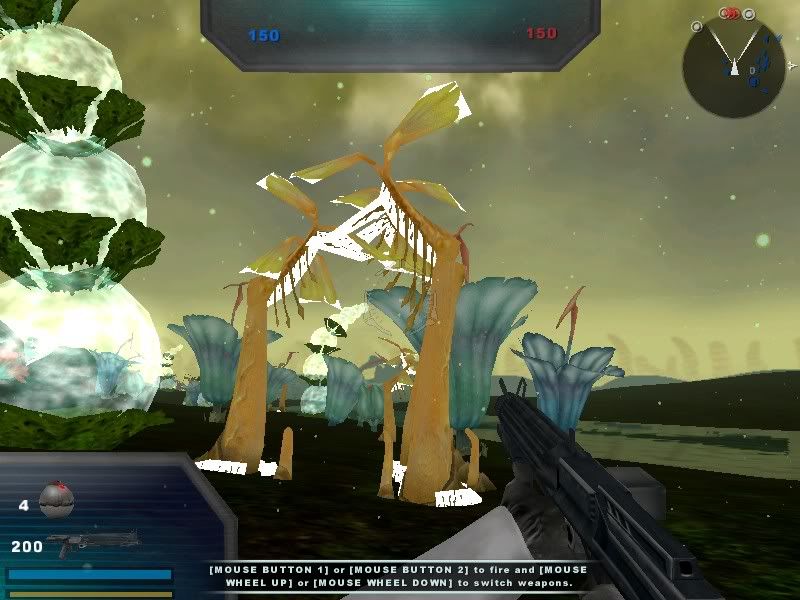
I added the prop fel1_bldg_whisker_clump01 to a map, but in-game it looks like this:
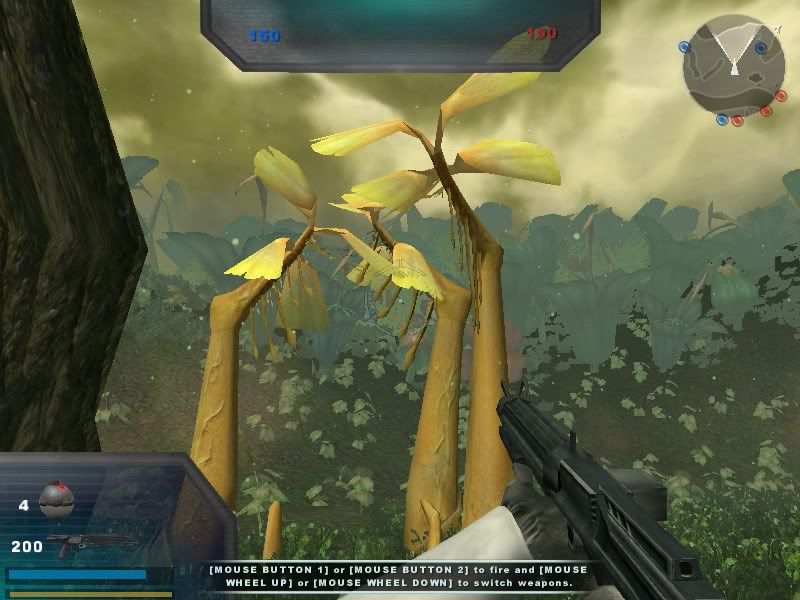
For comparison, here's what it looks like in the shipped Felucia map:
I opened up the texture in GIMP and it has an alpha channel, and the prop fel1_bldg_whisker, which uses the same texture, appears normal. I haven't edited the texture at all, everything is the same as it was when I copied it over from the assets.
Does anybody know why this happens?
Re: Texture problem (alpha related)
Posted: Wed Jun 24, 2009 4:00 pm
by DarthD.U.C.K.
did you try to clean and remunge?
Re: Texture problem (alpha related)
Posted: Wed Jun 24, 2009 4:33 pm
by Eggman
No luck.
Re: Texture problem (alpha related)
Posted: Wed Jun 24, 2009 4:39 pm
by AQT
Try opening up the texture again in GIMP and also open up a new image. Delete the white layer in the new image and copy and paste the texture over. Then save this new image and replace the original with it. I'm not sure how this would help but it's worth a try.
Re: Texture problem (alpha related)
Posted: Wed Jun 24, 2009 5:12 pm
by Eggman
Yeah, that didn't work either.
Edit: I just noticed that the other prop that uses the same texture doesn't include the leaves and grass (the parts with the missing alpha channel on the other prop), so maybe I just need to give it a new alpha channel as in the tutorial in the FAQ. I'll give that a try later and see if it works.