Page 1 of 1
Edges not attatching
Posted: Fri Jul 04, 2008 7:31 pm
by trainmaster611
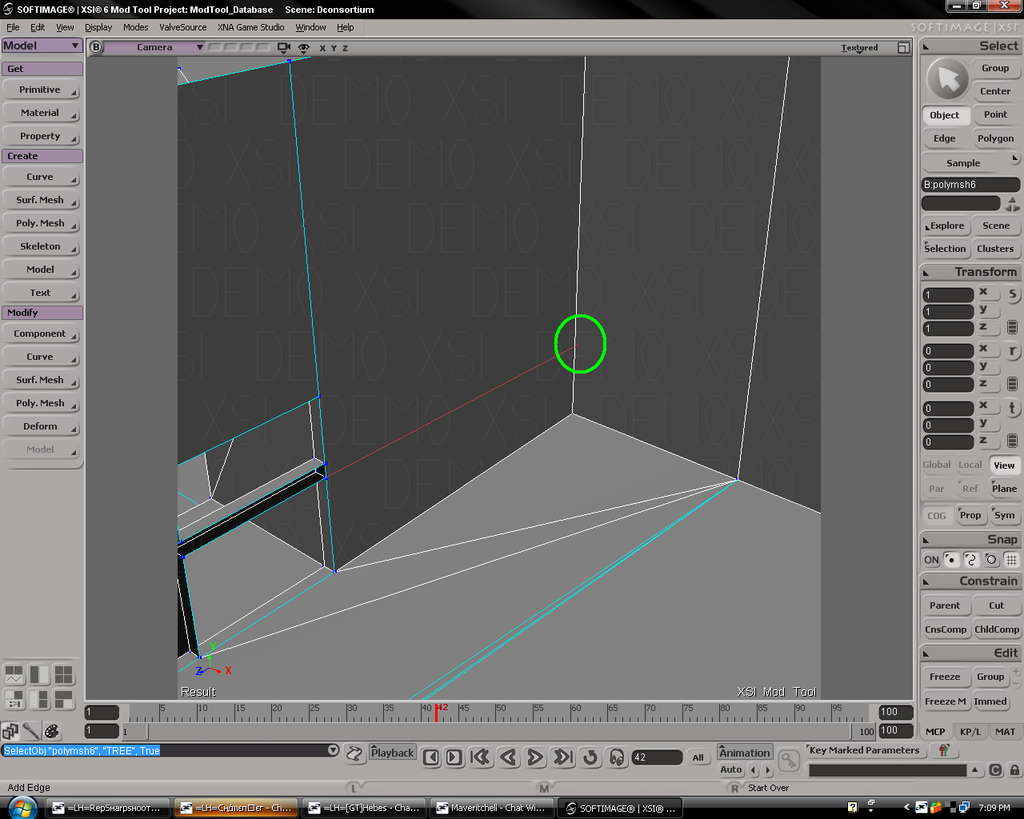
Well I've been using the 'create edge' tool (keyboard shortcut \ ) to try to connect an edge to a point. I can initiate the new edge from the point, but it won't hook up to the other edge. The other edge won't turn red.
This isn't the first time it has happened. I have had trouble with either 'create edge' or 'add polygon' not hooking up to another edge or line before. So any help would be appreciated

Re: Edges not attatching
Posted: Fri Jul 04, 2008 8:00 pm
by Caleb1117
So... you building this polygon by polygon?
Re: Edges not attatching
Posted: Fri Jul 04, 2008 8:30 pm
by FragMe!
you can only go from the point on one edge to a point on another edge you can't just go to the middle of a line.
What you can do is use the add vertex tool to put a point on the edge you want connect to at the place you want to connect the use the add edge tool to put in the edge.
Re: Edges not attatching
Posted: Fri Jul 04, 2008 9:34 pm
by AceMastermind
You can connect a new edge from a point to a edge, from point to point, or from edge to edge as long as they "flow" on the same object, another great thing about XSI is that it will not cooperate if your geometry is not valid for such a connection, think of it as "idiot proof", check the components that you're trying to connect to make sure they're in the same "flow" and can make a valid connection.
It looks like you're trying to connect a disconnected point on one part to an edge on another part of the same object, but the disconnection makes it an "invalid" operation.
Remember that cyan colored edges are border edges(disconnected) and all points residing on a border edge are also disconnected, white or yellow edges depending on which mode you're working in, are connected(welded).
Re: Edges not attatching
Posted: Fri Jul 04, 2008 10:25 pm
by trainmaster611
AceMastermind wrote:You can connect a new edge from a point to a edge, from point to point, or from edge to edge as long as they "flow" on the same object, another great thing about XSI is that it will not cooperate if your geometry is not valid for such a connection, think of it as "idiot proof", check the components that you're trying to connect to make sure they're in the same "flow" and can make a valid connection.
It looks like you're trying to connect a disconnected point on one part to an edge on another part of the same object, but the disconnection makes it an "invalid" operation.
Remember that cyan colored edges are border edges(disconnected) and all points residing on a border edge are also disconnected, white or yellow edges depending on which mode you're working in, are connected(welded).
Thats what I'm thinking it might have been. But just now, I went and deleted that square poly you see in the foreground. Then I drew a new one with 'add polygon', taking care this time to connect it to the point at which I am starting the new edge. So this creates that kind of 'geometry flow' you were talking about, but even when I tried to connect it, it still doesn't work.
And frag -- normally if you attatch a new edge to an existing edge, it automatically creates a new point on the existing edge (auto split edge) to hook up to your new edge. But if worse comes to worst, I'll use the add vertex thing.
Re: Edges not attatching
Posted: Fri Jul 04, 2008 10:51 pm
by AceMastermind
Example of "flowing" geometry, no disconnections.

And here's what you're trying to do, which works fine:

Re: Edges not attatching
Posted: Sat Jul 05, 2008 12:40 am
by trainmaster611
I can't believe I didn't think of this before: I just started from the segment and went back to the point

So I wonder what was stopping it.
But sometimes this thing is buggy. I little later, I found myself doing the same task; the new edge wouldn't hook up to the new edge. But I found that it would work if I tried making the camera face the backside of the polygons. Mind you, I tried this trick on the original scenario to no avail.
A little later, I was trying to connect a point to a point. It didn't work again so I deleted the polygon it was crossing and redrew it and then it worked

Whats weird in the first scenario is that both the edge was part of the same polygon as the edge containing the original point.
But I see what you mean with 'flowing geometry'. There's no blue lines. I don't know why that was there to begin with, cuz usually when you run a new polygon along an existing edge, you have to click 'double edges'. Oh well, I guess I should make sure it asks that next time.
I think thats all I'll need in the way of this particular subject. Thanks!

Re: Edges not attatching
Posted: Sat Jul 05, 2008 4:46 am
by AceMastermind
trainmaster611 wrote:I can't believe I didn't think of this before: I just started from the segment and went back to the point
So I wonder what was stopping it.
That worked because you started and ended the edge on the same polygon, going the other way you were probably selecting the point on the disconnected edge and trying to cross over the border, hence border edge.
trainmaster611 wrote:But sometimes this thing is buggy. I little later, I found myself doing the same task; the new edge wouldn't hook up to the new edge. But I found that it would work if I tried making the camera face the backside of the polygons. Mind you, I tried this trick on the original scenario to no avail.
It's not buggy, you were trying to perform an invalid operation and XSI is telling you to rethink what you are doing and inspect your geometry and correct it to avoid problems.
trainmaster611 wrote:A little later, I was trying to connect a point to a point. It didn't work again so I deleted the polygon it was crossing and redrew it and then it worked
Because when you drew the new polygon you corrected what was wrong, which in turn validated the operation.
trainmaster611 wrote:Whats weird in the first scenario is that both the edge was part of the same polygon as the edge containing the original point.
Remember that when you see 2 polygons side by side and a border edge seperating them, there are actually 2 border edges but they appear as one, it can be deceiving because if a point resides on both of those border edges at the same coordinates then both points will appear as only one, and if you were trying to connect an edge to one of those points then you more than likely will run into problems because the point that you want to connect to might be hidden by the other one.
trainmaster611 wrote:I don't know why that was there to begin with, cuz usually when you run a new polygon along an existing edge, you have to click 'double edges'. Oh well, I guess I should make sure it asks that next time.
If you get that "double edge" popup, then you need to inspect what are trying to connect, that indicates bad topology because XSI is trying to calculate how the normals are handled for the new polygon, a double edge will result from 2 polygons with normals facing opposite directions, but their edges are connected.
A thick yellow edge can be seen as the result of double edges.
trainmaster611 wrote:I think thats all I'll need in the way of this particular subject. Thanks!
I'm glad you got it worked out!
