Page 1 of 1
CP's in wrong modes.
Posted: Fri Jun 01, 2007 12:14 pm
by Caleb1117
Ok, I don't know whats wrong, I had a problem when I fixed my map.
In elimination, the cps for Eli showed up, but also the CTF cps and capture zones were there too.

And you could spawn from them.
When I played conquest, the cps from con, eli, and CTF where there and spawnable.
To try and remedy this I opened my eli, and CTF layers and removed the cps, capture zones, flags, ECT.
Then I decided to test Eli first, I gave it cps again, and spawn paths.
I must have made some small mistake cause in Eli you can't spawn at any of the cps, but the CTF cps are gone.(cause I deleted them)
I then tried conquest:
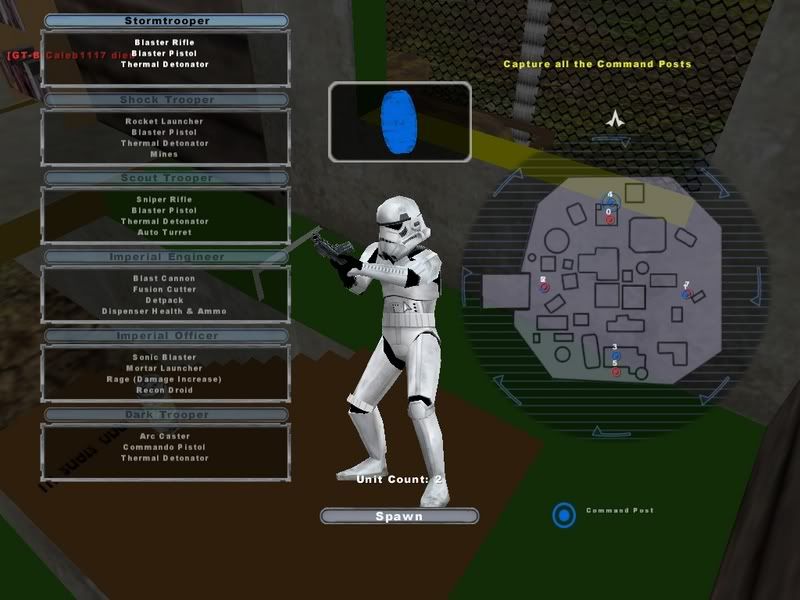
Both the conquest cps and the eli ones are there. nothing can spawn from The eli cps just like in elimination
RE: CP
Posted: Fri Jun 01, 2007 12:47 pm
by FragMe!
All I can suggest is double check the assigments as to which layers get loaded for each mode and resave the MRQs.
BTW you can load the same non-common layer for different modes meaning, taking what I did for my map as an example, I am using the ELI CP layer for Hunt mode as well that way I didn't have to make a separate CP layer for Hunt. I would post a screenie but they don't let me play with the modtools at work. I can later if you need and example.
Re: RE: CP
Posted: Fri Jun 01, 2007 1:03 pm
by Caleb1117
FragMe! wrote:All I can suggest is double check the assigments as to which layers get loaded for each mode and resave the MRQs.
Ok, that sounds Like a logical cause... but how do I check witch layers get loaded in witch mode?
And by resaveing the MRQs you mean the:
"Update world .req, and mode .MRQs" Botton?
RE: Re: RE: CP
Posted: Fri Jun 01, 2007 1:12 pm
by FragMe!
but how do I check witch layers get loaded in witch mode?
Ah that would be in the non postable screen shots

But it is on the same interface as the Update worl.req and mode .MRQ.
If you highlight a game mode the window to the right should show what non-common layers get loaded with that particular mode.
Other thing to check now I think of it is since you are using different layers for CPs make sure it is not in the common column once again refer to the non posted screenie (darn work computer policy)

but I will once I get home.
RE: Re: RE: CP
Posted: Fri Jun 01, 2007 11:46 pm
by Caleb1117
Wow, thats... iteresting.
I took pictures too.

Apperently conquest loads conquest
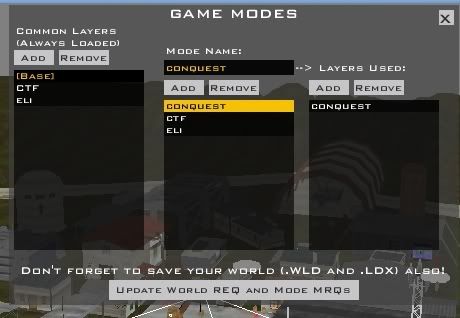
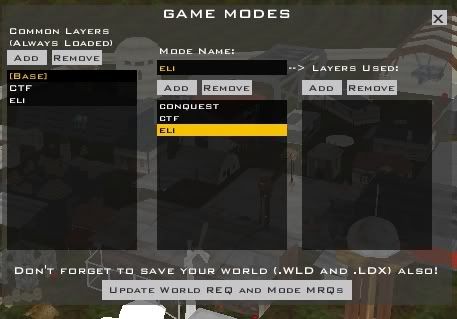
but CTF and Eli load nothing.
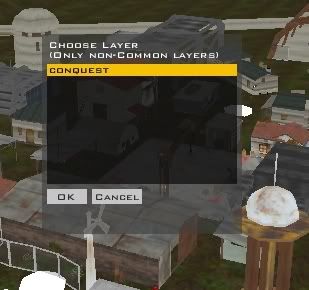
Also in the "layers used" box, I hit add and the only selection is conquest.
RE: Re: RE: CP
Posted: Sat Jun 02, 2007 10:19 am
by FragMe!
You have the ELI and CTF layers loading in the common layer so they will load in all modes.
Assuming you only have CPs and spawn paths on those layers hilite them in the common layer column and click remove.
Once you do that they will be available in the layers used column for modes.
Oh and here is the promised picture

Also as mentioned and I just reconfirmed for myself I am using the ELI layer as the CP and path information for Hunt mode.
RE: Re: RE: CP
Posted: Sun Jun 03, 2007 9:07 am
by Caleb1117
It really annoys me, sometimes the forums don't tell me of a reply.
any way I did this so that its:
[base]------>conquest----->conquest
-------------->CTF---------->CTF
-------------->Eli------------>eli
But eli CP's still show up in con. (there are no CTF CPs yet)
Do I need to delete and replace them or something?
Re: RE: Re: RE: CP
Posted: Sun Jun 03, 2007 11:01 am
by authraw
Caleb1117 wrote:It really annoys me, sometimes the forums don't tell me of a reply.
any way I did this so that its:
[base]------>conquest----->conquest
-------------->CTF---------->CTF
-------------->Eli------------>eli
But eli CP's still show up in con. (there are no CTF CPs yet)
Do I need to delete and replace them or something?
And you're sure that you didn't put the CPs in the base layer?
RE: Re: RE: Re: RE: CP
Posted: Sun Jun 03, 2007 11:32 am
by Caleb1117
yes
RE: Re: RE: Re: RE: CP
Posted: Sun Jun 03, 2007 1:51 pm
by FragMe!
And silly question you did press update the req and mrq button, then everyones favorite "clean" before munging.
The .mrq files are just text files you can open them and see if the appropriate layers are in there. Example
Code: Select all
ucft
{
	REQN
	{
		"congraph"
		"NSS_hunt"
	}
	REQN
	{
		"world"
		"NSS_eli"
	}
}
This is my nss_hunt.mrq the first REQN is the mode name the second one indicates what layers are associated with it. world = common NSS_eli means that it is going to use the eli layer, which in this case has the CPs and spawn paths.
Other question would be you didn't accidentally copy the CPs from eli layer to conquest layer during your attemps to fix the map?
Posted: Mon Jun 04, 2007 10:17 am
by Caleb1117
I did not clean... Gah I loathe cleaning. I'll post If it does, or does not work.
Edit: No bannana
What about me copying some renamed default layers and MRQs?
Posted: Mon Jun 04, 2007 10:58 am
by FragMe!
If it's not too big PM me your AIA.wld file (assuming your still using that letter code) and if there is room your conquest.lyr file.
I can have a look at them and see if I can see if there is anything you can't see that I might see. Okay I confused myself now.
Up to you if you want to or not.
Posted: Tue Jun 05, 2007 8:58 am
by FragMe!
This will arrive to you in a PM as well but it's taking it's time.
Okay so here's what it is, all the CPs and spawn paths are buggered.
What you need to do is go to the 3 layers, conquest, CTF and eli and delete all CPs and spawn paths. Save your world, close ZE. Restart ZE and put your CPs and paths back (may have to check your regions too but it might of just been me deleting too many things

)
Redoing these is a bit of a pain but at least the spawn paths weren't overly complex.
Now the question of why, something obviously got buggered during a copy process or something, if you take a look at a .lyr file you will notice each object has a sequence number, the objects in your conquest.lyr and eli.lyr had the same sequence numbers.
I did what I mentioned above and now only have 4 CPs in conquest (I did see the . BTW the only cp names that really matter on making the same as they were are the ones for conquest as they are the only ones that get called for in a LUA file so just name them as before cp1 - cp4. Hope that all works for you.
One last note I still think the couch should shoot potatoes
(couch potato
)
Posted: Sun Jun 17, 2007 10:52 am
by Caleb1117
I'm gonna bump this topic, even tough its not that old, and its mine.
To see if I can draw some more attention to it.
The problem still exists.
Any help with this by anyone would be HUGELY apreceated.
@fragme,
I'll send you my world file today, or tomarrow.
Do you need the assets, in AIA_data/worlds/AIA?
or just some of them? or all of them?
Posted: Sun Jun 17, 2007 10:57 am
by FragMe!
yes if you can crunch down the whole directory I can fix it and then send the whole thing back to you and you can carry on.
Posted: Sun Jun 17, 2007 11:00 am
by Caleb1117
I'll see how much I can "crunch" it first
Do you have win-rar? or something that can open it like 7-zip?
Posted: Sun Jun 17, 2007 11:02 am
by FragMe!
I have or can get all major crunching programs