
Hello.
Although I have already made two maps, I think, I am still lacking some basic knowledge.
I am wondering how to add animated stuff like the carbon forklift or sarlacc tentacles to a map.
I tried around a bit, and so far I have copied the bes2_carbon_forklift folder from the Shipped Common Animations to my Datamodid/Common/Animations.
In another forum, I read that eddie has changed the munge.bat inside the tat3_bldg_rancor folder to
@call ..\munge_animation.bat "/keepframe0 /specialquathack" ..\..\..\worlds\modid in order to add the rancor to a map.
So I did that aswell with the munge.bat inside the bes2_carbon_forklift folder which I had copied.
Also I copied bes2_carbon_forklift.zafbin and bes2_carbon_forklift.zaabin into my Datamodid\Worlds\modid\munged folder.
I munged the world, but when I want to play the map the game crashes while loading it, as long as I have the forklift on my map.
Could anyone explain me step by step what I have to do, to get the forklift on my map?
Greetings del.
How to add the Carbon Forklift?
Moderator: Moderators
-
d3linqu3nt
-
d3linqu3nt
-
Qdin
- Old School Staff
- Posts: 2059
- Joined: Wed Feb 23, 2005 9:54 am
- Projects :: No Mod project currently.
- xbox live or psn: No gamertag set
-
d3linqu3nt
-
Leviathan
- Missing Jedi Admin
- Posts: 3277
- Joined: Fri Nov 12, 2004 2:54 pm
- Projects :: No Mod project currently.
- xbox live or psn: No gamertag set
-
d3linqu3nt
-
Leviathan
- Missing Jedi Admin
- Posts: 3277
- Joined: Fri Nov 12, 2004 2:54 pm
- Projects :: No Mod project currently.
- xbox live or psn: No gamertag set
-
Qdin
- Old School Staff
- Posts: 2059
- Joined: Wed Feb 23, 2005 9:54 am
- Projects :: No Mod project currently.
- xbox live or psn: No gamertag set
I mean, the animation filesdoesnt work without the .zafbin and .zaabin files
if you copied the .msh files - which is the animation files - into your Animation Folder, then I guess you have to do so:
go to another Animation Folder - you decide, it doesnt matter - and then there is a MS-DOS Batch-file program file called Munge
copy the Munge file, and paste it into your Animation Files, then run the program
it should now create .zafbin and .zaabin files under the folder Munge
try it out
if you copied the .msh files - which is the animation files - into your Animation Folder, then I guess you have to do so:
go to another Animation Folder - you decide, it doesnt matter
- and then there is a MS-DOS Batch-file program file called Mungecopy the Munge file, and paste it into your Animation Files, then run the program
it should now create .zafbin and .zaabin files under the folder Munge
try it out
-
Saturn_V
- Emperor's Hand
- Posts: 487
- Joined: Sun Dec 26, 2004 12:11 pm
- Projects :: No Mod project currently.
- xbox live or psn: No gamertag set
- Contact:
Copy bes2_carbon_forklift.msh to your mods Worlds\modname\MSH folder along with it's textures - bes2_prop_carbonite.tga, bes2_prop_carbonite_fx.tga and chamber02.tga There are a couple of bumpmaps but I didn't test these
Copy bes2_carbon_forklift.odf to your mods Worlds\modname\ODF folder
Copy bes2_carbon_forklift.zaabin and bes2_carbon_forklift.zafbin to your mods Worlds\modname\munged folder (these are the files required for animation as Qdin said, but you shouldn't need to run the munge.bat or copy anything to common\animations since these animation files already exist)
And that's it. Place it in Zeroedit and munge. If your map crashes, something else is causing it because I just tested this and it works.
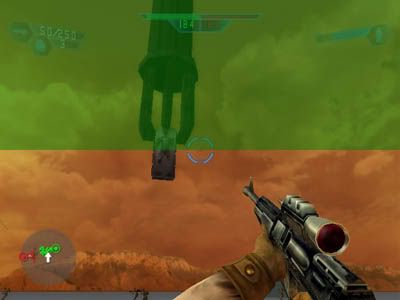
Copy bes2_carbon_forklift.odf to your mods Worlds\modname\ODF folder
Copy bes2_carbon_forklift.zaabin and bes2_carbon_forklift.zafbin to your mods Worlds\modname\munged folder (these are the files required for animation as Qdin said, but you shouldn't need to run the munge.bat or copy anything to common\animations since these animation files already exist)
And that's it. Place it in Zeroedit and munge. If your map crashes, something else is causing it because I just tested this and it works.

