Page 1 of 1

Attaching a BF1 Cape to a BF2 Character (Tutorial) (FAQ)

Posted: Wed Jun 27, 2007 4:41 pm
by Darth_Z13
Well since everyone else is writing tutorials lately I figure I'll write one too, as this question will come up sooner or later with new registrations being allowed. ;)

Attaching a BF1 Cape to a BF2 Unit

First thing is to acquire Count Dooku's cape from BF1 (IMO Vader's cape doesn't work as well).

If you don't have/don't want to get the BF1 Mod Tools, I've packaged the files up for download. Get them here.


You should have four files:

cis_inf_dooku.tga
cis_inf_dooku.tga.option
cis_inf_countdooku_cape.msh
cis_inf_countdooku_cape.msh.option


Place them in your MSH folder of your custom side.

Open the ODF of the unit you're using and put this code in at the end (I'll use the MagnaGuard as an example).

Code: Select all

AnimatedAddon			= "CAPE"

GeometryAddon			= "cis_inf_countdooku_cape"
AddonAttachJoint		= "bone_ribcage"
It should look like this (If you're using the MagnaGuard).
Hidden/Spoiler:
[code][GameObjectClass]
ClassParent = "cis_inf_default_officer"


[Properties]

GeometryName = "cis_inf_magnaguard"
GeometryLowRes = "cis_inf_magnaguard_low1"

SkeletonName = "magnaguard"
SkeletonLowRes = "magnaguardlz"
SkeletonRootScale = "1.24"

// no head offset for this guy, unlike all other droids
CollisionHeadOffset = "0.0 0.0 0.0"

FirstPerson = "CIS\cisoff;cis_1st_magnaguard"

CAMERASECTION = "STAND"
EyePointOffset = "0.0 1.8 0.0"
TrackCenter = "0.0 1.8 0.0
TrackOffset = "0.0 0.0 4"
TiltValue = "10.0"

CAMERASECTION = "STANDZOOM"
EyePointOffset = "0.0 1.8 0.0"
TrackCenter = "0.0 1.8 0.0
TrackOffset = "0.4 0.05 2.8"
TiltValue = "3.5"

CAMERASECTION = "CROUCH"
EyePointOffset = "0.0 1.3 0.0"
TrackCenter = "0.0 1.3 0.0
TrackOffset = "0.0 0.15 3.5"
TiltValue = "10.0"
CameraBlendTime = "0.75"

CAMERASECTION = "CROUCHZOOM"
EyePointOffset = "0.0 1.3 0.0"
TrackCenter = "0.0 1.3 0.0
TrackOffset = "0.4 0.2 2.8"
TiltValue = "3.5"

CAMERASECTION = "SPRINT"
EyePointOffset = "0.0 1.8 0.0"
TrackCenter = "0.0 1.8 0.0
TrackOffset = "0.0 0.0 5.0"
TiltValue = "10.0"
CameraBlendTime = "0.75"

AnimatedAddon = "CAPE"

GeometryAddon = "cis_inf_countdooku_cape"
AddonAttachJoint = "bone_ribcage"[/code]
There! Now load your character in the LUA and munge common and your custom side.

And... ALAKAZAM!

Your unit now has a cape. :D

However, this cape won't move as BF2 units do. You cannot attach a BF2 cape to a BF2 unit it was not intended for. It won't work.

Now, you may want to reskin the cape (the cape in that screen I've reskinned (that shot is from my very first map) ).

Here's a guide to re-skinning it.

Open cis_inf_dooku.tga (it's where the cape's texture is).
Hidden/Spoiler:
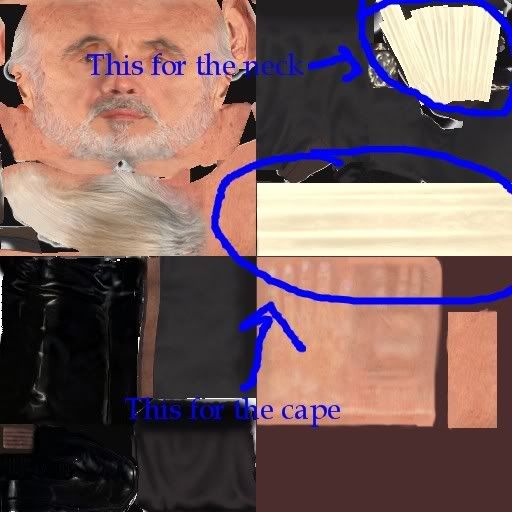
Image
And that's all there is to it! :D

Posted: Wed Jun 27, 2007 4:48 pm
by EGG_GUTS
Wow there are so many tuts coming out. I should make one. Nah too lazy.

Posted: Wed Jun 27, 2007 5:15 pm
by Challenger33
Nice, easy-to-understand tutorial! Good job! gtpwn

-:royal:

Posted: Wed Jun 27, 2007 6:23 pm
by Maveritchell
Gee whiz, I think I've seen this somewhere before.

And a buncha other threads where people asked how to do this. It's like a 1-post answer. Don't help enable the people too lazy to search for answers.

Posted: Wed Jun 27, 2007 6:29 pm
by Darth_Z13
I guess that's true but if this gets added to the FAQ people will (hopefully) stop making topics asking for help with it.

Posted: Wed Jun 27, 2007 6:30 pm
by {501st}Commander_Appo
Challenger33 wrote:Nice, easy-to-understand tutorial! Good job! gtpwn

-:royal:
Wow that was pretty easy to notice

Posted: Wed Jun 27, 2007 6:31 pm
by {501st}Commander_Appo
Maveritchell wrote:Gee whiz, I think I've seen this somewhere before.

And a buncha other threads where people asked how to do this. It's like a 1-post answer. Don't help enable the people too lazy to search for answers.
So, this means won't this topic be locked sorry for the double post

Posted: Wed Jun 27, 2007 8:40 pm
by ARC_Commander
They should really add this to the FAQ. Very good tut.

Posted: Wed Jun 27, 2007 8:42 pm
by Challenger33
{501st}Commander_Appo wrote:
Challenger33 wrote:Nice, easy-to-understand tutorial! Good job! gtpwn

-:royal:
Wow that was pretty easy to notice
:? I don't quite follow-do you mean it stood out, or do you mean what I said was obvious :?:

-:royal:

Posted: Wed Jun 27, 2007 8:44 pm
by Xavious
I think he means your use of smilies.

Nice tutorial, by the way. We've had a lot of 'em lately.

Posted: Wed Jun 27, 2007 8:46 pm
by Challenger33
Darth_Maul wrote:I think he means your use of smilies.

Nice tutorial, by the way. We've had a lot of 'em lately.
That's what I thought^^.

so darth z13

Posted: Mon Jul 02, 2007 12:09 am
by jirisysklatoon
hi everyone, Darth z13 i wanna ask you one off topic question:
How did you made to make the image of your map appeared on the loading screen??? :?

RE: so darth z13

Posted: Mon Jul 02, 2007 12:12 am
by Penguin
Read the FAQ, its answered there, in 2 video tutorials :)

UH

Posted: Mon Jul 02, 2007 3:29 pm
by jirisysklatoon
Penguin wrote:Read the FAQ, its answered there, in 2 video tutorials :)
which FAQ the one from here or from anything else?? btw sorry if this is off topic, could you gimme the link or something :?

RE: UH

Posted: Mon Jul 02, 2007 3:37 pm
by Taivyx

RE: UH

Posted: Mon Jul 02, 2007 5:23 pm
by jirisysklatoon
Ty

Posted: Tue Jul 10, 2007 1:32 pm
by Alpha-17
Is it possible to give some hero anakins skirt and a cape ??? This would help me a lot

Posted: Tue Jul 10, 2007 1:54 pm
by Teancum
Nopy, just the SWBF1 capes unfortunately.

Re: Attaching a BF1 Cape to a BF2 Character (Tutorial)

Posted: Tue Oct 02, 2007 11:19 am
by MandeRek
Nice tutorial! Hope a lot of people add cloth to their sides, it makes it lot's nicer i think!

Re: Attaching a BF1 Cape to a BF2 Character (Tutorial)

Posted: Tue Oct 02, 2007 11:31 am
by Maveritchell
Please, no bumping topics more than a month old. Read the rules. Also, this is semi-outdated, since we can add BF2 cloth to BF2 characters now.