Page 1 of 1
GLOW: another problem with flags
Posted: Mon Sep 07, 2015 6:47 pm
by Deviss
Hello to everybody, i know many people asked about glow, i read those topic, i followed tutorial but it dont work ingame, i took a shot:
Texture: have alpha channel
Flag: 11
Color: red light
any idea?
thanks in advance!!
Re: GLOW: another problem with flags
Posted: Mon Sep 07, 2015 7:44 pm
by AceMastermind
When trying to glow smaller polygons you should probably use the common flag for glow (02), the one in the 5th place after ATRB instead of the rendertype flag in the 6th place.
Re: GLOW: another problem with flags
Posted: Mon Sep 07, 2015 9:12 pm
by Deviss
AceMastermind wrote:When trying to glow smaller polygons you should probably use the common flag for glow (02), the one in the 5th place after ATRB instead of the rendertype flag in the 6th place.
Ace many thanks for reply

, i tried the next combinations:
1º flag (02) with texture1 cis_inf_aquadroid.tga
2º flag (02) with texture1 red.tga (texture red = 255)
3º flag (02) without texture1
4º flag (03) with texture1 cis_inf_aquadroid.tga
5º flag (02) with texture1 red.tga (texture red = 255)
6º flag (02) without texture1
but dont work :S, i tried make separate polygon and make him bigger but eithter
Re: GLOW: another problem with flags
Posted: Mon Sep 07, 2015 10:02 pm
by AceMastermind
You have Light Bloom enabled in your video settings right?
Re: GLOW: another problem with flags
Posted: Tue Sep 08, 2015 6:13 am
by Deviss
AceMastermind wrote:You have Light Bloom enabled in your video settings right?
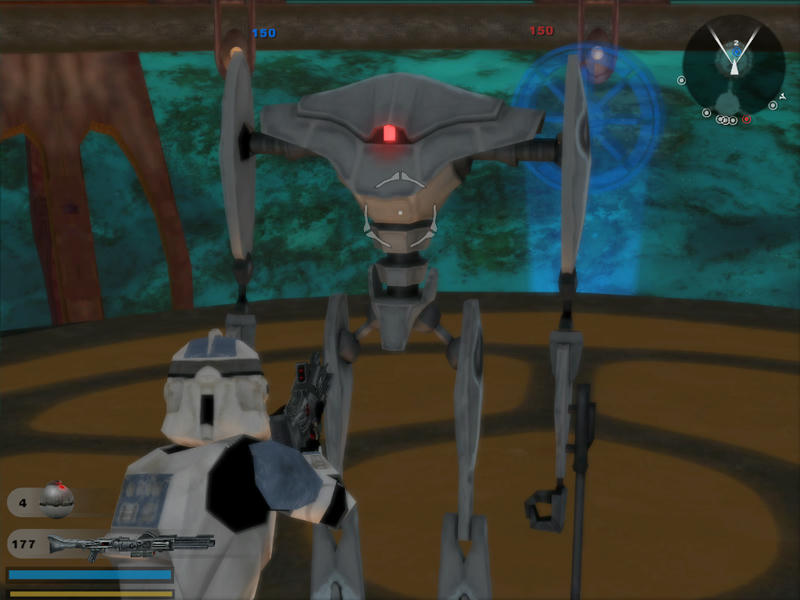
yes yes for example here its stock magnaguard:
.msh.option or .tga.option need some configuration on it?

Re: GLOW: another problem with flags
Posted: Tue Sep 08, 2015 4:14 pm
by AceMastermind
There's nothing special about the Magnaguard as far as I can see. The option files look standard. Material42 has the glow flag and nothing else, Material41 has the specular flag. The alpha channel in the texture is painted white where parts should glow and the rest is partly visible for the specular effect on the body. What you've done should be working.
EDIT
I set up the texture's alpha channel and material flags just like the Magnaguard and it seems to work fine.
Re: GLOW: another problem with flags
Posted: Tue Sep 22, 2015 6:18 am
by Deviss
AceMastermind wrote:There's nothing special about the Magnaguard as far as I can see. The option files look standard. Material42 has the glow flag and nothing else, Material41 has the specular flag. The alpha channel in the texture is painted white where parts should glow and the rest is partly visible for the specular effect on the body. What you've done should be working.
EDIT
I set up the texture's alpha channel and material flags just like the Magnaguard and it seems to work fine.
i tried and retried, and i tried making others flags like 15 (envmap) but nothing work :S, both ways fail for me (xsi and hex edit), could you take screen of flag window into xsi please? i cant give with the solution
Re: GLOW: another problem with flags
Posted: Tue Sep 22, 2015 9:56 am
by AceMastermind
These are the test files I used in the screenshot posted earlier:
http://www.mediafire.com/download/s4b32 ... w_test.zip
I didn't do anything special, for this test I just have 02 in the 5th place after ATRB in material1
Code: Select all
41 54 52 42 04 00 00 00 02 00 00 00
I also changed the alpha channel to look like the Magnaguard's for the specular flag in material_1, but this should have no effect on glow working or not.