
ZE Planning help [Solved]

In this forum you will find and post information regarding the modding of Star Wars Battlefront 2. DO NOT POST MOD IDEAS/REQUESTS.

Moderator: Moderators

Post Reply
nobody3
Rebel Sergeant
Rebel Sergeant
Posts: 188
Joined: Wed Jun 15, 2011 8:30 am

ZE Planning help [Solved]

Post by nobody3 »

Question 1:
I'm having issues allowing AI units to go through the little tunnel on mustafar shipped map, it's the one marked in the screenshot below
Hidden/Spoiler:
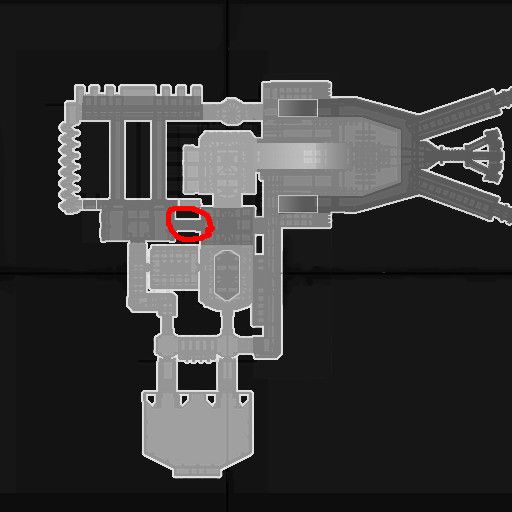
Image
I tried using the planning hubs and connecting them like normal but the AI ignore it completely. I even tried putting maximum weight on the connections too, with no effect.

Strange thing I noticed is when I put new hub, it automatically sticks to the terrain and I can't move it upwards to the same height as every other hubs that are already there by default put by the developers. And when I click on the existing ones, the same thing happens, they just stick to terrain and become unusable.

Question 2:
Also, must there be a dynamic connection applied to the connection because of the little doors?

Question 3:
Why does ZE bug when I click on existing connections that are dynamic? It hides the 3 options on all connections "Jump", "Jetjump" and "Oneway" unless I change the ZE tab from planning to something else then come back to it. Thanks
Last edited by nobody3 on Fri Nov 07, 2014 6:08 pm, edited 1 time in total.
thelegend
Sith
Sith
Posts: 1433
Joined: Thu Jan 23, 2014 6:01 am
Projects :: Star Wars - Battlefront III Legacy
Games I'm Playing :: Swbf GTA CoD LoL KH
xbox live or psn: El_Fabricio#
Location: Right behind you :)

Re: ZE Planning help

Post by thelegend »

Hm...perhaps there are barriers around yout little tunnel.
User avatar
AnthonyBF2
Sith
Sith
Posts: 1255
Joined: Wed Aug 21, 2013 3:55 pm
Projects :: PS2+PSP Overhaul

Re: ZE Planning help

Post by AnthonyBF2 »

If you're editing a stock Mustafar and want the planning data, look in the assets for MUS\world1\ and fine the main .PLN file(usually the largest), open it with Notepad, then copy everything.

Replace all that data over the data in your mod's main .PLN file.

This should add all the stock Mustafar planning to your level, then you can pick and choose which connections and hubs you may want gone. If you've moved any of the parts of the map, you will have to move the planning along with it.
hunpeter12
Command Sergeant Major
Posts: 260
Joined: Mon Apr 18, 2011 2:53 pm
Projects :: Underground City The Complex [WIP]
Games I'm Playing :: SWBF2

Re: ZE Planning help

Post by hunpeter12 »

I don't think that planning/barrier height level means anything since the AI can only use them in 2d e.g. you can't have two connections crossing eachother on different levels, because the AI will want to follow both of them on any height.
nobody3
Rebel Sergeant
Rebel Sergeant
Posts: 188
Joined: Wed Jun 15, 2011 8:30 am

Re: ZE Planning help

Post by nobody3 »

thelegend wrote:Hm...perhaps there are barriers around yout little tunnel.
Yeah I forgot about that thanks

And what about the other questions guys?
Marth8880
Resistance Leader
Posts: 5042
Joined: Tue Feb 09, 2010 8:43 pm
Projects :: DI2 + Psychosis
Games I'm Playing :: Silent Hill 2
xbox live or psn: Marth8880
Location: Edinburgh, UK
Contact:

Re: ZE Planning help

Post by Marth8880 »

Question 2: No.

Question 3: It's probably an engine limitation rather than a bug.

Conclusion: The only thing the dynamic flag is used for is making it so dynamic-flagged connections can be disabled/re-enabled in mission scripts, so set it only if you need to do so.
nobody3
Rebel Sergeant
Rebel Sergeant
Posts: 188
Joined: Wed Jun 15, 2011 8:30 am

Re: ZE Planning help

Post by nobody3 »

I see, thanks
Post Reply
