Page 1 of 1

Making a water tile model

Posted: Mon Jul 25, 2016 9:26 pm
by MileHighGuy
So I would like to make a water tile model using the water assets from the game. To make it animated, I would use render type 7 as outlined here viewtopic.php?f=36&t=32143#p523304

Whats the most efficient way to make a 16 frame water texture using the individual water textures from the game? (there are 16 frames each as their own texture already)
Like this but with water shimmering:
Hidden/Spoiler:
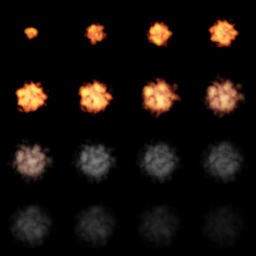
Image
How can I stitch all the textures together like that?


To avoid having flat looking water, Can I also do an animated bump, specular, and or normal map too?

What would be the best way to make ok looking water given the options I have?

Re: Making a water tile model

Posted: Tue Jul 26, 2016 11:44 am
by Ginev
I think if you can animate one surface to have bumps and to move like water with waves and to move forward then perhaps there is no need to make the texture water animated since i think it will look good enough.Anyway maybe what you want to do its possible but it will be tricky.I have not tested that.

Re: Making a water tile model

Posted: Wed Jul 27, 2016 10:52 am
by thelegend
So you want to have water but without having "real" water. While reading your post I was thinking about using the 16 textures in any world's effects folder (the ones which have water).
I guess you take the water_normal or bumpmap, color it to blue (Or any color you want to have) and put them all into a 16 frame texture. 4x4 images per square should fit to the number of 16 (Copy-paste, copy-paste, copy-paste....16x times). Now here's what I visually imagines just by now: Make the texture (Which should be a 1024x1024 now) transparent. Give it an Alpha channel and remove ~50 percents of its visibility. Now create an environment map which reflects the roof (Or whatever it has to reflect on your map; depends on where you place your water tiles).

Now you have two textures, a watertile map and an env. map. Now when you create your model have two "grids" being stacked of eachother. Maybe give it an altitude distance of a few milimeters. Apply the animated texture onto the upper grid, give it it's material: Rendertype "Animated", transparency "2" (two-sided) and that's it then.
Now apply any texture you want below the animated grid. It could be a water texture like seen in other maps; or one from here: http://www.textures.com/search?q=water

And give it an Environment map: Rendertype "6 (I gues)", put the env. map name (with .tga extension) into the texture3 slot and decrease the "Specular Decay" a bit. I recommend 18-22 (others told that; the rebel visor helmet uses the same) .

Now in-game, after you placed the object into ZE, you should see an animated water tile, which reflects the environment (by your env. texture) and it's moving (animated texture).