
Okay, I've had Battlefront II for a little while now, but I've just recently begun to convert over from BF1 modding. Naturally, it seems no mod tools would be complete without a million errors to correct. Because I don't wanna get lectured by the admins (again), I've been trying to find fixes for my problems in the FAQ thread. Unfortunately, I've got a couple problems that are just... I don't know.
(Note: I've not edited my test map in any way. I'm running Vista Home Premium.)
First off, my test map shows up as "TST s%_s%" or something like that in the map menu. I don't think it's that I don't have the 1.1 version of the game, as I seem to have the 1.3 version already installed. Unless they have to be installed separately?
And further, when I try to play it, I get the error "couldn't open mission.lvl". I figured this could be because of a munge error, as it seemed to munge very fast (near instantaneous), and nothing appears in the "TST/data/_LVL_PC" folder (which, by the way, winds up in that users/documents sub-folder place that you access through "compatability files"). So I went and downloaded that supposed Vista/7 munge fix made by Frisbeetarian, but after installing that, I started getting a Runtime Error every time I tried creating a new world. So I uninstalled that, and now I can create worlds again, but nothing gets compiled.
Am I missing something here?
Trying to get started but hitting snags [Solved]
Moderator: Moderators
-
Ty294
- Sergeant Major

- Posts: 247
- Joined: Thu Mar 12, 2009 10:28 pm
- Projects :: Various
- Location: Minnesota
-
DarthD.U.C.K.

- Master of the Force

- Posts: 6027
- Joined: Wed Sep 27, 2006 11:05 am
- Location: Duckburg, Germany
Re: Trying to get started but hitting snags...
yes. the 1.1 patch is the only official patch while the inofficial 1.2 patch improves the overall appearance of the sides and the 1.3 patch introduces a large amount of awesome scripting improvements and new features.Ty294 wrote:First off, my test map shows up as "TST s%_s%" or something like that in the map menu. I don't think it's that I don't have the 1.1 version of the game, as I seem to have the 1.3 version already installed. Unless they have to be installed separately?
-
AceMastermind

- Gametoast Staff

- Posts: 3285
- Joined: Mon Aug 21, 2006 6:23 am
- Contact:
Re: Trying to get started but hitting snags...
There's only one patch for SWBF2 and that's the 1.1 update, everything else is just a side/shell mod. I never really cared for the word 'patch' being tacked on to anything else since it tends to cause confusion.
After you install the game you should launch it to see if it has been pre-patched, the result depends on how old the game disc is or if the game was downloaded(e.g. Steam, D2D).
If your game is updated to 1.1 then you should see this:
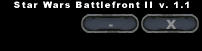
After you install the game you should launch it to see if it has been pre-patched, the result depends on how old the game disc is or if the game was downloaded(e.g. Steam, D2D).
If your game is updated to 1.1 then you should see this:
-
Ty294
- Sergeant Major
- Posts: 247
- Joined: Thu Mar 12, 2009 10:28 pm
- Projects :: Various
- Location: Minnesota
Re: Trying to get started but hitting snags...[solved]
Okay, appearantly it is updated to 1.1 (prolly was when I bought it, since I got it in the fairly new "Fan Favorites" pack), so that isn't the problem. So, I still don't know what is wrong with the munging. Has anyone else gotten that error Runtime error when using that "Vista/7 munge fix"?
EDIT: Okay, I got it working now.
EDIT: Okay, I got it working now.
