Page 1 of 1
Large squares on terrain after darkening ground [Solved]
Posted: Wed Feb 23, 2011 4:53 pm
by Jendo7
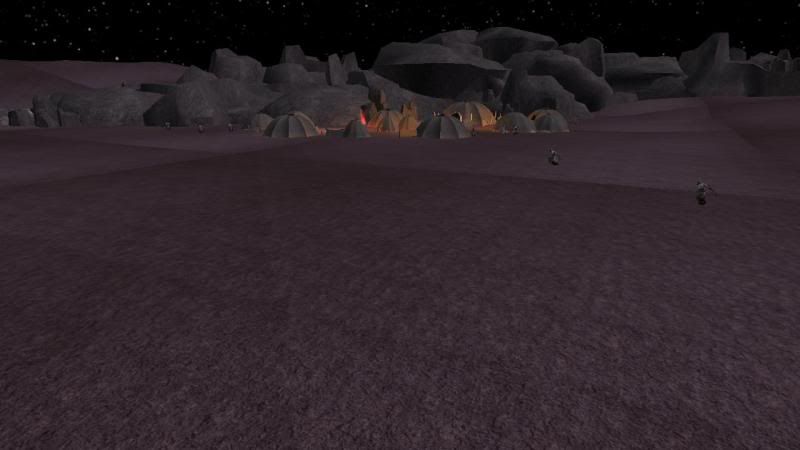
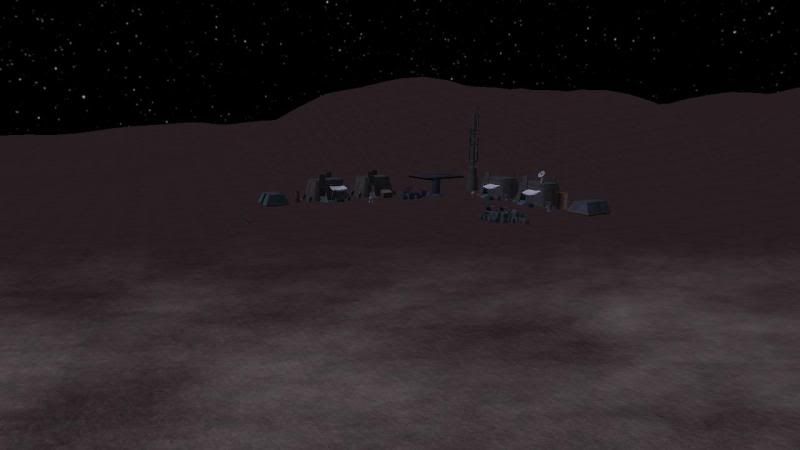
I've been able to darken the ground just for hunt mode by loading the Terrain through the sky file but unfortunately it now has noticeable squares in one corner where most of the action takes place. The other side seems fine. I've tried deleting some textures to see if that would help but it has no effect. I had to change the name of the .TER file as I am using two. The loaded textures are the same for each terrain file but one has a darker color. Would it work if I renamed the textures for one of the .TER files and then apply them in the editor. Or would that make no difference.
I may have to abandon this if I can't fix it but any help would be appreciated.
Screenshots of the problem
Just updated the screenshots, posted the wrong code.
Re: Large squares on terrain after darkening ground
Posted: Wed Feb 23, 2011 5:01 pm
by ACEwithSPADES
Could you just blend the edges (thats what i think those are) toward the ends of the terrain.tga so then ingame they would look more blended together?
Re: Large squares on terrain after darkening ground
Posted: Wed Feb 23, 2011 5:06 pm
by Jendo7
Yeah thanks, I actually tried using the blend tool but it didn't make any differnce, which is strange, as it worked for the lighter terrain when I only blended a few edges.
Re: Large squares on terrain after darkening ground
Posted: Wed Feb 23, 2011 5:07 pm
by ACEwithSPADES
Are you talking about in ZE? or on the actual .tga file?
Re: Large squares on terrain after darkening ground
Posted: Wed Feb 23, 2011 5:23 pm
by Jendo7
In ZE, but I think it was the color I blended, not the terrain. So thank you , I think you have solved my problem. I'll blend the terrain, and I'm sure that will do it.

I'm a bit tired, so I wasn't really thinking straight.
Edit: That didn't work either, unfortunatley.
Edit 2: Got it working. I just had to change the ground textures in gimp, and then load the new ones with the sky2.lvl file. A big thanks to Mav, and Sky_216.