Hello modders and mappers, here is Indytotof who is going back home.
I have some questions to ask about skinning and modding.
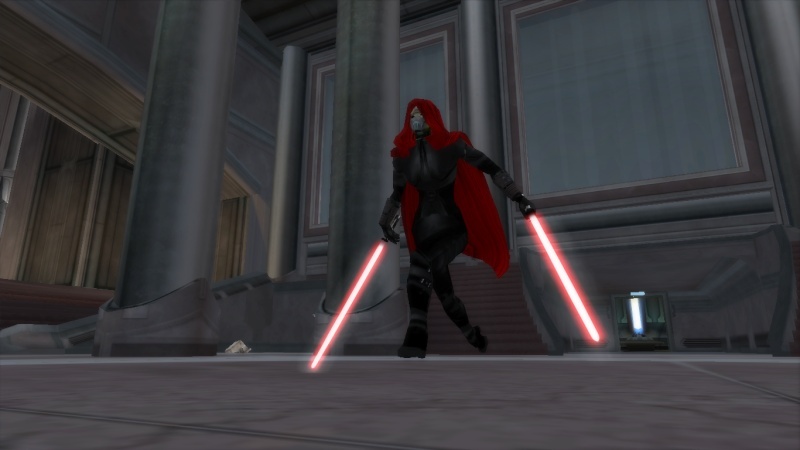
First of all, the first pic:
Yes, it's Barriss Offee as she appears in the season 5 finale against Ahsoka. The problem come from the cloak. I already use one for my Mother Talzin unit (yes the final released of my mod will feature Mother Talzin) but the Barriss' one come from another unit. This unit mesh feature a "rep_inf_ep3cloakedanakin" line and I think that this the problem. I think I've to hex edit that to the name of the other .msh unit (who is rep_hero_cloakedplokoon1) and then the good cloak will appear instead of this one, without changing anything to Talzin.
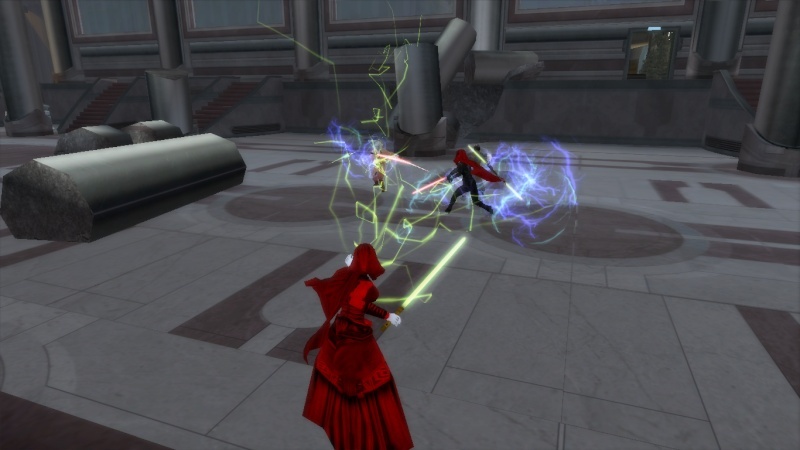
Speaking of Talzin, there is a pic:
As you can see, the lightning balls appears blue instead of green and I just don't know how to change this. Any though ?
Third question:
I want to add Yoda's cloth to my Ben Kenobi model (and changing the color of the cloth) and change the size of the cloth without affecting the stock Yoda unit.
How can I do all that ?
And the final:
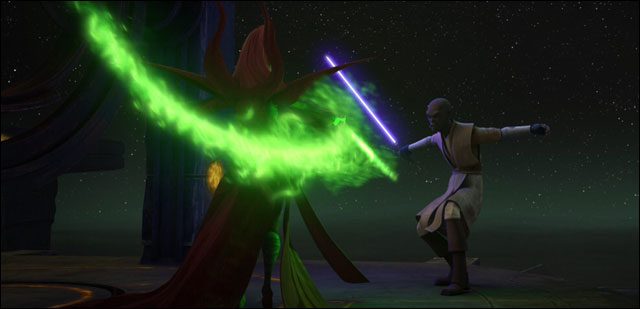
Is that possible to make a lightsaber edge having that Talzin's like texture ?
Thanks.
EDIT: I want to add an unit based on the "imp_hero_royal_guard" that can be found on the stock asset (only the .req file) and after some munge, I got this:
[code]ERROR[PC_texturemunge msh\pikesaber.tga]:TextureMunge(pikesaber:66x696x1): Must have power of two dimensions!
ERROR[PC_texturemunge msh\pikesaber.tga]:TextureMunge(pikesaber:66x696x1): Must have power of two dimensions!
[continuing]
2 Errors 0 Warnings[/code]
Ok. Once again to off topic: My formula for the tga files is: 1+1=2. That was simple. After that: 2x2 is 4. 4x2 is 8. 8x2 is 16.
Here a tiny list:
16
32
64
128
256
512 oh the basic texture size the most use
1024
2048
4096 oh sad the limit for our tga files.
And that was it for me.
Anyway for the lightsaber trail maybe (I never tried it but..) look at the commons' lighsaber odf. I think there should be a .fx file listed. All your fx. files (in cases as the weapon effects) are located in data_XXX/ common/ effects.
You wrote A,B = 2^k, which is the same as A=2^k; B=2^k and that concludes in A=B. You'd have to use an additional variable besides 'k' in order to express the truth which AQT stated.
And to the 4th question, all you could do is make the blade look more distorted by modifying it's texture. The trail effect is apparently hardcoded, all you can do there is edit the color via the saber's odf.
I bet you could attach an effect to the lightsaber so that the effect created the trails of the lightsaber. Just modify some smoke effect to your liking and attach it to the lightsaber.
As for the lightning ball: try copying com_sfx_damage_electricity.fx, com_sfx_lightningball1, com_sfx_lightningball2, com_sfx_lightningball3.msh and com_sfx_lightning.tga from your data_***/common/effects folder to your side folder/effects. Now you can modify the fx file.
Change these lines to your liking in all of the !Mesh sections: Hue(0, 160.0000, 180.0000);
Saturation(0, 80.0000, 150.0000);
Value(0, 100.0000, 200.0000);
Alpha(0, 0.0000, 0.0000);
I don't know what the first '0' means, but the others are for min and max values I guess. I recommend using a graphic program, to see what combination to use for a certain color. You could also copy that from your com_sfx_lightning.fx. (I assume you've changed that, since your lightning is green) Hope this works.
Add to kenobi: hex
Color: change the texture. Maybe you should change the cloth name, when hexing.
Size: there are ways with the tran section to scale the cloth, but i never got this working.
'odfmunge' is not recognized as an internal or external command,
operable program or batch file.
'odfmunge' is not recognized as an internal or external command,
operable program or batch file.
'odfmunge' is not recognized as an internal or external command,
operable program or batch file.
'odfmunge' is not recognized as an internal or external command,
operable program or batch file.
And, I don't know why, avast saw now "odfmunge" as a suspiscious program.
But now, I cannot munge my odfs files.
Any though ?
EDIT: I've unistall my Mod Tool and when I try to reinstall it, I got two errors with the ODFmunge.exe and the ParticleEditor.exe that the installer seems to not find.
I just had the very same error a few hours ago.
The latest avast version doesn't seem to like the odf munge (it even got mad when I tried to run 3DS Max...).
Just open the UI and click on Test or Scan on the left side (I'm using the German version so I'm not totally sure what it's called in English - second button from top). Then, click on the quarantine link at the bottom of the window, restore the files that avast moved and add an exclusion.
Locutus wrote:I just had the very same error a few hours ago.
The latest avast version doesn't seem to like the odf munge (it even got mad when I tried to run 3DS Max...).
Just open the UI and click on Test or Scan on the left side (I'm using the German version so I'm not totally sure what it's called in English - second button from top). Then, click on the quarantine link at the bottom of the window, restore the files that avast moved and add an exclusion.
The munge worked perfectly now !
Thanks !
EDIT : I've a little question: Is it possible to "feminize" a model ?
Indytotof wrote:EDIT : I've a little question: Is it possible to "feminize" a model ?
Uhhhhmmm, yeah. You have to change the vo's and stuff. If you want, you could try re-skinning the female rebel to suit your purpose.
Hidden/Spoiler:
Why do you need a female model for BF2?
Because I'm going to make Mother Talzin and she will wear the Darth Sidious robe, the cloth that is the most close to her. I want to make the "Darth Sidious skin" look feminine.





 that's easy math there are a lot ways to make it more difficult




