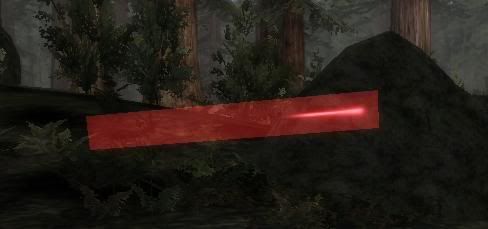
Blocky laser glow/blur [Solved]

In this forum you will find and post information regarding the modding of Star Wars Battlefront 2. DO NOT POST MOD IDEAS/REQUESTS.

Moderator: Moderators

Post Reply
AQT
Gametoast Staff
Gametoast Staff
Posts: 4910
Joined: Sat Nov 03, 2007 4:55 pm
Location: SoCal, USA

Blocky laser glow/blur [Solved]

Post by AQT »

For some reason that I can't figure out, the lasers on my map are looking like this:

Image

No custom weapons or anything here, everything is stock. Anyone know or have a clue as to what the problem might be? There was nothing in the error log that even hinted towards this. Any help would be appreciated.
User avatar
Maveritchell
Jedi Admin
Jedi Admin
Posts: 7366
Joined: Mon Aug 21, 2006 11:03 pm

Re: Blocky laser glow/blur

Post by Maveritchell »

Textures like that are usually handled through "ingame.lvl" anyway - are you using a custom ingame.lvl?
AQT
Gametoast Staff
Gametoast Staff
Posts: 4910
Joined: Sat Nov 03, 2007 4:55 pm
Location: SoCal, USA

Re: Blocky laser glow/blur

Post by AQT »

Yes, only for a custom CP icon though. I tried commenting out the line that loads the custom ingame.lvl but the lasers still appear to be blocky. So it's not a problem with the custom ingame.lvl then?
User avatar
Maveritchell
Jedi Admin
Jedi Admin
Posts: 7366
Joined: Mon Aug 21, 2006 11:03 pm

Re: Blocky laser glow/blur

Post by Maveritchell »

Just for giggles, try re-saving your laser texture and loading it through the ingame.lvl.
AQT
Gametoast Staff
Gametoast Staff
Posts: 4910
Joined: Sat Nov 03, 2007 4:55 pm
Location: SoCal, USA

Re: Blocky laser glow/blur

Post by AQT »

Well my ingame.req currently looks like this:
Hidden/Spoiler:
ucft
{
REQN
{
"model"
"com_icon_CIS"
}
}
And I'm not using any custom laser textures nor am I trying to. All the lasers look the same way as the picture not just the red ones. It's the glowing/blurred portion around the bolt that's blocky not the bolt itself.
RogueKnight
Space Ranger
Posts: 2512
Joined: Sat Nov 22, 2008 1:50 pm
Projects :: Life. Work.
Games I'm Playing :: League of Legends
xbox live or psn: No gamertag set
Location: Washington, US

Re: Blocky laser glow/blur

Post by RogueKnight »

I think I'm pointing out the obvious, but there appears to be not enough alpha layer. There has to be one, since I can see through it, but not enough of one.
AQT
Gametoast Staff
Gametoast Staff
Posts: 4910
Joined: Sat Nov 03, 2007 4:55 pm
Location: SoCal, USA

Re: Blocky laser glow/blur

Post by AQT »

Again, I haven't edited any laser textures nor have I created a custom side. The laser you see in the picture was fired by a stock Stormtrooper loaded from the shipped imp.lvl. All I did was make a map, made minor changes to the LUA, and munged a custom ingame.lvl so I can get a new CP icon to work. I suspect the problem has to do with an overload or a memory issue where the game can't render the glow/blur of the laser, which are set with _ord ODF parameters by the way (I haven't edited a single weapon ODF for this map at all) not textures/alpha layers. I thought the problem had to do with too many godrays but removing all instances of them didn't fix the problem. Did I hit a limit or something?
User avatar
Maveritchell
Jedi Admin
Jedi Admin
Posts: 7366
Joined: Mon Aug 21, 2006 11:03 pm

Re: Blocky laser glow/blur

Post by Maveritchell »

Like I said, AQT, go ahead and try re-saving your laser bolt texture (one of them, all of them, it probably won't matter) and loading them in through your custom ingame.lvl. I know you weren't doing that in the first place. I know that you didn't plan on doing that. I just want to see if that makes any changes.
FragMe!
Gametoast Staff
Gametoast Staff
Posts: 2244
Joined: Sat May 13, 2006 12:34 am
Projects :: Not sure keep changing my mind.
Games I'm Playing :: F1 and SWBF
xbox live or psn: No gamertag set
Location: Origin name GT_FragMe
Contact:

Re: Blocky laser glow/blur

Post by FragMe! »

I have experienced the same problem on various test maps but if I remember correctly it was after I fooled around with lighting as I don't believe the map wasn't using a custom ingame.lvl at the time and just checking it doesn't have a dc: ingame thing either. I was a while ago so I could be shakey memory wise.
AQT
Gametoast Staff
Gametoast Staff
Posts: 4910
Joined: Sat Nov 03, 2007 4:55 pm
Location: SoCal, USA

Re: Blocky laser glow/blur

Post by AQT »

@Mav: I just tried what you suggested and still no change unfortunately.

@Fragme!: I didn't mess around with the lighting much. The lasers were looking normal with my current lighting.

Any other ideas?
User avatar
sim-al2
2nd Lieutenant
2nd Lieutenant
Posts: 412
Joined: Mon Jul 06, 2009 10:26 pm
Projects :: Mapping on occasion
Games I'm Playing :: SWBFII + MW4 + SC4
Location: In the cockpit of some vehicle...

Re: Blocky laser glow/blur

Post by sim-al2 »

Just for fun munging the common side? I don't think anything will be any different but one can hope, eh? :roll:
FragMe!
Gametoast Staff
Gametoast Staff
Posts: 2244
Joined: Sat May 13, 2006 12:34 am
Projects :: Not sure keep changing my mind.
Games I'm Playing :: F1 and SWBF
xbox live or psn: No gamertag set
Location: Origin name GT_FragMe
Contact:

Re: Blocky laser glow/blur

Post by FragMe! »

Okay not sure of the cause yet but do have a possible solution, just tried it on a map that also has blocky lasers.

Save your modified ingame.req some where, then copy over an unedited one, open it add a space or something then resave it (this is just to get a newer save date) then munge your map.

And here is the really dumb part, normally you would have to copy the new ingame.lvl file manually to the addon directory, I didn't it is still using the same ingame.lvl that was there before. It has to be one of those wierd interaction things in VM because the only newer file is the core.lvl (obviously there is a new map .lvl)
AQT
Gametoast Staff
Gametoast Staff
Posts: 4910
Joined: Sat Nov 03, 2007 4:55 pm
Location: SoCal, USA

Re: Blocky laser glow/blur

Post by AQT »

:shock: Yay, it worked! Thank you very much, Fragme!! :D
FragMe!
Gametoast Staff
Gametoast Staff
Posts: 2244
Joined: Sat May 13, 2006 12:34 am
Projects :: Not sure keep changing my mind.
Games I'm Playing :: F1 and SWBF
xbox live or psn: No gamertag set
Location: Origin name GT_FragMe
Contact:

Re: Blocky laser glow/blur [Solved]

Post by FragMe! »

I am happy (and relieved) that it worked for you too and it wasn't just a randon fluke on my part.

Question did it allow you to keep your custom command post icon?
As well did you try just copying the commandpost odf to your maps odf folder, rename it then put in the new icon info then place that in ZE? I had done a lot of playing around with the icons (maybe too much as I can't always remember all the steps I took) and I think you may be able to get away without having to make a new ingame.lvl file.
AQT
Gametoast Staff
Gametoast Staff
Posts: 4910
Joined: Sat Nov 03, 2007 4:55 pm
Location: SoCal, USA

Re: Blocky laser glow/blur [Solved]

Post by AQT »

Yeah, I could still use the new CP icon. Like you said, I left my custom ingame.lvl where it was in the addon directory before trying your solution and there it stayed. And I was using the method where you have to replace an existing CP icon (CIS in this case) so I didn't do any of the renaming ODFs and ZE stuff. :)

FragMe!
Gametoast Staff
Gametoast Staff
Posts: 2244
Joined: Sat May 13, 2006 12:34 am
Projects :: Not sure keep changing my mind.
Games I'm Playing :: F1 and SWBF
xbox live or psn: No gamertag set
Location: Origin name GT_FragMe
Contact:

Re: Blocky laser glow/blur [Solved]

Post by FragMe! »

Yeah! Another VM quirk figured out.
Post Reply