which file do I copy? XSIZETools.py? I will try that and see if that doesnt fix the problem.
Re: XSI ZETools
Posted: Sun Jan 01, 2012 11:33 pm
by Unlucky13
The whole XSIZETools folder.
Re: XSI ZETools
Posted: Sun Jan 01, 2012 11:34 pm
by Tears2Roses
The whole folder is there. Honestly, I think softimage is telling me it dislikes line 70 in XSIZETools.py but I wish I knew why....
Re: XSI ZETools
Posted: Sun Jan 01, 2012 11:50 pm
by Cerfon Rournes
@About the msh Export.
Does the new material system mean that we would have to reassign materials to imported stock models?
Re: XSI ZETools
Posted: Mon Jan 02, 2012 1:23 am
by DarthD.U.C.K.
yes, but you when you imported them as obj you have to reassign materials anyway.
Re: XSI ZETools
Posted: Mon Jan 02, 2012 5:27 am
by Marth8880
I cannot seem to be able to see meshes in Zero Editor, other than their silhouettes against the sky in the selection box, but I can see them perfectly fine in-game. What could be causing this?
EDIT:
I'm talking with AQT about it, and we think that it *might* be cause of specular, but the thing is, only one of the models has specular enabled, so that one should be the only one that is transparent, I would think.
EDIT 2:
Nevermind, I fixed the problem!
In the material's options, the diffuse texture color channels were all set to 0 for some odd reason, but the specular channels were all set to 255! To fix it, I set the diffuse color channels all up to 255, re-exported, and BAM! Fixed! Also, what do the ambient(?) color channels do?
Re: XSI ZETools
Posted: Mon Jan 02, 2012 8:27 am
by ANDEWEGET
@Tears2Roses:
Download v 0.9.05.00b again, delete the XSIZETools folder in the Addons Directory and unzip the donwloaded version there. This error is caused by a 'new' statement(with + as) which isnt supported by python versions under 2.6. For 0.9.05.00b I replaced that so it should work after youve downloaded the new version. Remember to close XSI and then paste the addon. If it still doesnt work after youve installed the new version, go to File>Plugin Manager, then expand User Root until you se XSIZETools, go into the plugin directory and right click>Reload(or was it update?).
@Marth8880:
Good to know! I have no clue what effect they have ingame but they exist so I 'support' them.
The color options might get a re-design when I come back. Its not certain if they actually work how I use them...
Workflow would be something like:
Create model.
UV model.
Assign XSI material.
Adjust UV(if needed).
(weight/vertex colors).
If youre pleased with the result, apply a ZETools material, edit the flags etc...
Set diffuse color values to 1.0.
Export MSH.
Re: XSI ZETools
Posted: Mon Jan 02, 2012 1:10 pm
by The Nasal Abyss
Just to clarify, If I wanted to export a player model, I would envelope the mesh and edit weights. Then to export, I would choose the object and the skeleton. Correct?
EDIT: I would imagine if the ambient color were set all the way to 255 for everything lighting would not effect the abject. It would always act as if pure white light were hitting it on every vertex. It's worth it to test it out.
Re: XSI ZETools
Posted: Mon Jan 02, 2012 2:16 pm
by Tears2Roses
@ANDE
I had to re-install python to softimage, and now it works perfectly! Thank you so much!
Re: XSI ZETools
Posted: Mon Jan 02, 2012 2:33 pm
by The Nasal Abyss
Alright, I'm getting an error at the bottom of my screen that has a red bar any time that I try to export anything. It looks like this:
What am I doing wrong?
Edit: I played around with the tools a little bit and the problem seems to have something to do with objects having UV's before being brought in to XSI. If I make a simple box in XSI and apply UV's also in XSI the model exports with no problems whatsoever. If I try to export my N7 armor (as an example) which had UV's that I had done in Maya, and I follow the same exact methods, I get the above error. It's definitely a bug I guess.
EDIT 2: I played around with it even more and the model having UV's before being brought into XSI is no longer the problem. I'm having trouble exporting something that is enveloped, I guess. I'll play around with it even more and see if it's just user error. If you would be so nice as to create a mini tutorial for exporting player models with this tool properly, Ande, that would be most appreciated. Because I am having a little trouble with it right now hahaha
Re: XSI ZETools
Posted: Mon Jan 02, 2012 4:50 pm
by Cerfon Rournes
The Nasal Abyss wrote:
EDIT 2: I played around with it even more and the model having UV's before being brought into XSI is no longer the problem. I'm having trouble exporting something that is enveloped, I guess. I'll play around with it even more and see if it's just user error. If you would be so nice as to create a mini tutorial for exporting player models with this tool properly, Ande, that would be most appreciated. Because I am having a little trouble with it right now hahaha
Yes, I'm having the same problem with exporting a player model. A quick tutorial would be very helpful.
Re: XSI ZETools
Posted: Mon Jan 02, 2012 5:49 pm
by ANDEWEGET
To report errors, please click this button:
and copypaste the complete error message.
Lephenix reported this error before and I believe I fixed it. So please make sure you have the latest version(I sometimes forget to update the version in the Help dialog so ignore that version). I checked the code and I couldnt see something causing this error.
I never exported a player model, so I dont know if it works at all. I cant munge anything so I cant directly test stuff. Theoretically you just have to either branch select or just select the root, tick the branch export option and export.
Re: XSI ZETools
Posted: Mon Jan 02, 2012 6:11 pm
by Cerfon Rournes
Where is the button located? I can't seem to find it.
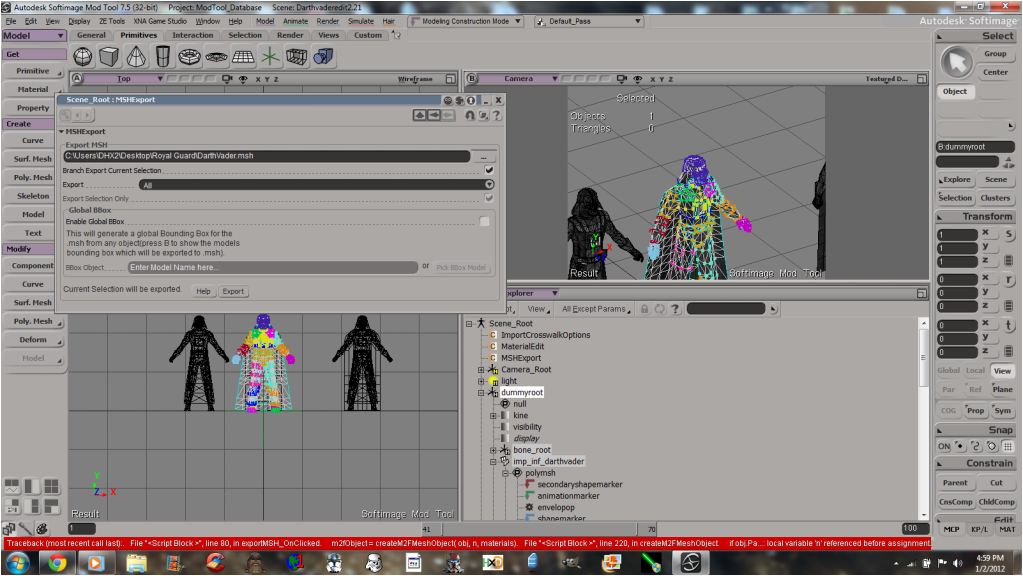
Also, here is a screen of my export.
Hidden/Spoiler:
Re: XSI ZETools
Posted: Mon Jan 02, 2012 7:32 pm
by ANDEWEGET
View>Scripting>Script Editor or alternatively Alt+4.
But as I just found out I either uploaded the wrong version or just forgot to upload the new version. Added revision 2 to the first page. This should fix this error.
Re: XSI ZETools
Posted: Mon Jan 02, 2012 7:42 pm
by Cerfon Rournes
I'll download and see if it's fixed, thanks.
EDIT
Now, It says, "Getting Model Data" for a few seconds, then goes back to the error.
Hidden/Spoiler:
[code]# ERROR : Traceback (most recent call last):
# File "<Script Block >", line 80, in exportMSH_OnClicked
# m2fObject = createM2FMeshObject( obj, n, materials)
# File "<Script Block >", line 367, in createM2FMeshObject
# weight = weight_list[n]
# IndexError: list index out of range
#
[/code]
Re: XSI ZETools
Posted: Tue Jan 03, 2012 9:32 am
by ANDEWEGET
Thats a different error though. Progressed a step. It seems I broke weight exporting when I cleaned up the code and didnt test it since then.
Uploaded revision 3.
Re: XSI ZETools
Posted: Tue Jan 03, 2012 1:23 pm
by Cerfon Rournes
That fixed it. I'll report when I get my player model ingame and working.
Re: XSI ZETools
Posted: Tue Jan 03, 2012 1:55 pm
by The Nasal Abyss
I get this error now whenever I try to export anything with weights:
Hidden/Spoiler:
[code]' ERROR : Traceback (most recent call last):
' File "<Script Block >", line 101, in exportMSH_OnClicked
' success = msh2_framework.packMSHFile( models, materials, info, True, mshPath )
' File "C:\users\A\Autodesk\Softimage_Mod_Tool_7.5\Addons\XSIZETools\Application\Plugins\msh2_framework\msh2_framework.py", line 652, in packMSHFile
' packed_meshes2 = [packMesh(mesh, meshes) for mesh in meshes]
' File "C:\users\A\Autodesk\Softimage_Mod_Tool_7.5\Addons\XSIZETools\Application\Plugins\msh2_framework\msh2_framework.py", line 516, in packMesh
' geodata = packGeometry( mesh, models )
' File "C:\users\A\Autodesk\Softimage_Mod_Tool_7.5\Addons\XSIZETools\Application\Plugins\msh2_framework\msh2_framework.py", line 411, in packGeometry
' segment = packSegment( mesh )
' File "C:\users\A\Autodesk\Softimage_Mod_Tool_7.5\Addons\XSIZETools\Application\Plugins\msh2_framework\msh2_framework.py", line 367, in packSegment
' vertdata = packListChunk( mesh, 'POSL' )
' File "C:\users\A\Autodesk\Softimage_Mod_Tool_7.5\Addons\XSIZETools\Application\Plugins\msh2_framework\msh2_framework.py", line 276, in packListChunk
' velist = [pack('<fff',ve_coord[0], ve_coord[1], ve_coord[2]) for ve_coord in vertex_list]
' TypeError: 'NoneType' object is not iterable
' - [line 100 in C:\users\Aaron\Autodesk\Softimage_Mod_Tool_7.5\Addons\XSIZETools\Resources\Logic\MSHLogic.py]
' ERROR : Property Page Script Logic Error (Python ActiveX Scripting Engine)
' ERROR : [98] progBar.Value = 0
' ERROR : [99] progBar.Caption = 'Packing and Writing MSH File...'
' ERROR : >[100] # pack and write msh file.
' ERROR : [101] success = msh2_framework.packMSHFile( models, materials, info, True, mshPath )
' ERROR : [102] progBar.Increment()
' ERROR : [103] end = datetime.now()
' ERROR : Traceback (most recent call last):
' File "<Script Block >", line 101, in exportMSH_OnClicked
' success = msh2_framework.packMSHFile( models, materials, info, True, mshPath )
' File "C:\users\A\Autodesk\Softimage_Mod_Tool_7.5\Addons\XSIZETools\Application\Plugins\msh2_framework\msh2_framework.py", line 652, in packMSHFile
' packed_meshes2 = [packMesh(mesh, meshes) for mesh in meshes]
' File "C:\users\A\Autodesk\Softimage_Mod_Tool_7.5\Addons\XSIZETools\Application\Plugins\msh2_framework\msh2_framework.py", line 516, in packMesh
' geodata = packGeometry( mesh, models )
' File "C:\users\A\Autodesk\Softimage_Mod_Tool_7.5\Addons\XSIZETools\Application\Plugins\msh2_framework\msh2_framework.py", line 411, in packGeometry
' segment = packSegment( mesh )
' File "C:\users\A\Autodesk\Softimage_Mod_Tool_7.5\Addons\XSIZETools\Application\Plugins\msh2_framework\msh2_framework.py", line 367, in packSegment
' vertdata = packListChunk( mesh, 'POSL' )
' File "C:\users\A\Autodesk\Softimage_Mod_Tool_7.5\Addons\XSIZETools\Application\Plugins\msh2_framework\msh2_framework.py", line 276, in packListChunk
' velist = [pack('<fff',ve_coord[0], ve_coord[1], ve_coord[2]) for ve_coord in vertex_list]
' TypeError: 'NoneType' object is not iterable[/code]
Re: XSI ZETools
Posted: Tue Jan 03, 2012 3:47 pm
by ANDEWEGET
Now this is special...
This says that something went wrong with fetching the vertex data.
Are you able to export non weighted models?
Are you able to export a different weighted model?
Make sure you dont have more than one cluster for weights/uvs/vertex colors.
Re: XSI ZETools
Posted: Tue Jan 03, 2012 6:34 pm
by The Nasal Abyss
ANDEWEGET wrote:Now this is special...
This says that something went wrong with fetching the vertex data.
Are you able to export non weighted models?
Are you able to export a different weighted model?
Make sure you dont have more than one cluster for weights/uvs/vertex colors.
-Yes I am able to export non-weighted models.
-I used the same exact model but only enveloped to two nulls and that also worked. But then I tried to just re-export the imported Unit template (which should work, right?) but that didn't work.
-I'm sure I don't have more than one cluster for anything.
This was my process for the model:
Hidden/Spoiler:
1. Import the armor
2. Import Unit Template
3. Re-size Armor to fit unit template
4. Freeze transforms (on armor)
5. Give the mesh a ZeTools Material
6. Envelop the mesh to bone_root (branch selected)
7. Try to export (doesn't work)
Picture of Hierarchy:
Hidden/Spoiler:
EDIT: I forgot to mention that I was using the unit template that doesn't come with ZeTools. I'm using the one that has been around forever because the unit template that comes with ZeTools has a really messed up weirdly scaled appearance and is hard to work with. Would that cause the problem?
 Also, what do the ambient(?) color channels do?