Page 1 of 1
.ter file
Posted: Fri Apr 27, 2012 8:22 pm
by Fiodis
Does anyone know the format of the .ter file? It's getting rather annoying having to switch to a laptop for all my ZE mapping since ZE won't work on my Win7 machine. I see where it references the terrain textures, but beyond that I'm not sure where height data is stored, or texture data, or colors. I know a bit of C#, and I'm getting into SharpGL, so I thought I'd see if I couldn't write some program to quickly paint textures or raise small hills by editting the .ter file directly.
Re: .ter file
Posted: Fri Apr 27, 2012 9:05 pm
by Teancum
There is no program to directly edit .ter files. It's done in concert with several other files using ZeroEdit.
Re: .ter file
Posted: Fri Apr 27, 2012 10:13 pm
by Fiodis
I know; I can't use ZE, and I want to try editing .ter files myself directly rather than going through ZE. Is that not possible because several other files must be modified as well, even if all I want to do is change terrain texture/height?
Re: .ter file
Posted: Fri Apr 27, 2012 10:29 pm
by AceMastermind
If you want to find out where certain data is stored in the *.ter file just do a 'change>save>compare' to see where the file was modified after making changes using ZeroEditor.
Re: .ter file
Posted: Sat Apr 28, 2012 6:52 am
by ANDEWEGET
Riley did some research on .ter files:
http://ande.pytalhost.eu/ter_file_format.htm
It's not very extensive but it's a start.

If you get stuck feel free to ask. I'm not very good with C# but I know my way around bytes since I wrote the .msh exporter...
Re: .ter file
Posted: Sat Apr 28, 2012 1:38 pm
by Fiodis
Thanks Ande, that was just what I needed.
Re: .ter file
Posted: Sat Apr 28, 2012 5:07 pm
by AceMastermind
Riley's table was for SWBF *.ter files but will apply to SWBF2 except this:
Code: Select all
Offset | Data Type | Size (bytes) | Description
__________________________________________________________________________________
0x0004 |    int    |      4       | 32-bit integer, unknown purpose. This appears to always be a value of 21.
for SWBF2 *.ter files this value is 22 instead of 21.
Source:
forums/viewtopic.php?p=328708#p328708
.ter file format
Posted: Fri Jun 08, 2012 4:07 pm
by Fiodis
I noticed that, but didn't pay much heed, though it confused me at first. Nice to know the rest of Riley's data is spot-on for BF2.
EDIT
I
posted a question last April about the BF2 .ter file format used by ZeroEditor, and Ande linked me to
this very useful doc. However, I'm not quite sure I understand it perfectly. What exactly is the "total grid size" Riley talks about there? When I open a freshly created .ter file, it has a value of 1024, while the visible grid co-ordinates are (-64, -64) and (64, 64). The total "length" of the two axes would then be 64+64 = 128, meaning a 128 by 128 (meter?) map, with an area of 128^2 = 16384 square meters, right?
But then why is the total grid size 1024?
Re: .ter file
Posted: Fri Jun 08, 2012 4:26 pm
by minilogoguy18
How is it that zeroeditor doesn't work for you but I'm on win7 x64 and it works just fine for me?
Re: .ter file
Posted: Fri Jun 08, 2012 4:29 pm
by Marth8880
It all depends on the hardware your machine is running.
Re: .ter file
Posted: Fri Jun 08, 2012 4:49 pm
by Fiodis
minilogoguy18 wrote:How is it that zeroeditor doesn't work for you but I'm on win7 x64 and it works just fine for me?
I wish I knew.

I've been getting that dreaded runtime error since I got a fresh install of Win7 some three or four years ago.
Re: .ter file
Posted: Fri Jun 08, 2012 5:40 pm
by ANDEWEGET
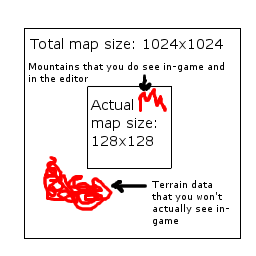
Every terrain has a total map size units(which are pretty much metres)) defined at offset 0x00B0. This by default is 1024. In the editor/in game you only see the region defined by the visible grid coordinates(0x0008).
You could think of the visible grid coords as the uv coordinates for the map. The total grid size would be the texture.
The total grid size is larger than the visible grid coords so you could shift/enlarge the visible part of the terrain.
If I was at home Id draw a pic but Im in france now...
To maximize performance youd only render the parts in the visible grid region. 1024x1024 are quite a lot of verts.
Re: .ter file
Posted: Fri Jun 08, 2012 6:12 pm
by minilogoguy18
Why not just try to reinstall the mod tools running the .exe in winxp compatibility mode?
Re: .ter file
Posted: Sat Jun 09, 2012 2:03 am
by lucasfart
minilogoguy18 wrote:Why not just try to reinstall the mod tools running the .exe in winxp compatibility mode?
The whole unworking ZE thing has been going on for years now. I don't know if you've seen
THIS thread before, but I'm pretty sure he would have tried something along those lines.

Marth8880 wrote:It all depends on the hardware your machine is running.
I also have the ZE problem, and I can tell you now it's not just a hardware problem. I had windows xp installed on this computer and ZE worked fine, albeit with the 3dAnalyze fix, and after updating to win 7 ultimate 64bit, it doesn't work. At all.
But we're getting offtopic now. Back to terrain files.
Re: .ter file
Posted: Sat Jun 09, 2012 12:51 pm
by Fiodis
lucasfart wrote:The whole unworking ZE thing has been going on for years now. I don't know if you've seen
THIS thread before, but I'm pretty sure he would have tried something along those lines.
But we're getting offtopic now. Back to terrain files.
Thanks, and yes, I've tried basically everything in that thread. The only way I can use ZE, as mentioned in the first post, is on my laptop, which is awkward and buggy as hell.
ANDEWEGET wrote:If I was at home Id draw a pic but Im in france now...
Let me see if I've got it right...
All the data for all those extra vertices outside what you see in the editor and in-game is part of the height blocks, and water blocks and texture blocks and everything? So the terrain file is some four thousand times larger than it needs to be? Why would there be all that wasted filesize?
Re: .ter file
Posted: Sat Jun 09, 2012 1:30 pm
by ANDEWEGET
Yeah, thats right. The invisible data wont be munged so only the source is larger. Creating an algorithm which adds additional data to the file if the mapper wants a larger map is quite time consuming. Just adding a few megabytes to the source which is already many many gigs large isnt a big problem.
Re: .ter file
Posted: Sat Jun 09, 2012 3:36 pm
by Teancum
I'm a little late to the party, but I wanted to post this here as it'll be useful in future topics: