
Ding. Give him a prize.lucasfart wrote:So this problem ONLY happens after you load your map, not when you start ZE?
Problem with ZeroEditor
Moderator: Moderators
-
darthtyren

- Chief Warrant Officer

- Posts: 345
- Joined: Mon Dec 29, 2008 3:41 pm
- Projects :: RotS [Media section for details]
- Location: C:\BF2_ModTools\data_DEN
- Contact:
Re: Problem with ZeroEditor
-
lucasfart

- Sith

- Posts: 1440
- Joined: Tue Feb 24, 2009 5:32 am
- Projects :: No Mod project currently.
- xbox live or psn: No gamertag set
- Location: Australia
Re: Problem with ZeroEditor
Hey, i was just checking 
-
linksith

- Command Sergeant Major

- Posts: 284
- Joined: Mon Jul 12, 2010 12:19 pm
- Projects :: Waaay too many projects
- xbox live or psn: me has no xbox
- Location: looking for a wifi connection
Re: Problem with ZeroEditor
So just to get this straight, it starts acting wierd AFTER you load your map into the editor, this has never happened before in the past, and it only happens on this map? Hmmmmmmmm. What did you add to your map or change in an LUA before this started happening?
-
MercuryNoodles
- Jedi

- Posts: 1003
- Joined: Sun Mar 12, 2006 7:16 pm
- Projects :: Space - Boarding Action
- xbox live or psn: No gamertag set
Re: Problem with ZeroEditor
The lua would have nothing to do with that. Whatever the problem is, it stems from the hardware having trouble rendering the scene and the editor. The tearing/spiking is a clear indication of a problem, along with the fact that the treetops and foliage are also not being rendered.
Come to think of it, it may be the editor's view distance, coupled with the thick vegetation. From what I see, there is a lot of foliage everywhere, along with trees, and other objects. Try clicking the minimum view distance preset button the next time you load the map, and see what happens. There's a chance making the editor render less could clear up the problem.
Come to think of it, it may be the editor's view distance, coupled with the thick vegetation. From what I see, there is a lot of foliage everywhere, along with trees, and other objects. Try clicking the minimum view distance preset button the next time you load the map, and see what happens. There's a chance making the editor render less could clear up the problem.
-
darthtyren
- Chief Warrant Officer
- Posts: 345
- Joined: Mon Dec 29, 2008 3:41 pm
- Projects :: RotS [Media section for details]
- Location: C:\BF2_ModTools\data_DEN
- Contact:
Re: Problem with ZeroEditor
Rocks.linksith wrote:What did you add to your map before this started happening?
Huh?MercuryNoodles wrote:Come to think of it, it may be the editor's view distance, coupled with the thick vegetation. From what I see, there is a lot of foliage everywhere, along with trees, and other objects. Try clicking the minimum view distance preset button the next time you load the map, and see what happens. There's a chance making the editor render less could clear up the problem.
-
MercuryNoodles
- Jedi
- Posts: 1003
- Joined: Sun Mar 12, 2006 7:16 pm
- Projects :: Space - Boarding Action
- xbox live or psn: No gamertag set
Re: Problem with ZeroEditor
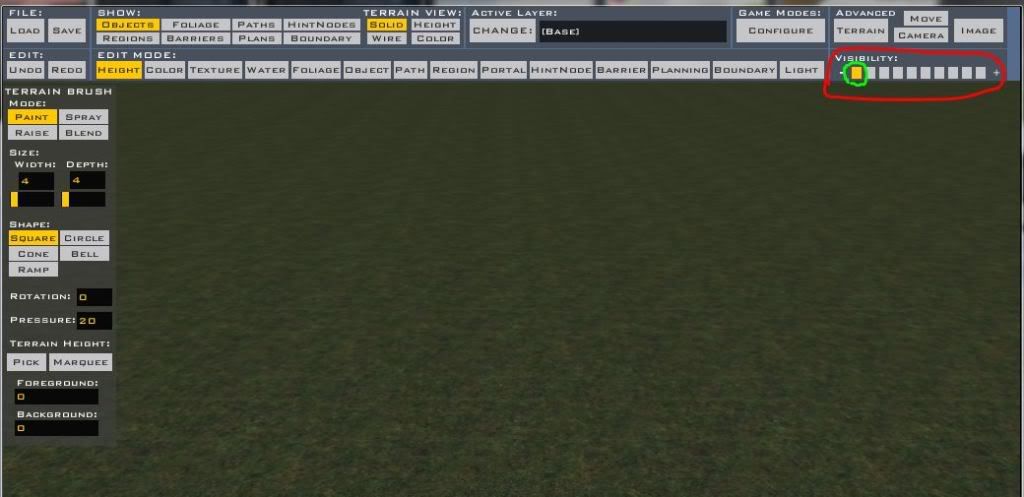
The small buttons (mouse cursor size) on the lower right portion of the main toolbar, it's the one farthest to the left. The group of buttons is normally labelled "Visibility".
-
linksith
- Command Sergeant Major
- Posts: 284
- Joined: Mon Jul 12, 2010 12:19 pm
- Projects :: Waaay too many projects
- xbox live or psn: me has no xbox
- Location: looking for a wifi connection
Re: Problem with ZeroEditor
Here is a picture to help you know what he is talking about.
Hidden/Spoiler:
-
darthtyren
- Chief Warrant Officer
- Posts: 345
- Joined: Mon Dec 29, 2008 3:41 pm
- Projects :: RotS [Media section for details]
- Location: C:\BF2_ModTools\data_DEN
- Contact:
Re: Problem with ZeroEditor
Well that doesn't help.
-
linksith
- Command Sergeant Major
- Posts: 284
- Joined: Mon Jul 12, 2010 12:19 pm
- Projects :: Waaay too many projects
- xbox live or psn: me has no xbox
- Location: looking for a wifi connection
Re: Problem with ZeroEditor
Just a thought that could have little or no effect. Try removing the rocks. If this doesn't work then try the following: create a new world, open your world, hit ctrl+s, go to the new world and save your world there, copy your odf and msh files to the new world and anything else that is necessary.
EDIT: another thought, try doing a clean (that may and may not have any effect).
EDIT: another thought, try doing a clean (that may and may not have any effect).
-
darthtyren
- Chief Warrant Officer
- Posts: 345
- Joined: Mon Dec 29, 2008 3:41 pm
- Projects :: RotS [Media section for details]
- Location: C:\BF2_ModTools\data_DEN
- Contact:
Re: Problem with ZeroEditor
Tried it. Didn't work.linksith wrote:Just a thought that could have little or no effect. Try removing the rocks. If this doesn't work then try the following: create a new world, open your world, hit ctrl+s, go to the new world and save your world there, copy your odf and msh files to the new world and anything else that is necessary.
I'll try that. But should I do a manual clean, or the Munge clean?linksith wrote:EDIT: another thought, try doing a clean (that may and may not have any effect).
-
linksith
- Command Sergeant Major
- Posts: 284
- Joined: Mon Jul 12, 2010 12:19 pm
- Projects :: Waaay too many projects
- xbox live or psn: me has no xbox
- Location: looking for a wifi connection
Re: Problem with ZeroEditor
I would do the munge clean first and then the manual clean.
-
darthtyren
- Chief Warrant Officer
- Posts: 345
- Joined: Mon Dec 29, 2008 3:41 pm
- Projects :: RotS [Media section for details]
- Location: C:\BF2_ModTools\data_DEN
- Contact:
Re: Problem with ZeroEditor
DIdn't work.
-
linksith
- Command Sergeant Major
- Posts: 284
- Joined: Mon Jul 12, 2010 12:19 pm
- Projects :: Waaay too many projects
- xbox live or psn: me has no xbox
- Location: looking for a wifi connection
Re: Problem with ZeroEditor
Well, the last thing I can probably say is make a new world like I said before.
-
darthtyren
- Chief Warrant Officer
- Posts: 345
- Joined: Mon Dec 29, 2008 3:41 pm
- Projects :: RotS [Media section for details]
- Location: C:\BF2_ModTools\data_DEN
- Contact:
Re: Problem with ZeroEditor
Fine. Goodbye, WIP.
-
linksith
- Command Sergeant Major
- Posts: 284
- Joined: Mon Jul 12, 2010 12:19 pm
- Projects :: Waaay too many projects
- xbox live or psn: me has no xbox
- Location: looking for a wifi connection
Re: Problem with ZeroEditor
What is WIP anyway?
EDIT: Just to make sure, you may want to keep the original world folder just in case the ultimate fix to your problem gets found.
EDIT: Just to make sure, you may want to keep the original world folder just in case the ultimate fix to your problem gets found.
-
darthtyren
- Chief Warrant Officer
- Posts: 345
- Joined: Mon Dec 29, 2008 3:41 pm
- Projects :: RotS [Media section for details]
- Location: C:\BF2_ModTools\data_DEN
- Contact:
Re: Problem with ZeroEditor
Too late.
And WIP stands for Work-In-Progress.
And WIP stands for Work-In-Progress.
-
lucasfart
- Sith
- Posts: 1440
- Joined: Tue Feb 24, 2009 5:32 am
- Projects :: No Mod project currently.
- xbox live or psn: No gamertag set
- Location: Australia
Re: Problem with ZeroEditor
Are you saying you've totally deleted your map?!?
This could probably be fixed, you know, if you kept trying new things to fix it...
This could probably be fixed, you know, if you kept trying new things to fix it...
-
MercuryNoodles
- Jedi
- Posts: 1003
- Joined: Sun Mar 12, 2006 7:16 pm
- Projects :: Space - Boarding Action
- xbox live or psn: No gamertag set
Re: Problem with ZeroEditor
A clean won't change what's in the editor. That had nothing to do with the problem.
My other suggestion, which I should've posted first, would've been to remove the foliage. Even the richest stock maps don't have more than a patch here and a patch there. It's even mentioned in the docs that they used placeholders for at least one type to reduce the problems with it while in the editor. Unfortunately, removing foliage would've meant blindly navigating the menus to remove all foliage (since it'd be easier to erase everything), because apparently foliage placement data is part of the terrain file. Otherwise, you would have needed to redo the terrain.
My other suggestion, which I should've posted first, would've been to remove the foliage. Even the richest stock maps don't have more than a patch here and a patch there. It's even mentioned in the docs that they used placeholders for at least one type to reduce the problems with it while in the editor. Unfortunately, removing foliage would've meant blindly navigating the menus to remove all foliage (since it'd be easier to erase everything), because apparently foliage placement data is part of the terrain file. Otherwise, you would have needed to redo the terrain.
-
darthtyren
- Chief Warrant Officer
- Posts: 345
- Joined: Mon Dec 29, 2008 3:41 pm
- Projects :: RotS [Media section for details]
- Location: C:\BF2_ModTools\data_DEN
- Contact:
Re: Problem with ZeroEditor
I knew this.
-
501st_commander
- Master Bounty Hunter

- Posts: 1570
- Joined: Wed Dec 10, 2008 7:48 pm
Re: Problem with ZeroEditor
If the problem is Only after you load a map then (maybe) the memory resorses are low. Try closing all un-needed programs before loading the map.