
Exporting JKA models to .obj files with noesis ? [Solved]

In this forum you will find and post information regarding the modding of Star Wars Battlefront 2. DO NOT POST MOD IDEAS/REQUESTS.

Moderator: Moderators

Post Reply
Indytotof
Chief Warrant Officer
Posts: 348
Joined: Fri Jun 06, 2014 6:58 am
Projects :: SWBF2 Sides Overhaul Mod
Games I'm Playing :: Battlefront 2
xbox live or psn: No gamertag set
Location: Senlis, France

Exporting JKA models to .obj files with noesis ? [Solved]

Post by Indytotof »

Hello modders and mappers, here is Indytotof.

I'm here to know how to correctly exporting .glm files to .obj files.

For the information, I use noesis for that matter.

Here is a little screen:
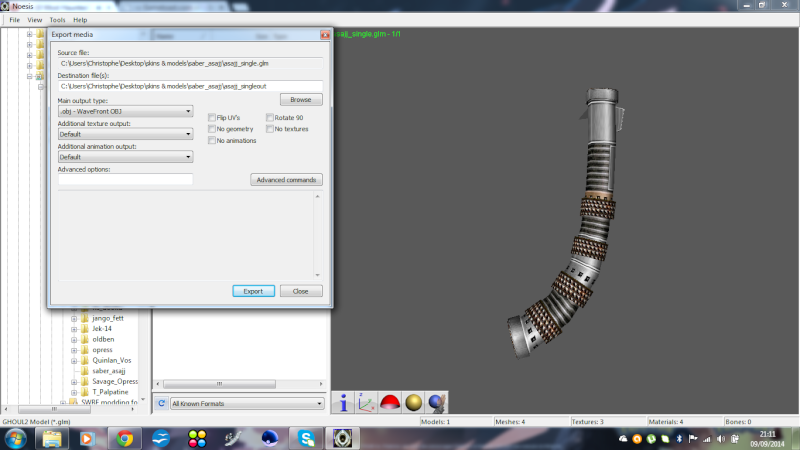
Image (yes it's Asajj Ventress' lightsaber model).

What did I have to do next ? What I have to check ?

Thanks a lot.
Last edited by Indytotof on Sat Sep 20, 2014 5:10 am, edited 1 time in total.
User avatar
commanderawesome
Field Commander
Field Commander
Posts: 971
Joined: Tue Aug 13, 2013 11:58 pm
Projects :: Skin Changer - Warfront - Other stuff
Games I'm Playing :: SWBF SWTOR KotOR EaW
xbox live or psn: AaTc_CmdrAwesome
Location: The Universe

Re: Exporting JKA models to .obj files with noesis ?

Post by commanderawesome »

I'm fairly certain there is already an Asajj Ventress saber hilt released. You might want to look around for one first.
User avatar
Anakin
Master of the Force
Master of the Force
Posts: 4817
Joined: Sat Sep 19, 2009 11:37 am
Projects :: RC Side Mod - Remastered - SWBF3 Legacy
Location: Mos Espa (germany)

Re: Exporting JKA models to .obj files with noesis ?

Post by Anakin »

Why don't you click export and see what happens??

One tipp you may try to select flip uvs because the last time i ported an jka model i need to mirrow all uvs manuel. Or you can also mirro the tga files.
Last edited by Anakin on Wed Sep 10, 2014 3:37 am, edited 1 time in total.
Indytotof
Chief Warrant Officer
Posts: 348
Joined: Fri Jun 06, 2014 6:58 am
Projects :: SWBF2 Sides Overhaul Mod
Games I'm Playing :: Battlefront 2
xbox live or psn: No gamertag set
Location: Senlis, France

Re: Exporting JKA models to .obj files with noesis ?

Post by Indytotof »

There is a way, with noesis, to make .obj files appears already textured on XSI ?

Thanks for the advice btw.
User avatar
Anakin
Master of the Force
Master of the Force
Posts: 4817
Joined: Sat Sep 19, 2009 11:37 am
Projects :: RC Side Mod - Remastered - SWBF3 Legacy
Location: Mos Espa (germany)

Re: Exporting JKA models to .obj files with noesis ?

Post by Anakin »

Just export it. Maybe you need to readd the texture, but the uvings are already there. So you just need to select the parts belong to one tga file, and select this file. If there is only one tga filw it is really easy
MileHighGuy
Jedi
Jedi
Posts: 1194
Joined: Fri Dec 19, 2008 7:58 pm

Re: Exporting JKA models to .obj files with noesis ?

Post by MileHighGuy »

From the 3D Modeling forum
AceMastermind wrote:When you export an *.obj from Noesis you can opt for an *.mtl file also by typing -objmtl into the Advanced options line. This will prevent you from having to browse to textures and reassign them on import in other software.

From the Advanced Commands menu:
WaveFront OBJ
-objmtl - enables export of mtl file with the obj.
User avatar
Anakin
Master of the Force
Master of the Force
Posts: 4817
Joined: Sat Sep 19, 2009 11:37 am
Projects :: RC Side Mod - Remastered - SWBF3 Legacy
Location: Mos Espa (germany)

Re: Exporting JKA models to .obj files with noesis ?

Post by Anakin »

mh and i selected all single polygon for the textures and selected them :/
Indytotof
Chief Warrant Officer
Posts: 348
Joined: Fri Jun 06, 2014 6:58 am
Projects :: SWBF2 Sides Overhaul Mod
Games I'm Playing :: Battlefront 2
xbox live or psn: No gamertag set
Location: Senlis, France

Re: Exporting JKA models to .obj files with noesis ?

Post by Indytotof »

Well, since XSI didn't want to work for me (tested with all the version compatible with the Pandemic Tool), what program do you suggest me to export .obj files into .msh files ?

Thanks for the help btw, I will certainly do this. So I will have .mtl files to do that ?

Did I have to say that the textures are .tga files on the "Additionnal textures outpout" line ?

EDIT : For the ones that is interested, here is the pack that I want to be exported for my mod: viewtopic.php?f=25&p=508929#p508929

Thanks a lot.
Post Reply
