Page 1 of 1
Model Textures appear skewed/distorted only in game [solved]
Posted: Tue Jul 06, 2010 3:43 am
by Food_Eater
Hey, it's me again. I've encountered
yet another issue with custom models. This time, some textures on my model appear very messed up only in-game but nowhere else. I've had this problem on a few models, but I've managed to fix it on all of them except this large hangar model.
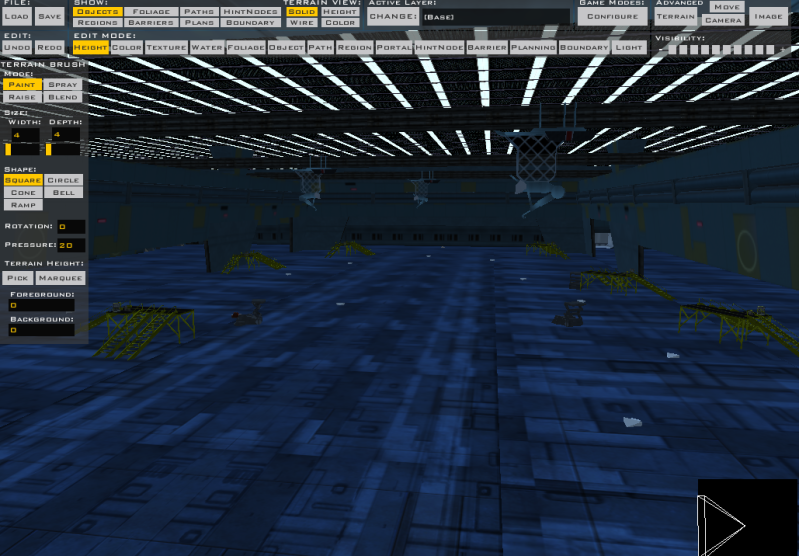
How it looks in SketchUp, Blender, XSI, the wookie Mesh Viewer, and ZeroEditor:
As you can see, the textures are all lined up perfectly with the model. Note the ceiling.
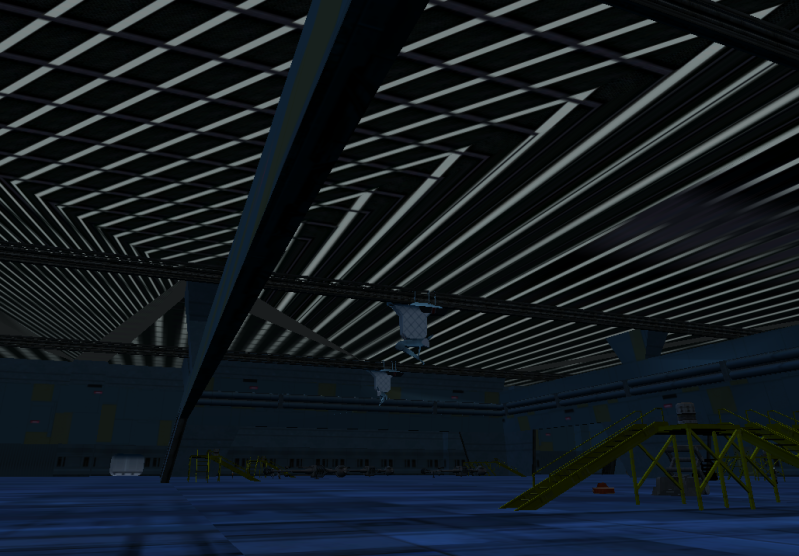
How the ceiling looks in-game:
Pretty bad, eh? A couple other textures are like this, but the ceiling is the most annoying one.
I've tried a few different things to fix the ceiling with no luck. I rebuilt the ceiling and reapplied the texture. I chose
not to merge polymeshes in XSI (which fixed the problem on my other models) but it didn't work here. It doesn't make a difference if I merge polymeshes here or not, the problem persists.
I'm stumped, any ideas?
Re: Model Textures appear VERY skewed/distorted only in game
Posted: Tue Jul 06, 2010 4:50 am
by DarthD.U.C.K.
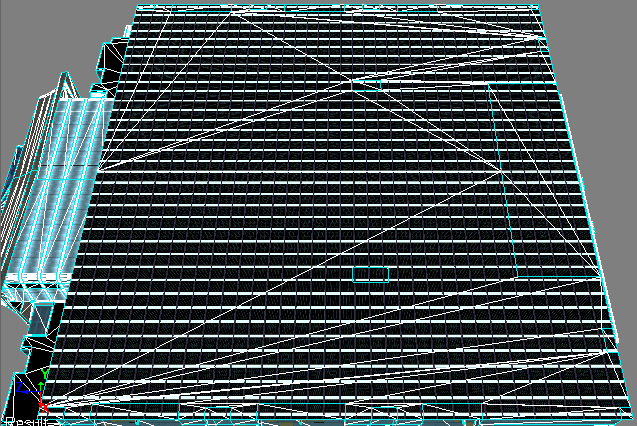
can you post an image of the textured ceiling in xsi with wireframe overlay?
Re: Model Textures appear VERY skewed/distorted only in game
Posted: Tue Jul 06, 2010 6:30 am
by Food_Eater
Dunno how to get a wireframe overlay while displaying textures, so I just selected the whole mesh so the wireframe is visible.
Re: Model Textures appear VERY skewed/distorted only in game
Posted: Tue Jul 06, 2010 6:48 am
by DarthD.U.C.K.
argh! >.<
the texturebug is cause by the ackward polyflow, im pretts shure (no offence, its sketchups fault)
i would make a simple plane as big as the ceiling (without any cuts and so on), texture it just as the ceiling, and replace the old ceiling with it
Re: Model Textures appear VERY skewed/distorted only in game
Posted: Tue Jul 06, 2010 8:19 am
by Food_Eater
I had done that before, but this time I put the new ceiling just slightly above the walls so the walls don't "cut" it. The result is that the texture is now projected evenly in-game, but it's still stretched out really long/
Anyway, this is nearly solved. I think maybe the ceiling is still too close or something (it looks that way in XSI). I figure it out later today.
Re: Model Textures appear VERY skewed/distorted only in game
Posted: Tue Jul 06, 2010 8:20 am
by mswf
Well, if the texture is way too stretched, edit the UV's so that the texture starts forming tiles, that's not a big deal for the thing you're trying to achieve and for games.
Re: Model Textures appear VERY skewed/distorted only in game
Posted: Tue Jul 06, 2010 9:10 am
by Maveritchell
If you post a picture of your UV layout I can know for sure, but I don't believe it's caused by awkward polyflow. One thing that VisualMunge likes to do (and only VM, so you won't see it in any viewer that views the .msh file directly - like ZE or SWBFViewer) is skew textures if they're too far off of the origin in the UV layout. The easiest thing to do is to try to reposition your UV map for the ceiling so that it isn't located in the -X,-Y quadrant (or close to it) in your UV editor. If that doesn't work, you can either reduce the amount of tiling your ceiling texture uses or you can, like mswf suggested, subdivide your ceiling evenly and manually reduce the size of your tiles (by overlaying them on each other).
Re: Model Textures appear VERY skewed/distorted only in game
Posted: Tue Jul 06, 2010 10:45 am
by Commander_Fett
Maveritchell wrote:If you post a picture of your UV layout I can know for sure, but I don't believe it's caused by awkward polyflow. One thing that VisualMunge likes to do (and only VM, so you won't see it in any viewer that views the .msh file directly - like ZE or SWBFViewer) is skew textures if they're too far off of the origin in the UV layout. The easiest thing to do is to try to reposition your UV map for the ceiling so that it isn't located in the -X,-Y quadrant (or close to it) in your UV editor. If that doesn't work, you can either reduce the amount of tiling your ceiling texture uses or you can, like mswf suggested, subdivide your ceiling evenly and manually reduce the size of your tiles (by overlaying them on each other).
Ah, the infamous stretching bug. This one has plagued me for a while. I'm pretty sure mav is right on this one, because I've experienced the texture bug many times, and it seems it's more likely to happen on larger models with more tiling. Sketchup tends to center polies on the uv layout instead of going up and to the right, so if you have a really big poly it will extend far into the -x and -y coordinates.
Re: Model Textures appear VERY skewed/distorted only in game
Posted: Tue Jul 06, 2010 10:45 am
by FragMe!
Yes having done one too many sketchup to xsi imports (one actually but that was enough) for someone, did spend a lot of time going back and fixing up wierd polies.
What you could try in xsi is selecting all the polies that make up the roof and then quadrangulate them (found in modify polymesh menus, can't remember entire menu structure right now.) That may help to fix it up, remember to Freeze model after you do it though.
Re: Model Textures appear VERY skewed/distorted only in game
Posted: Wed Jul 07, 2010 3:29 am
by Food_Eater
I spent quite some time looking for the UV Editor. I never found something with precisely that name. But I did find plenty of settings to reposition the texture. Nothing where I can edit X and Y-type coordinates though. What I did was I changed the ceiling's polymesh's Translation from 0 to 1 on U, V, and W. That made the texture look really large, but the dimensions were proportional. I messed with the scaling a bunch, but nothing showed up right in game, it would always be elongated in some form.
Quadrangulating didn't do anything special.
So I took the painful route and divided up the ceiling mesh into smaller, equally-sized pieces. Now some pieces are perfect, but others aren't.
So yeah, I guess it's back to finding the "UV Editor." It must be called something different. It's not showing up on XSI's help topics or when I google it. (This is kinda why I don't use XSI for modeling - I can never find the help topics I'm looking for)
Re: Model Textures appear VERY skewed/distorted only in game
Posted: Wed Jul 07, 2010 4:41 am
by DarthD.U.C.K.
search for "texture editor" or simply press ALT+7
Re: Model Textures appear VERY skewed/distorted only in game
Posted: Wed Jul 07, 2010 9:03 am
by FragMe!
You mentioned quadrangulate didn't do anything special, do you mean visually in XSI or when you exported it? What quadrangulate may do is "force" the the UV pattern to adhere more to what XSI and the exporter can handle. (It is sort of along the lines of doing and obj export within xsi then reimporting that right back in, it seems to fix some bad UV bits)
Re: Model Textures appear VERY skewed/distorted only in game
Posted: Wed Jul 07, 2010 3:52 pm
by Jaspo
Ah, yes, the stretching glitch. mswf and Mav are in complete agreement as to the cause and probable solution to the problem, because if you look in the later posts of the blender modeling FAQ, mswf wrote about the same thing as:
The easiest thing to do is to try to reposition your UV map for the ceiling so that it isn't located in the -X,-Y quadrant (or close to it) in your UV editor.
so, even though I haven't yet put this fix into practice myself, I would definitely recommend following their advice.
And, speaking of (large) hangars with stretch glitches, take a closer look at my (large) ATAT hangar on Jade Moon. In various places, including on the roof, the texture is streched quite awkwardly, and not because I mapped it that way. Definitely a size/tiling related glitch; almost all of the large texture jobs on the skyscraper exteriors of Taris: Sky High are screwed up, whereas only one place in my entire Star Destroyer map has this glitch, and there is a LOT of uv mapping in that map.
One other thing that may or may not help is to make that specific part of the model a seperate object. This fixed a stretching glitch for me on the ramp of Taris: Spiral Stair. I had to detach the ramp from the exterior.
Re: Model Textures appear VERY skewed/distorted only in game
Posted: Thu Jul 08, 2010 4:57 am
by Food_Eater
Dunno why, but everything fixed itself. To make the model simpler, I was un-cutting up the ceiling and the messed-up parts in SketchUp (and I was about to follow through with Maveritchell's instructions anyway...) and when I re-exported through XSI and into SWBF2, I tested it out just for kicks and everything's fine now.
I think I was fooling around in SketchUp and right clicked to "Make Texture Unique" on everything that was messed up, but then I replaced the unique textures with the original ones.
Sorry for the hassle, thanks for the feedback, I'll keep all the advice in this topic in mind if/when this happens again.