Page 64 of 76
Posted: Fri Sep 01, 2006 5:12 pm
by Hebes24
I don't know, make a selection area, copy, open up another texture, paste???? (maybe?????) I am not a skinner, you should ask Dragon93 How he did it. (via PM)
Posted: Fri Sep 01, 2006 6:40 pm
by [SBF]ATATFIGHTR
Dabrowski wrote:[SBF]ATATFIGHTR wrote:Nice Scout Trooper!
Hey I have a custom smilie.....

~ATAT~
lol, you forgot to make the smiley's background invisible. You can tell by the color does not match the post bacground color on your post.
Yah I know. How do I get it to match the background?
~ATAT~
Posted: Fri Sep 01, 2006 8:27 pm
by Penguin
make the bavkgorund transparent and save the image as a .png
Posted: Sat Sep 02, 2006 5:19 am
by Dragon93
ֱֱֱֱֱֱֱֱֱֱֱֱֱֱֱֱֱֱֱֱֱֱֱֱֱֱֱֱֱֱֱֱֱֱֱֱֱֱֱֱֱֱֱֱֱֱֱֱֱֱֱֱֱֱֱֱֱֱֱֱֱֱֱֱֱֱֱֱֱֱֱֱֱֱֱֱֱֱֱֱֱֱֱֱֱֱֱֱֱֱֱֱֱֱֱֱֱֱֱֱֱֱֱֱֱֱֱֱֱֱֱֱֱֱֱֱֱֱֱֱֱֱֱֱֱֱֱֱֱֱֱֱֱֱֱֱֱֱֱֱֱֱֱֱֱֱֱֱֱֱֱֱֱֱֱֱֱֱֱֱֱֱֱֱֱֱֱ
This is a tutorial i just found on making an image transparent:
1. Open your image in the gimp.
2. Right click the image and go to LAYERS then ADD ALPHA CHANNEL. You won't notice anything happening, but don't be concerned. It basically adds a transparent layer at the bottom of your image so when we erase the colors.....it's shows the transparent layer. Which of course would show whatever was under it on the screen.
3. Right click on the image again and go to SELECT and then down to BY COLOR. A window that is all black opens up. Don't change any of the settings....just use the defaults for now.
4. Now click on the color in the image you want to be transparent. These colors will now show up outlined.
5. Right click on the image again and go to EDIT and then down to CLEAR. This should now erase the outlined color you just picked from the image and the "transparent gimp checkerbox" should show through. This is the Gimps way of showing you that section is now transparent.
6. Right click on the image and choose SAVE AS and make sure to save as a GIF file if you want the transparency to work on the web.
This is something i did using the tutorial, i made a path around the SBD and made a selection, then inverted the selection so i had the rest of the picture selected instead and then deleted it, i saved it as a PNG.
 ֱֱֱֱֱֱֱֱֱֱֱֱֱֱֱֱֱֱֱֱֱֱֱֱֱֱֱֱֱֱֱֱֱֱֱֱֱֱֱֱֱֱֱֱֱֱֱֱֱֱֱֱֱֱֱֱֱֱֱֱֱֱֱֱֱֱֱֱֱֱֱֱֱֱֱֱֱֱֱֱֱֱֱֱֱֱֱֱֱֱֱֱֱֱֱֱֱֱֱֱֱֱֱֱֱֱֱֱֱֱֱֱֱֱֱֱֱֱֱֱֱֱֱֱֱֱֱֱֱֱֱֱֱֱֱֱֱֱֱֱֱֱֱֱֱֱֱֱֱֱֱֱֱֱֱֱֱֱֱֱֱֱֱֱֱֱֱ
- Dragon93
ֱֱֱֱֱֱֱֱֱֱֱֱֱֱֱֱֱֱֱֱֱֱֱֱֱֱֱֱֱֱֱֱֱֱֱֱֱֱֱֱֱֱֱֱֱֱֱֱֱֱֱֱֱֱֱֱֱֱֱֱֱֱֱֱֱֱֱֱֱֱֱֱֱֱֱֱֱֱֱֱֱֱֱֱֱֱֱֱֱֱֱֱֱֱֱֱֱֱֱֱֱֱֱֱֱֱֱֱֱֱֱֱֱֱֱֱֱֱֱֱֱֱֱֱֱֱֱֱֱֱֱֱֱֱֱֱֱֱֱֱֱֱֱֱֱֱֱֱֱֱֱֱֱֱֱֱֱֱֱֱֱֱֱֱֱֱֱ
- Dragon93
Posted: Sat Sep 02, 2006 1:40 pm
by Dabrowski
or if you have photoshop, delete the color so its a clear background. Click
Save for Web... , change image to save as
.gif or
.png, tick
transperancy, and you got it.
Dragon93, intresting skin using your method.

darthpingu wrote:The blue bits on the sniper on page 83, it has some texture from the ep3trooper tga.
How do one copy a texture like that.
He either (a) Made that part himself or (b) made a selection, copied, pasted onto another image. ANd cut out the blue parts that extended out of the region desired.
Posted: Sat Sep 02, 2006 3:35 pm
by [SBF]ATATFIGHTR
How is this....

Edit: Oops I did it wrong.
Posted: Sat Sep 02, 2006 3:43 pm
by Hebes24
LOL!! I guess you did!
No offence, it's just that it went from sort of blending in, to crazy bright green!!!
Posted: Sat Sep 02, 2006 3:57 pm
by [SBF]ATATFIGHTR
Yah I know what it a good program to us? It used PhotoStudio
Posted: Sun Sep 03, 2006 1:41 am
by Bac-Talan
Here's some more work on my skin I posted earlier. (sorry about the imageshack, my photobucket account is being stubborn right now, something about my Firewall/Anti-Virus)
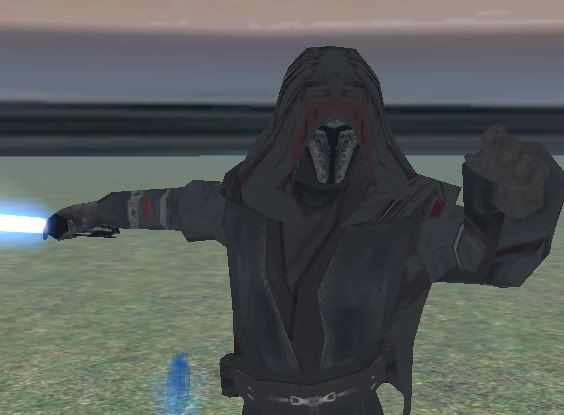
On reflection, I really like the upper body, it's almost done and I only have a few final touches on it.
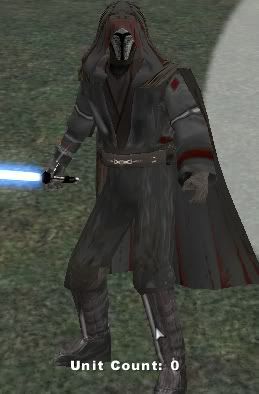
This is the whole skin, the legs need work, but the Anakin model is odd about how it does them, not too much I can doo.
Also, when this is finally released in a map, it will have (hopefully) a really cool and unique weapon/style. (but don't count on it, the person who would be able to make it so hasn't gotten back to me yet.)
One other pics, bottom is most recent:
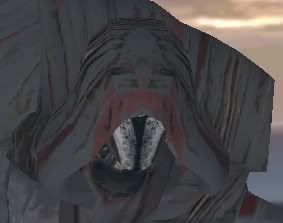
(I've fixed the neck now.)
And I'm still waiting on the special weapon!
Posted: Sun Sep 03, 2006 3:14 am
by Syth
cool, maybe darken it up a bit though. And he (or it) really looks like a sith (bluelight sabre??)
EDIT: [SBF]ATATFIGHTR try Autocrop image under the "image" section.
Posted: Sun Sep 03, 2006 12:28 pm
by [SBF]ATATFIGHTR
What image section?
Posted: Sun Sep 03, 2006 1:22 pm
by Aksel3
Your skin looks great
Bac-Talan! Unfortunately, there's the robotic arm which looks a little... Umh... Wierd.

Other than that it looks awesome! Keep it up!
Posted: Sun Sep 03, 2006 1:58 pm
by Bac-Talan
The robotic arm is coming along just fine, I don't think it's that much of a problem. (In fact, I'd like both arms to be like that, but oh well.
(Oh, and btw.

)
Once you have the checkerboxes in gimp, make sure to save as .gif
Posted: Sun Sep 03, 2006 2:51 pm
by Rekubot
That actually reminds me of the Jedi who yelled "Prepare to board!" in the Clone Wars cartoons at the second battle of Coruscant. I've forgotten his name
. If you were to make the helmet the right colour it would look like him before he took off his cloak.
Posted: Sun Sep 03, 2006 4:08 pm
by darthtrogsasea
hey bac-talian howd you make yur own smilley
i know gif like 20X20 pix rigth and how do make it a smilley cuz now i justawana have my own smilley
Posted: Sun Sep 03, 2006 4:31 pm
by Dohnutt
darthtrogsasea wrote:hey bac-talian howd you make yur own smilley
i know gif like 20X20 pix rigth and how do make it a smilley cuz now i justawana have my own smilley
Well, as you already said.... Make a 20x20 .GIF picture, and draw a picture of someone/something on it. Then upload it to a image-hosting site...
Posted: Mon Sep 04, 2006 11:49 am
by darthpingu
Dunno if that worked but it's a movie with 8 pics, dunno how many skins, darthtrogeasa made the yellow and black imptrooper(I made the pack), and he made the xwing.
Posted: Mon Sep 04, 2006 12:11 pm
by RC-1290
For more info about this, just PM max, he says it's still in game
Posted: Mon Sep 04, 2006 12:12 pm
by darthpingu
What do you mean with "this"?
Posted: Mon Sep 04, 2006 3:47 pm
by darthtrogsasea
starange i dont see any thing when i click on the moive-ish thingy