Page 1 of 1
Yet another skin problem...HapSlash's Obi-wan. (solved)
Posted: Wed Dec 30, 2009 8:03 pm
by Havoc 526
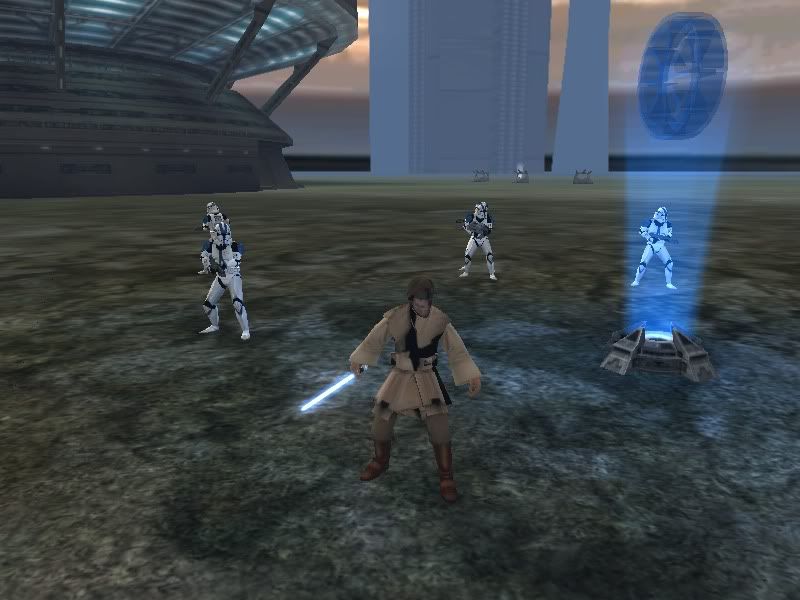
All I'll do is show the picture. No, I didn't modify a thing.
This is the Episode III ObiWan by HapSlash....Jeeze, I can't have any luck with model textures nowadays, can't I? I didn't even look at it! I just downloaded it, stuck it in my side folder, set it for the unit model, munge, test...and here we are!
Re: Yet another skin problem...HapSlash's Obi-wan.
Posted: Wed Dec 30, 2009 8:08 pm
by genaral_mitch
Open it's skin and see what it's like.
Re: Yet another skin problem...HapSlash's Obi-wan.
Posted: Wed Dec 30, 2009 9:04 pm
by Teancum
What OS are you running? I don't think it matters, but it'll help to figure it out.
Re: Yet another skin problem...HapSlash's Obi-wan.
Posted: Wed Dec 30, 2009 9:20 pm
by B.I.G_Cookie
i guess thats the same problem like on this skin
open obi-wans textures in gimp an resave them.
it should fix the problem.
Re: Yet another skin problem...HapSlash's Obi-wan.
Posted: Thu Dec 31, 2009 2:46 pm
by Fiodis
In MSH Viewer you have (or at least, I have) the same issue with Gungans and Droidekas. It fixed itself in-game, though....
Re: Yet another skin problem...HapSlash's Obi-wan.
Posted: Thu Dec 31, 2009 3:17 pm
by AQT
Those .tgas were saved with Origin at bottom left unchecked. That's why the models appear the way they are in MSH Viewer.
Re: Yet another skin problem...HapSlash's Obi-wan.
Posted: Thu Dec 31, 2009 3:20 pm
by Havoc 526
Found the problem. If you have any other models that were converted from JKA (i.e. Toonces Kit Fisto), the models will clash, because for some reason, the textures for the models all use the same names (such as head, belt, torso, etc.) I got it to work, but at a cost...
My recommendation: Make a seperate side for the JKA heroes. But any other working recommendation is just as good.
Re: Yet another skin problem...HapSlash's Obi-wan.
Posted: Thu Dec 31, 2009 3:30 pm
by Maveritchell
Havoc 526 wrote:My recommendation: Make a seperate side for the JKA heroes.
Your recommendation won't fix anything. It doesn't matter how many separate sides you use; if you're loading models in that use the same texture name they will clash. All you need to do is rename some of the textures and hexedit the corresponding meshes to use the differently-named textures. (This is in the FAQ, FYI.)
Re: Yet another skin problem...HapSlash's Obi-wan. (solved)
Posted: Thu Dec 31, 2009 3:32 pm
by AQT
So when you copied the Fisto files into your side's MSH folder you allowed it to overwrite any file that shared the same names?

I'm sorry to say but that was pretty careless of you.
Re: Yet another skin problem...HapSlash's Obi-wan. (solved)
Posted: Thu Dec 31, 2009 4:04 pm
by Havoc 526
AQT wrote: I'm sorry to say but that was pretty careless of you.
I will freely admit it: Yes...yes, it was. It was.

Ehehehe...I'm still kinda new to this....but I'm learning! At least I saved all the assets in separate folders before using them.
To Mav: Working on that right now. Thanks!