Have to be close for objects to load?

In this forum you will find and post information regarding the modding of Star Wars Battlefront 2. DO NOT POST MOD IDEAS/REQUESTS.

Moderator: Moderators

Post Reply
MissingTexture
2nd Lieutenant
2nd Lieutenant
Posts: 380
Joined: Sat Jun 13, 2015 10:51 am
Projects :: SW Resistance Rising
Location: Toronto, ON

Have to be close for objects to load?

Post by MissingTexture »

I imported some props from CWA and at first it seems that my map looks empty, but in reality, I just need to get really close to objects for them to load in.

How can I fix it so I can see them from far away and do not need to run up closer to them to see them properly?

Help me, please and thanks in advance :D
User avatar
Lorul1
Rebel Colonel
Rebel Colonel
Posts: 562
Joined: Wed Apr 24, 2013 10:34 pm
Projects :: Assault on Theed
Games I'm Playing :: Battlegrounds
xbox live or psn: No gamertag set
Location: Your House

Re: Have to be close for objects to load?

Post by Lorul1 »

what your looking for is to make a lowrez mesh thing. This is gonna be annoying but you'll have to go back into your modeling program and do this

http://www.gametoast.com/viewtopic.php?p=210477#p210477

so you could always just copy and paste your original model and rename it like the tutorial above says but this is the problem with that is people who don't have strong computers and try to run your map will get lag.
you may also want to turn up your lod and view settings in the battlefront 2 settings tab if your computer is strong enough.
MissingTexture
2nd Lieutenant
2nd Lieutenant
Posts: 380
Joined: Sat Jun 13, 2015 10:51 am
Projects :: SW Resistance Rising
Location: Toronto, ON

Re: Have to be close for objects to load?

Post by MissingTexture »

In the link you gave, why does the symbol for the low rez model have a yellow H?
User avatar
AceMastermind
Gametoast Staff
Gametoast Staff
Posts: 3285
Joined: Mon Aug 21, 2006 6:23 am
Contact:

Re: Have to be close for objects to load?

Post by AceMastermind »

The yellow H means it is hidden. You don't have to hide the lowrez mesh.
MissingTexture
2nd Lieutenant
2nd Lieutenant
Posts: 380
Joined: Sat Jun 13, 2015 10:51 am
Projects :: SW Resistance Rising
Location: Toronto, ON

Re: Have to be close for objects to load?

Post by MissingTexture »

It exports 2 separate msh files, is that correct or no?
User avatar
AceMastermind
Gametoast Staff
Gametoast Staff
Posts: 3285
Joined: Mon Aug 21, 2006 6:23 am
Contact:

Re: Have to be close for objects to load?

Post by AceMastermind »

No, 2 mesh objects in the same msh file.
MissingTexture
2nd Lieutenant
2nd Lieutenant
Posts: 380
Joined: Sat Jun 13, 2015 10:51 am
Projects :: SW Resistance Rising
Location: Toronto, ON

Re: Have to be close for objects to load?

Post by MissingTexture »

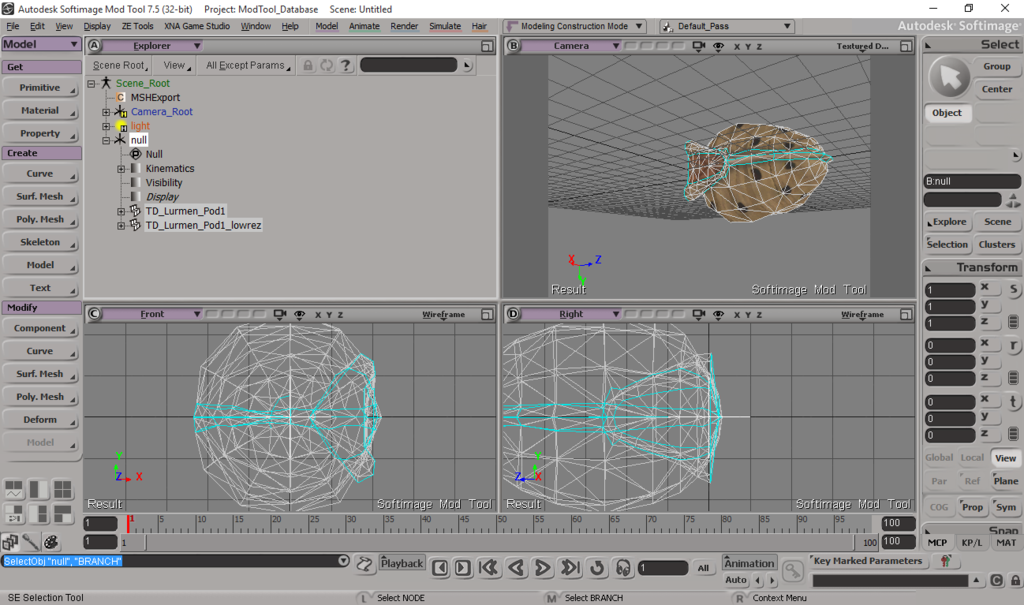
This is what I did, but I am still receiving 2 separate msh files: "TD_Lurmen_Pod1" & "TD_Lurmen_Pod1_lowrez"

Image

Am I doing it correctly?
User avatar
AceMastermind
Gametoast Staff
Gametoast Staff
Posts: 3285
Joined: Mon Aug 21, 2006 6:23 am
Contact:

Re: Have to be close for objects to load?

Post by AceMastermind »

Did you accidently enable "Batch Export" again?
You might want to rotate that model into the correct position, Y is up.
Also, you only need to select the null to export the whole hierarchy, no branch selecting required.

MissingTexture
2nd Lieutenant
2nd Lieutenant
Posts: 380
Joined: Sat Jun 13, 2015 10:51 am
Projects :: SW Resistance Rising
Location: Toronto, ON

Re: Have to be close for objects to load?

Post by MissingTexture »

Yup I got it now! & Yup... batch export was checked off... again -.-"
Post Reply