Page 1 of 1
Could use some help with Geonosis map
Posted: Wed Jun 10, 2009 11:42 am
by newguy99
I made my (quote) "first" map and after running it in SPtest.exe and taking some "dumpcamera" screen shots I was wondering where to add the coords? In the modder's tutorial it said to put them at the end of the LUA, where is that?
Also why won't the com_prop_cratelg_3 render? when I played my map it gave an error in SPtest saying:
"D:\src\FRONTLINE_PC\FrontLine\Source\LoadUtil.cpp(879)
Attempting to build an object, com_prop_cratelg_01, that does not have an .odf file associated with it"
I have the crate odf and msh in the proper Worlds\(modID)\ODF and MSH folders!
Lastly when I name my CPs Control and Capture zones it automaticlly renames the last named zone to the previous zone so the Contol becomes a Capture or "vice-versa"? --(example I name the "CP3 ControlBox" and then name the "CP3 CaptureSphere", but when I go back the sphere is a "CP3 ControlSphere" and if I rename it to the original "CP3 CaptureSphere" then the "CP3 ControlBox" becomes a "CP3 CaptureBox"), which inhibits me from have my command post be able to be held when enemys are capturing it, like when it blinks back and forth and you have to kill all enemys in the vicinity before you can capture. Please Help and TY in advance
Re: Could use some help with Geonosis map
Posted: Wed Jun 10, 2009 11:53 am
by jango
For the screenshots: theyre at bottom of the lua
Code: Select all
--start camerashots
AddCameraShot(-0.404895, 0.000992, -0.914360, -0.002240, -85.539894, 20.536297, 141.699493);
AddCameraShot(0.040922, 0.004049, -0.994299, 0.098381, -139.729523, 17.546598, -34.360893);
AddCameraShot(-0.312360, 0.016223, -0.948547, -0.049263, -217.381485, 20.150953, 54.514324);
--end camerashots
for the cpzones getting renamed make sure that when you make a new region that you click
new group NOT new region.
Re: Could use some help with Geonosis map
Posted: Wed Jun 10, 2009 11:59 am
by newguy99
TY jango!
Does anyone know about the crate problem? (info in my first post at top of page)
Also where can I change the ground texture it seems to standardly set at geo1.tga, but where do I find the other .tga files for the grass on kashyyyk or the tile on bespin?
Re: Could use some help with Geonosis map
Posted: Wed Jun 10, 2009 12:10 pm
by Jendo7
Just to reiterate what jango said:
Make sure you have them written out including region ID, properties and type.
Example:
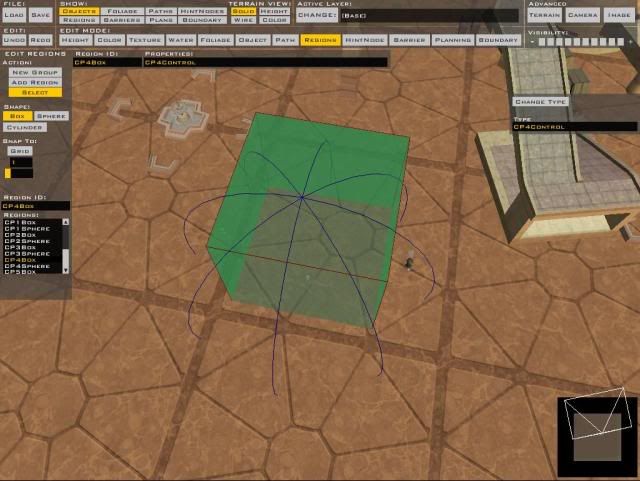
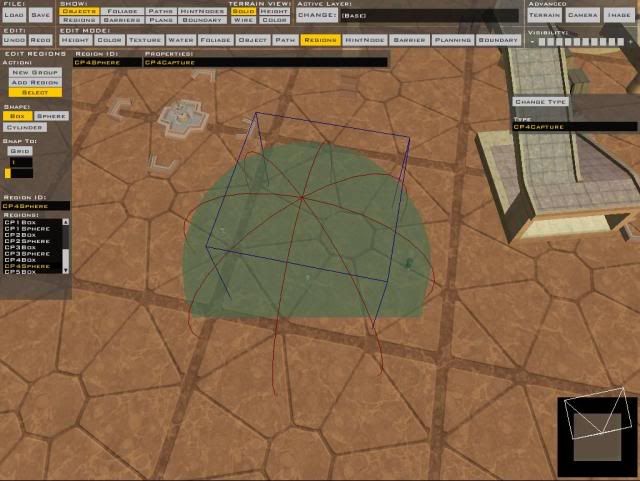
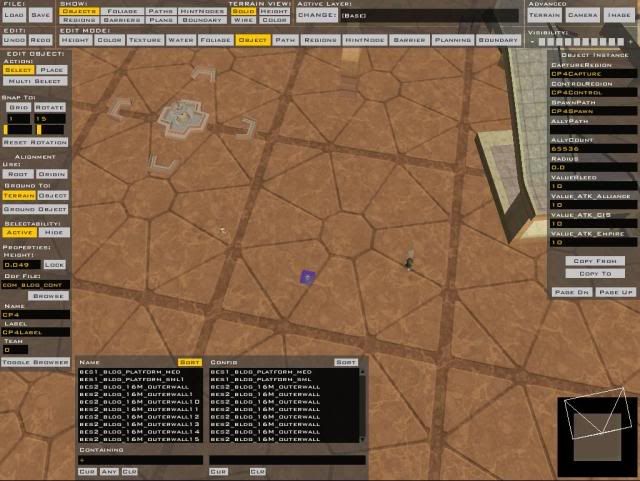
The lua is found in your Data(Modid)/Commom/Scripts/(Modid) folder
Assets/Shipped Worlds/Kashyyyk/world 1 folder for textures, and the same for Bespin
Re: Could use some help with Geonosis map
Posted: Wed Jun 10, 2009 12:14 pm
by newguy99
TY TY TY!!
(note: about the crate I have no clue what I did, but the odf and tga files are nowhere to be seen I saw them somewhere this morning, so don't worry about trying to answer my question about it!)
Re: Could use some help with Geonosis map
Posted: Wed Jun 10, 2009 1:52 pm
by Ty294
How DO you get the camera coords?
Re: Could use some help with Geonosis map
Posted: Wed Jun 10, 2009 2:43 pm
by Jendo7
Just type "dumpcamera" in the SPtest console when in free cam mode:
by MasterNorth
"Ok, now in free cam mode, which can be accessed in the ESC menu called fakeconsole (NOTE: Once you go into free cam mode you can't go back, and will have to close SPtest by hiting Ctrl+Alt+Delete. Also to close the SPtest console press ~ . You must have it closed to accessed the ESC menu.)
Once in free cam mode you can find camera cords for use in your map. (The part of the map you see at the spawn screen or at victory or defeat.)
To do this just position the free cam to a place you like then bring down the console by pressing ~ then type "dumpcamera" and hit enter.
You should get like Six or more of these camera coordinates. Then, once you exit SPtest, you'll notice a text file called CameraCoords (It will be right next to the BFront log). In there are all the coords you just dumped. So now past them into the bottom of your LUA and munge".
Re: Could use some help with Geonosis map
Posted: Wed Jun 10, 2009 3:00 pm
by newguy99
What does this mean --D:\src\FRONTLINE_PC\FrontLine\Source\CommandPost.cpp(392)
Label "level.ls1.CP3LABEL" not localized--
it didn't happen last time I tested, but then when I did what Jendo7 and Jango said to do with the CP Control and Capture area's this happened. What is not localized? I named it CP3 could there be two CPs with the same name or something like that?
and how do I rotate objects in zero editor?
TY
Re: Could use some help with Geonosis map
Posted: Wed Jun 10, 2009 3:31 pm
by MileHighGuy
I have another question, how can I change the view distance for a map so that the terain doesn't disapear at long distances?
http://www.gametoast.com/forums/viewtopic.php?t=236
Re: Could use some help with Geonosis map
Posted: Wed Jun 10, 2009 5:27 pm
by jango
for your question about localize you open bf builder pro (or bfbuilder) and hit localize then click on CP1Label and change it to the name u want.
Re: Could use some help with Geonosis map
Posted: Wed Jun 10, 2009 6:57 pm
by newguy99
My map has sort of disintegrated, when I save it and test, the changes aren't reflected in the new game and I was wondering where saved games are supposed to be saved? like what directory should they go in, I've been saving them in ModID\Worlds\ModID\World1\.wld is this right?
Edit: I think the problem is that when I hit save in zero editor it's not saving the changes into the .wld file and then when I try to compile and play, it compiles the .wld file that last got changed therefore when ever I compile a map they're always the same map as the last save that zero editor logged.
Please some helo here I have no clue what to do?
2nd Edit: Problem solved deleted map new map has files and folders as Not Read Only seems to work now!