Need help wih addind an era-mod
Posted: Sun May 22, 2016 2:50 pm
Hey there,
I'm trying (for the first time... ) to add a new era to some/all stocks maps following this tutorial: http://www.gametoast.com/viewtopic.php? ... 96#p287596 (I want to add a new era to the Felucia map).
So first question, do I have to use the files of Zerted's 1.3 patch r117 (lite version as Sky_216 said)? I don't think so...but I'm not sure normally I can just copy the stocks scripts I need, directly from the 'assets' folder no?
After that I followed step 2 and 3 sucessfuly.
But I'm stuck with step 6:
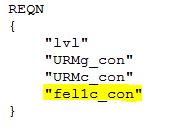
I've understood step 7 because it's the same process for just adding units...etc
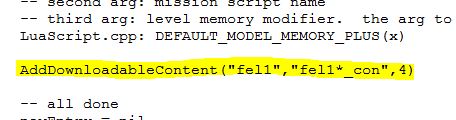
According to step 8 I've changed my addme lua:
and now when I want to munge i got this:
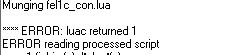

I checked my felucia script and I found the "unexpected symbol" near '(' I corrected it.
But I can't find a solution for the 2 next errors! The game can't even start!
Thanks for the help GT
I'm trying (for the first time...
) to add a new era to some/all stocks maps following this tutorial: http://www.gametoast.com/viewtopic.php? ... 96#p287596 (I want to add a new era to the Felucia map).So first question, do I have to use the files of Zerted's 1.3 patch r117 (lite version as Sky_216 said)? I don't think so...but I'm not sure normally I can just copy the stocks scripts I need, directly from the 'assets' folder no?
After that I followed step 2 and 3 sucessfuly.
But I'm stuck with step 6:
WHY he is talking about "era a"??? He didn't speak about that before: (the little I know about this is that each era mod have his own letter...but correct me if i'm wrong)6) Go to your 'mission'.req file (in the 'common' folder in your map) and edit the script files it says. It should have something along the lines of 'XXXc_con', 'XXXg_con' (where XXX is your maps three letter id). Add the name of the script you modified. So if you added era 'a' to mygeeto conquest, add 'myg1a_con' to your mission req.
What I've done:So if you added era 'a' to mygeeto conquest, add 'myg1a_con' to your mission req.
I've understood step 7 because it's the same process for just adding units...etc
According to step 8 I've changed my addme lua:
and now when I want to munge i got this:
I checked my felucia script and I found the "unexpected symbol" near '(' I corrected it.
But I can't find a solution for the 2 next errors! The game can't even start!
Thanks for the help GT
