Page 44 of 75
Re: Model showcase thread Part II
Posted: Mon Aug 25, 2008 8:45 am
by Guest
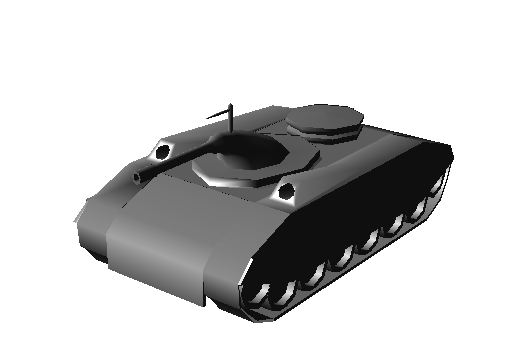
the tank looks pretty futuristic, especially the turret
Re: Model showcase thread Part II
Posted: Mon Aug 25, 2008 9:13 am
by PsYcH0_]-[aMsT3r
negah wrote:the tank looks pretty futuristic, especially the turret
It's meant to be

Maps gona be based about 15-20 years in the future.btw, skins gona be a dark camo colour, with the cannon blacker.
Re: Model showcase thread Part II
Posted: Mon Aug 25, 2008 10:31 am
by Gogie
Re: Model showcase thread Part II
Posted: Mon Aug 25, 2008 10:48 am
by PsYcH0_]-[aMsT3r
ARGH! Man, that makes me jealous! That's the best model i think I've seen here in ages!
EDIT: How many polys is that?
Re: Model showcase thread Part II
Posted: Mon Aug 25, 2008 10:59 am
by Taivyx
Wow, that's really impressive, Gogie. Can't wait to see that textured
Re: Model showcase thread Part II
Posted: Mon Aug 25, 2008 11:08 am
by Guest
now that looks awesome, but gunners position looks way too big
btw, here is a pic of a real MI-24D, that inspired IMO Gogie's model
Re: Model showcase thread Part II
Posted: Mon Aug 25, 2008 11:29 am
by Challenger33
A conference table I just made, using both shipped assets and my own (there are two other chairs on the other side, out of view):
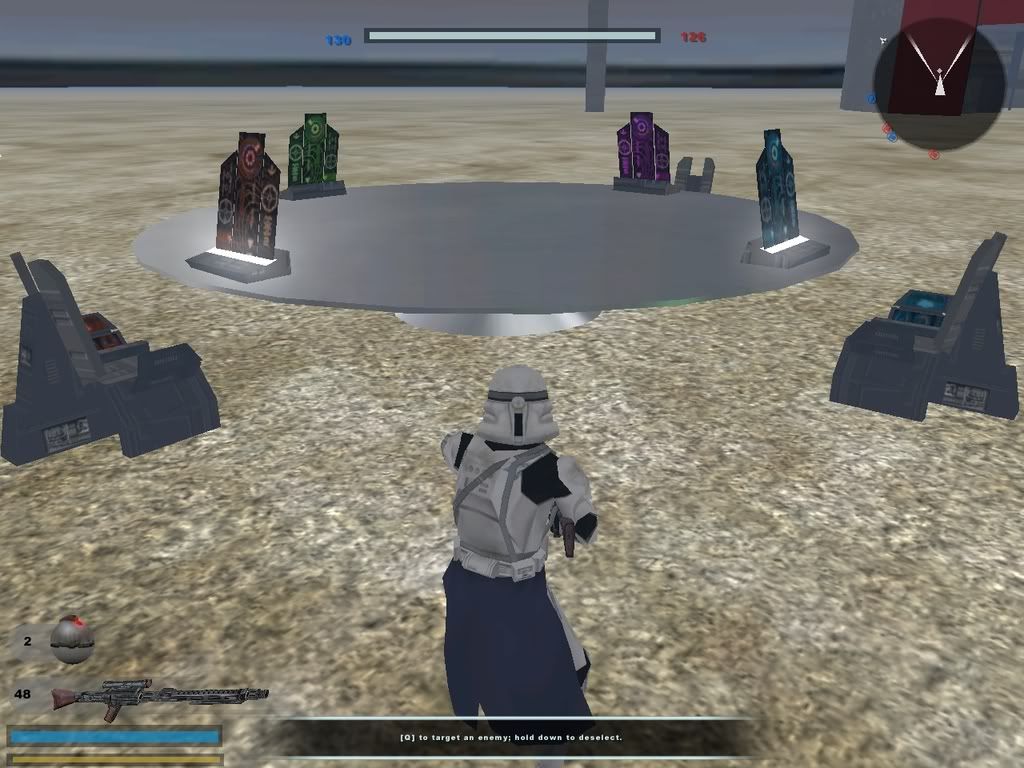
(looks better with an ingame screenshot due to envmapping and glow, that's why I posted an ingame screenshot)
Re: Model showcase thread Part II
Posted: Mon Aug 25, 2008 11:36 am
by (RAPTOR)BENSTWO{SGT}
Looks cool chalenger. Also great immrovment on the tank. Much better. Nice helocopter. Will it just be a prop or are you going to amimate it?
Re: Model showcase thread Part II
Posted: Mon Aug 25, 2008 12:29 pm
by Caleb1117
PsYcH0_]-[aMsT3r wrote:Thx for good feedback guys

If any of you wana UV it just ask. Anyways, finished it now
the UVs hard because the treads are merged on to the whole body and i cant move them properly so i can have a good cubic projection

. I'd be happy to lets some else get a good UV on cus it's to many polys for YJJ to UV (1000+).
Anyways final pic:
Looks abit strange unskinned but once skin is done itll look way better.
Still looks a bit odd, I think it would be better if you replaced the turret with a half sphere on top of the model, and make a canon sticking out of it.
Re: Model showcase thread Part II
Posted: Mon Aug 25, 2008 12:56 pm
by PsYcH0_]-[aMsT3r
Caleb1117 wrote:PsYcH0_]-[aMsT3r wrote:Thx for good feedback guys
If any of you wana UV it just ask. Anyways, finished it now
the UVs hard because the treads are merged on to the whole body and i cant move them properly so i can have a good cubic projection
. I'd be happy to lets some else get a good UV on cus it's to many polys for YJJ to UV (1000+).
Anyways final pic:
Looks abit strange unskinned but once skin is done itll look way better.
Still looks a bit odd, I think it would be better if you replaced the turret with a half sphere on top of the model, and make a canon sticking out of it.
Hmm yeah your right lol. I'll change it now so i dont have to do more stupid uvs. I'm tempted to bin it since the UV is so hard :S.
Re: Model showcase thread Part II
Posted: Mon Aug 25, 2008 1:39 pm
by VF501
PsychoHamster, an easier way to do UVs for complex models is to make the model but dont merge the parts. After its done and UVed and textured, select the pieces then merge them via Create Polymesh>Merge and in the pop up dialog find the area that reads Materials, UVs, Vertex Colors, Weight Maps and hit the merge button there.
To break your model back up into its component meshs, select all the polygons or points of the part you want to extract, then go to Create Poly Mesh>Extract Polygons (delete). This will take the selected polygons/points/edges and make a new mesh out of it. Just make sure you select all the points of the section you want and no extra ones.
Re: Model showcase thread Part II
Posted: Mon Aug 25, 2008 4:42 pm
by PsYcH0_]-[aMsT3r
VF501 wrote:PsychoHamster, an easier way to do UVs for complex models is to make the model but dont merge the parts. After its done and UVed and textured, select the pieces then merge them via Create Polymesh>Merge and in the pop up dialog find the area that reads Materials, UVs, Vertex Colors, Weight Maps and hit the merge button there.
To break your model back up into its component meshs, select all the polygons or points of the part you want to extract, then go to Create Poly Mesh>Extract Polygons (delete). This will take the selected polygons/points/edges and make a new mesh out of it. Just make sure you select all the points of the section you want and no extra ones.
Wow yeah, thats a good idea. Hell, you've saved me! Thanks so much, if i can get this working this will be one crazy model! Btw everyone I've remodeled the gun so its a MASSIVE cannon at the back.
Re: Model showcase thread Part II
Posted: Mon Aug 25, 2008 9:14 pm
by Gogie
negah wrote:now that looks awesome, but gunners position looks way too big
btw, here is a pic of a real MI-24D, that inspired IMO Gogie's model
mines more of a mixture between the MI24D and the MI24P
[EDIT]
its nearing completion, added a few tail details, grooves on the hull, and wheels.

Re: Model showcase thread Part II
Posted: Tue Aug 26, 2008 1:44 pm
by Fluffy_the_ic
please be low-poly enough for battlefront...
Re: Model showcase thread Part II
Posted: Tue Aug 26, 2008 6:22 pm
by obiboba3po
gogie thats simply amazing

Re: Model showcase thread Part II
Posted: Tue Aug 26, 2008 8:45 pm
by Taivyx
I don't think he's making it for battlefront 2, after all, everyone needs some high-poly practice once in a while for newer generation engines
Re: Model showcase thread Part II
Posted: Wed Aug 27, 2008 6:19 am
by PsYcH0_]-[aMsT3r
Yeah high-poly models are pretty fun, but the UVs aren't

. I might model my guitar soon and make it about 5000 polys
.
Re: Model showcase thread Part II
Posted: Wed Aug 27, 2008 1:57 pm
by Fluffy_the_ic
I've been working on this for about an hour and a half; most of it was the placing of the head and deleting extra polys. But it's not done, not by a long shot. I still need to reskin the armor, make the flamethrower and gauntlets, and get them and the backpack textured. I'm posting one pic, sort of as a teaser, even though it's not very good...
Is it okay if I post something that I made by importing models? 'Cuz, in case you can't tell, that's what this is. An imported Darktrooper that I fattened up with scaling, gave it a clone trooper head, and gave it a new jetpack. You'll know what this is if you've read the All-purpose request thread recently.
Been a while since I posted a model here, hasn't it?
Re: Model showcase thread Part II
Posted: Wed Aug 27, 2008 2:04 pm
by Karnage
Yay for being able to model!
Here's what I have of my blood gulch base model.

Everything is as close to 1:1 as I can get.
Re: Model showcase thread Part II
Posted: Wed Aug 27, 2008 4:27 pm
by (RAPTOR)BENSTWO{SGT}
Great job fluffy and Karnage. Nice job making the Blaze Trooper bulky. Please release it.