Page 1 of 1
About the HD Clone from RepSharpshooter...
Posted: Wed Oct 28, 2009 6:12 pm
by Havoc 526
Um, yeah. I was curious if it's possible to override the trooper texture for the HD Clone. No explanation necessary.
And if so, how do I do it correctly?
Re: About the HD Clone from RepSharpshooter...
Posted: Wed Oct 28, 2009 6:44 pm
by Null_1138
Treat it like any other skin. Open it up in an image editor like Paint.net, GIMP, or Photoshop, edit it as you please, and save. Be sure to keep a copy of the original though.
Re: About the HD Clone from RepSharpshooter...
Posted: Wed Oct 28, 2009 7:13 pm
by Havoc 526
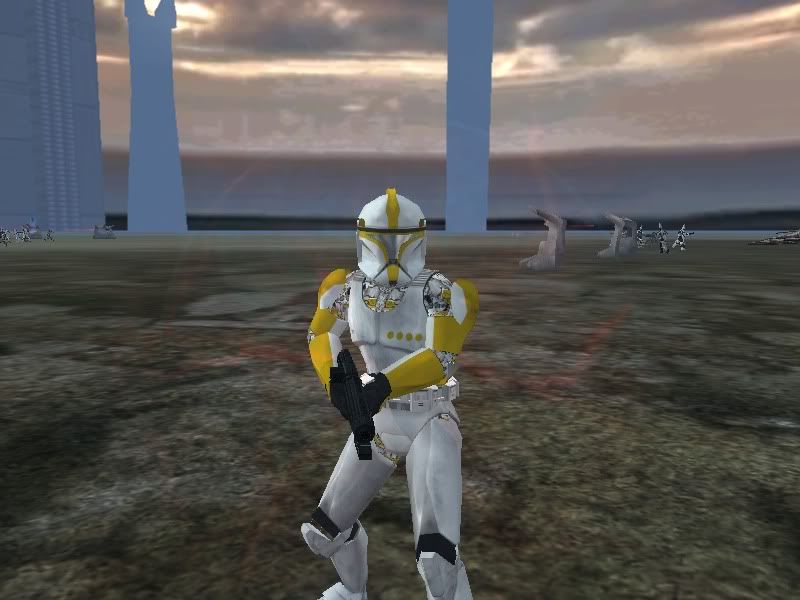
I'd hate to admit it, but that's kinda what I did. Now look:
Re: About the HD Clone from RepSharpshooter...
Posted: Wed Oct 28, 2009 7:17 pm
by Deviss
Link504 wrote:I'd hate to admit it, but that's kinda what I did. Now look:
i understand you i have the extra texture black for leather for this reason i remove it so all parts from clone use the same and one skin

Re: About the HD Clone from RepSharpshooter...
Posted: Wed Oct 28, 2009 7:18 pm
by The_Emperor
Removed the alpha channel perhaps?
@ DEVISS:

huh, what where now?
Re: About the HD Clone from RepSharpshooter...
Posted: Wed Oct 28, 2009 7:20 pm
by Deviss
The_Emperor wrote:@ DEVISS:
huh, what where now?
yeah i modified UV for the black parts (clone leather) use the part into skin the same all clones use XD you want the model

?
Re: About the HD Clone from RepSharpshooter...
Posted: Wed Oct 28, 2009 8:12 pm
by Null_1138
Link504 wrote:I'd hate to admit it, but that's kinda what I did. Now look:
Uh, you did leave rep_inf_cloneleather.tga alone, right?
Re: About the HD Clone from RepSharpshooter...
Posted: Thu Oct 29, 2009 2:11 pm
by mswf
Null_1138 wrote:Link504 wrote:I'd hate to admit it, but that's kinda what I did. Now look:
Uh, you did leave rep_inf_cloneleather.tga alone, right?
My guess? He didn't. I suggest you to redownload it, since it appears you deleted/somehow replaced the clone_leather.tga.
Re: About the HD Clone from RepSharpshooter...
Posted: Thu Oct 29, 2009 8:12 pm
by Havoc 526
Oh, yes. I left it alone. It works perfectly for all my main troopers, but anyone with a override texture is messed up.
Re: About the HD Clone from RepSharpshooter...
Posted: Fri Oct 30, 2009 1:37 pm
by mswf
It would have been usefull if you said that you encountered the bug while using an override-texture more clearly. (not meaning to sound angry, it's only that I'm experiencing an "oooooh, now I understand" moment)
I think it's because the model uses 2 textures and you're overriding all the textures with 1. Because of this, you also apply the new skin as the skin to replace the clone_leather.tga . It may be an error with your .odf, but I'm not sure if a model with 2 separate textures is compatible with the override command.
Re: About the HD Clone from RepSharpshooter...
Posted: Fri Oct 30, 2009 5:40 pm
by ANDEWEGET
the model "override_texture" has originally 2 textures applied. if you use override texture you apply the texture for the model you reference in the odf, if it has 2 textures it uses the override texture for both.
you could hex other texture names in, that should work.
Re: About the HD Clone from RepSharpshooter...
Posted: Sat Oct 31, 2009 9:49 pm
by Havoc 526
ANDEWEGET wrote:the model "override_texture" has originally 2 textures applied. if you use override texture you apply the texture for the model you reference in the odf, if it has 2 textures it uses the override texture for both.
you could hex other texture names in, that should work.
Well, I guess that's my only option. Not a first....but I digress.
Thanks guys!