Ok first your unit(s) req.
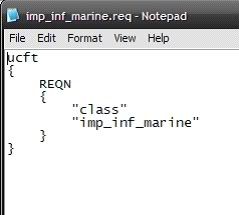
Go into your side’s req folder, and make a text file, you should name it whatever then name of your unit is. So if your unit is called pms_inf_supr_tropr You should call the req file pms_inf_supr_tropr.req. Now its handy to look at a shipped .req, so you go do that, I’ll wait.
Done? Its really quite simple.
I suggest you just copy the text out of a shipped req, and paste it into your own and change the text about the unit. If you don’t understand, then you didn’t look.
That is a unit req, just copy it, and change the unit name to yours, req names must match that of the unit’s odf.
Save your new .req file, and that’s done.
Quote from tut for custom sides.
Basically I was wondering the units req, do u paste ur unit name(bla_bla_name) as the name of the file itself? or is it inside the file as a text under "class"? And which one of these do I need to put the name of the shipped/custom unit .odf I want to put in?
And is this the only reference the game has on which unit I want to insert?
(And can ewoks be made a side for IMPS this way, jus wondering)
Re: Custom sides now
Posted: Fri Jun 19, 2009 1:54 am
by Frisbeetarian
To answer your question, the name of the unit, as you say, is both inside the file and the name of the file. The unit is also referenced in the side .req file that I'm sure is explained in the same tutorial. On the other hand, you could just look at the BF2 Jedi Creation.doc which says the same thing with more pictures.
Your problem is that you don't understand how a side is built or how the munge process works. You create the ODF which references the .msh file which in turn references the texture. The ODF is referenced in the .req file through the process you quoted. This .req file is referenced in the side .req file which is munged into the side .lvl file. The same unit name that appears in the side .req file is the unit name that is referenced by the Lua script when you load the side through ReadDataFile(). Once a unit is loaded with ReadDataFile(), it can be put into whichever side, no matter from what side .lvl it originated.
Re: Custom sides now
Posted: Fri Jun 19, 2009 7:55 am
by CodaRez
So lemme get this straight:
Your .odf needs to be the same name as the .req file, and whatever is under the class field INSIDE the .req file as well, and in turn the .req file name will be typed into the side.req, which is the same name as the .odf too, right?
and btw:
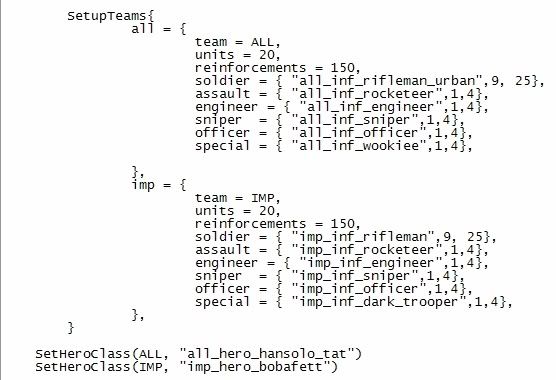
SetupTeams{
all = {
team = ALL,
units = 20,
reinforcements = 150,
soldier = { "all_inf_rifleman",9, 25},
assault = { "all_inf_rocketeer",1,4},
engineer = { "all_inf_engineer",1,4},
sniper = { "all_inf_sniper",1,4},
officer = { "all_inf_officer",1,4},
special = { "all_inf_wookiee",1,4},
That crucial line(underlined) that actually adds the unit to the roster is actually bellow the local side(jawas) that I added, so does the AddUnit thing ahve to be ABOVE the jawa locals line or BELOW?
Re: Custom sides now
Posted: Fri Jun 19, 2009 8:25 am
by FragMe!
Best way to get an example would be to check out a shipped map that already has what you are trying to do. In this case look at the Mos Eisley conquest script as it has Jawas in it already.
But a quick point your AddUnitClass should be above the SetHeroClass lines
Re: Custom sides now
Posted: Fri Jun 19, 2009 8:25 am
by Frisbeetarian
It mostly doesn't matter where the AddUnitClass() goes, I believe it just has to go before SetHeroClass().
Re: Custom sides now
Posted: Fri Jun 19, 2009 10:34 am
by CodaRez
Thnx Ill keep those in mind, but still though
So lemme get this straight:
Your .odf needs to be the same name as the .req file, and whatever is under the class field INSIDE the .req file as well, and in turn the .req file name will be typed into the side.req, which is the same name as the .odf too, right?
Still wondering, is my theory here correct?
Re: Custom sides now
Posted: Fri Jun 19, 2009 10:43 am
by Frisbeetarian
That's what I said, except generally, the ODF is named first and the .req file later.
Re: Custom sides now
Posted: Fri Jun 19, 2009 4:58 pm
by AceMastermind
For good examples to determine what goes where in the LUA have a look at how wookiees, gungans and ewoks are added.
The file name of your class req(located in your side's req folder) goes under the ReadDataFile section in the LUA, the ODF file name of the unit goes in the SetupTeams section of your LUA.
To simplify this and ensure that what you're doing is going to work just keep the names the same.
Re: Custom sides now
Posted: Sat Jun 20, 2009 4:05 am
by CodaRez
Well I did manage to get a probe droid into the IMP side roster in-game(although if i click it it crashes, bit of help on that?)
But other things like normal infantry sides never seem to appear for me.
So I wonder can anyone spare the time to show their LUA script with custom sides added in, and if you REALLY don't mind, show their custom side folders to see what I actually need added in to mine(as in the folders in your (insert side folder name here) file, like the msh, odf, munged, req etc.)
Re: Custom sides now
Posted: Sat Jun 20, 2009 4:54 am
by DarthD.U.C.K.
inst that allways included in how-to-create-custom-side-tutorials
Re: Custom sides now
Posted: Sat Jun 20, 2009 5:00 am
by CodaRez
Well those aren't as comprehensive....I think
Well I did find this in my data_***/_BUILD/Sides/(Custom Side Name Here) folder.
The levelpack_units notepad inside had these lines:
Missing file.......and I think I can't find it anywhere in assets, what is it?
Re: Custom sides now
Posted: Sat Jun 20, 2009 6:19 am
by DarthD.U.C.K.
this part explains everything lua related you need:
Hidden/Spoiler:
Last step adding your unit to the lua script.
Go to Data_ABC/Common/scripts/ABC there should be a bunch of files here, .lua and .bak.
The baks are just luas with their file extension changed, and are “backups” of the default luas.
You can delete these, I do.
Now you need to find the lua you want. The unit we’re talking about is a soldier, so lets put him in conquest. Lua names start with your map name ABC then either a c for CW era, or g for GCW era.
And then the mode con = Conquest
eli = Hero Assault
ctf = Capture the Flag
1flag = 1 Flag Capture the Flag
So lets put him in the GCW era, so find your ABCg_con.lua and open it, it’s a notepad file.
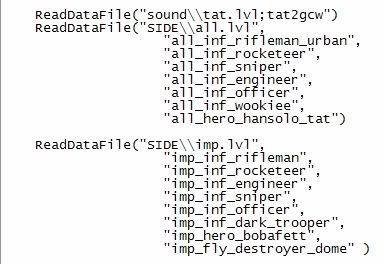
First scroll down and find this part.
This area of the lua loads a unit’s data into the game for use.
Again, we’re just going to kinda copy and paste a shipped bit.
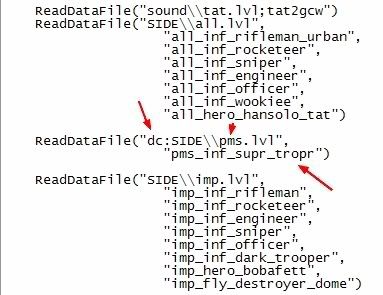
Take the imp section, copy all of it and paste it again, in that section, change the lvl name from imp.lvl to pms.lvl, and put a dc: in front of SIDE, but before the parentheses, this dc: tells the lua that it is loading a custom file.
(if you where editing a shipped side, you would need to add a dc: to it’s load section too.)
And delete all the listed units, except for the top one, and change the name to your unit’s.
And close it off with a )
It should look a bit like this:
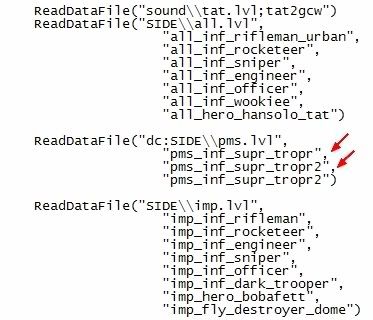
Now if you where adding more units, you would have to add comma’s like so:
Ok, now scroll down to the unit line up.
This bit:
Now if you could replace one of the normal unit’s with yours, but I’ll teach you how to add a new one, incase you don’t want to replace anyone, and hurt a trooper's feelings.
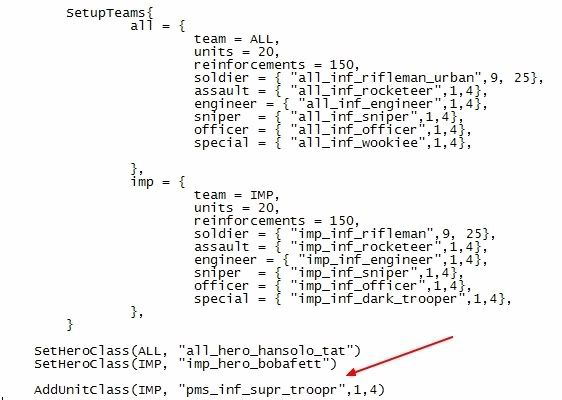
Under the SetHeroClass part, add this:
AddUnitClass(IMP, "pms_inf_supr_troopr",1,4)
This will add your unit under the Imperial side’s line up.