
Ok, to start off I think it would be best if people could understand what I am trying to do. I am trying to use transporters to give the effect of entering and exiting planet atmospheres and entering into space (that is when you are flying), but for those on land I am going to use a prop with transporters to give the effect of being transported to another planet (but done super fast). When I am done with this map I plan on it looking like you can fly around the Star Wars galaxy. Right now I have enlarged the map size to 1024x1024.
1.) Distant visibility?
Ok, so I was adding some new sky domes to my map and I cannot see them from where I spawn (I modified the object to match the size I wanted in Blender). I have them set as an ordinary object placed in the editor. I created an odf and msh.option file so I could put in some of the stuff from the original dome. Well, when I move closer to the dome I can see it, but that is when I am closer than I am supposed to be. So how do I make this object visible from a farther distance?
2.) Adding space to a land map?
Ok, I have almost no idea how to do this one. So far the best I can do is give the sky the Naboo texture, but that only covers the top half of the sky. I'm not entirely sure what all I'm gonna have to do but I hope someone can give me some pointers.
3.) Sudden death?
This is an easy one but just to make sure I can get help in case something goes wrong. When I go so far out of the center of the map, I will suddenly die. Will a boundary fix this? I recognize I am going to need some code as I cannot find any in the documentation.
Thanks for the help!
Problem #3 unsolved "Sudden Death?"
Moderator: Moderators
-
linksith

- Command Sergeant Major

- Posts: 284
- Joined: Mon Jul 12, 2010 12:19 pm
- Projects :: Waaay too many projects
- xbox live or psn: me has no xbox
- Location: looking for a wifi connection
Problem #3 unsolved "Sudden Death?"
Last edited by linksith on Wed Sep 15, 2010 5:22 pm, edited 2 times in total.
-
DarthD.U.C.K.

- Master of the Force

- Posts: 6027
- Joined: Wed Sep 27, 2006 11:05 am
- Location: Duckburg, Germany
Re: Some questions for my map
1. as ive said in the other thread you probably wont be able to make big skydomes and have them displayed like the "real" skydome ingame because they are so huge but you can try to put "-lodgroup hugemodel" in the msh.option file and see if it has an effect
2. this has been discussed several times and nobody managed to make a and-space map with enough bots, planning etc., use the serachfunction if you want to find out more.
3. yes, the boundary is the line which causes the "you are leaving the battlefield"-message to come up and kills you when youve crossed it and didnt turn back
2. this has been discussed several times and nobody managed to make a and-space map with enough bots, planning etc., use the serachfunction if you want to find out more.
3. yes, the boundary is the line which causes the "you are leaving the battlefield"-message to come up and kills you when youve crossed it and didnt turn back
-
linksith
- Command Sergeant Major
- Posts: 284
- Joined: Mon Jul 12, 2010 12:19 pm
- Projects :: Waaay too many projects
- xbox live or psn: me has no xbox
- Location: looking for a wifi connection
Re: Some questions for my map
1. That didn't help at all. I did try to ad this line "MaxDistance = "600"" into the odf as you may find something similar in the yav_prop_grass.odf file, but that didn't help much either. However, I did notice that on a space map I was trying, I would go out a long ways (I didn't add any boundaries) and I could see the republic ship but I couldn't see my large custom-made object.
2. Well then is there a way to change the sky to a space sky? and if that won't work is there a way to get a surrounding dome to work (this would probably need help from the first question also)?
3. I looked at the FAQ for the boundary problem and I couldn't get it to work. I kept trying to find an error in the scripting but couldn't find anything.
2. Well then is there a way to change the sky to a space sky? and if that won't work is there a way to get a surrounding dome to work (this would probably need help from the first question also)?
3. I looked at the FAQ for the boundary problem and I couldn't get it to work. I kept trying to find an error in the scripting but couldn't find anything.
-
Press_Tilty
- Chief Warrant Officer

- Posts: 331
- Joined: Fri Jun 04, 2010 10:57 pm
- Projects :: Korsava IV - Pre WIP
- Location: Seattle Area
Re: Some questions for my map
Turn on Boundary editing and make your boundary bigger, or delete it all together.
-
DarthD.U.C.K.
- Master of the Force
- Posts: 6027
- Joined: Wed Sep 27, 2006 11:05 am
- Location: Duckburg, Germany
Re: Some questions for my map
1. thats probably because they all have lowrezmodles included in the msh which cant be done with blender
2. shure, reaplce the sky with one from space
3. make shure to call your boundary exactly like your map and reference it correctly
edit: YAY! 4000 posts!
2. shure, reaplce the sky with one from space
3. make shure to call your boundary exactly like your map and reference it correctly
edit: YAY! 4000 posts!
-
linksith
- Command Sergeant Major
- Posts: 284
- Joined: Mon Jul 12, 2010 12:19 pm
- Projects :: Waaay too many projects
- xbox live or psn: me has no xbox
- Location: looking for a wifi connection
Sudden death?
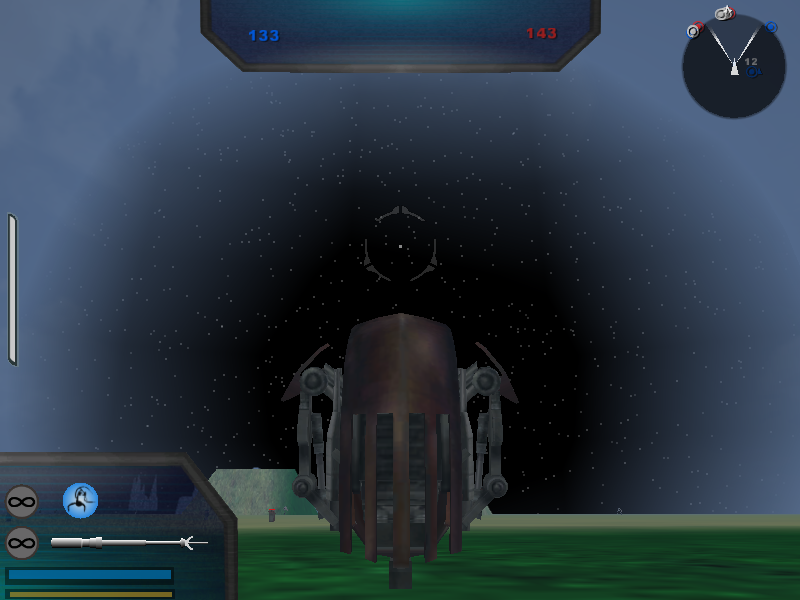
1. Ok, I have found something that has helped a little bit on the visibility and I have little knowledge of how to get it working fully. I've posted a pic of what I've got right now. I found some info on how to change it a bit (not much) from here. I will hopefully play around with it sometime soon, but does anyone know what each of the four numbers mean? I'm also posting the code that I changed in my CWG.sky file. I got the code from the page but that just tells me that this is where I can get it to work.
3. Ok, the boundary issue is weird. Droidekas seem to be immune to the death that occurs when I go so far out, so I took the droideka past the point that I had the boundary and the boundary works. The big problem is about halfway from the center of the map to the boundary is death to everyone but droidekas. How do I fix this?
EDIT: I think I might just make #3 a seperate thread as the problem seams to be bigger than I thought.
Topics merged, -Staff
@ Staff- Can I remove this "topics merged" note or will I get in trouble for removing it?
My current status is:
1. [Solved]
2. [Could be possible, will have to try]
3. [Unsolved. Need to solve] I have changed my map size to 1024x1024 and had a problem with walking toward a more distant part of the map. I thought a boundary would fix this problem but nothing helped. Currently it seems that droidekas are immune to this weird death. About halfway from the center of the map to the edge is where this death seems to occur. Can anyone explain this weird occurrence? And is there a way to fix this?
EDIT: Here are my "message severity: 3" problems.
Hidden/Spoiler:
EDIT: I think I might just make #3 a seperate thread as the problem seams to be bigger than I thought.
Topics merged, -Staff
@ Staff- Can I remove this "topics merged" note or will I get in trouble for removing it?
My current status is:
1. [Solved]
2. [Could be possible, will have to try]
3. [Unsolved. Need to solve] I have changed my map size to 1024x1024 and had a problem with walking toward a more distant part of the map. I thought a boundary would fix this problem but nothing helped. Currently it seems that droidekas are immune to this weird death. About halfway from the center of the map to the edge is where this death seems to occur. Can anyone explain this weird occurrence? And is there a way to fix this?
EDIT: Here are my "message severity: 3" problems.
Hidden/Spoiler:
