Page 1 of 1
This Noob needs help with skins
Posted: Mon Dec 22, 2008 2:52 pm
by hammythepig
How do you take a picture like this:
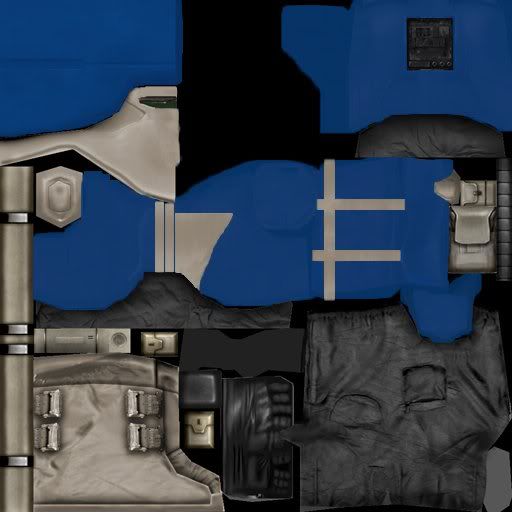
(Image taken from PhantoM on this site)
and make it the clone's skin when modding a map?
Re: This Noob needs help with skins
Posted: Mon Dec 22, 2008 8:35 pm
by Null_Clone_Assasin
hammy that is a skin

it will appear on the troop you put it on
Re: This Noob needs help with skins
Posted: Mon Dec 22, 2008 8:54 pm
by YaNkFaN
he's right it is a skin it sorta folds around a model (.msh) you also need to copy that into a program like photoshop or GIMP and save it as a .tga at 24 pixels/in with no compression (those are the settings that will pop up when you try to save it). Also in order to see your edit you need to make a side the tutorial can be found in the everything you need to know thread
Re: This Noob needs help with skins
Posted: Mon Dec 22, 2008 10:55 pm
by obiboba3po
YaNkFaN wrote:he's right it is a skin it sorta folds around a model (.msh) you also need to copy that into a program like photoshop or GIMP and save it as a .tga at 24 pixels/in with no compression (those are the settings that will pop up when you try to save it). Also in order to see your edit you need to make a side the tutorial can be found in the everything you need to know thread
yup good definition of a skin

Re: This Noob needs help with skins
Posted: Tue Dec 23, 2008 12:12 pm
by hammythepig
I knew what a skin was, I don't know how to put it on, what file does it go in?
YaNkFaN wrote:the tutorial can be found in the everything you need to know thread
Ok, I'll look there.
Re: This Noob needs help with skins
Posted: Wed Dec 24, 2008 12:34 pm
by YTGTangerine
What everyone said is correct. Be sure to search Gametoast before you ask questions.
Re: This Noob needs help with skins
Posted: Wed Dec 24, 2008 2:15 pm
by PhantoM
YaNkFaN wrote:he's right it is a skin it sorta folds around a model (.msh) you also need to copy that into a program like photoshop or GIMP and save it as a .tga at 24 pixels/in with no compression (those are the settings that will pop up when you try to save it). Also in order to see your edit you need to make a side the tutorial can be found in the everything you need to know thread
What he said.
Off-Topic: yay, people look at my skins! xD
Re: This Noob needs help with skins
Posted: Fri Dec 26, 2008 1:42 am
by RogueKnight
If you are trying to figure out how to get that on gametoast, you need to upload it to a image hoster like photobucket, then paste the image link into a [img] tag.