Page 43 of 45

Re: XSI ZETools

Posted: Sun Oct 30, 2016 1:40 pm
by Spiret
Works perfectly now. Thank you!

Re: XSI ZETools

Posted: Sun Oct 30, 2016 4:35 pm
by Deviss
ANDEWEGET wrote:Update 1.3.15

This should fix it.
cloth its fix too :) ?

Re: XSI ZETools

Posted: Sun Oct 30, 2016 5:10 pm
by Marth8880
I'm having trouble importing a weapon MSH that was exported using the Pandemic Tool a long time ago in late 2011. I'm using the latest version of the XSI ZETools. Here's the log:
Hidden/Spoiler:
[code]Last 15 log lines:


Rotation: 0.0, 0.0, 0.0;
Scale: 1.0, 1.0, 1.0.
INFO (196, build): Finished building hp_fire in 0s 10000ms.
INFO (521, build_null): Building hp_fire1 as null(originally null).
DEBUG (620, set_transform): Model transform: Pos(0.0, 0.0827073082328, 0.326325148344), Rot(-0.0, -0.0, -0.0, 1.0), Scl(1.0, 1.0, 1.0)
DEBUG (627, set_transform): Set local transform for hp_fire1 to:
Position: 0.0, 0.0827073082328, 0.326325148344;
Rotation: 0.0, 0.0, 0.0;
Scale: 1.0, 1.0, 1.0.
INFO (196, build): Finished building hp_fire1 in 0s 9000ms.
INFO (338, build_geo): Building polymsh2 as polymesh(originally geostatic).
DEBUG (470, get_vertex_positions): Retrieved 1756 vertex positions.
INFO (33, __exit__): Retrieved vertices in 0s 2000ms.
INFO (33, __exit__): Retrieved faces in 0s 6000ms.
INFO (33, __exit__): Built chain in 0 s 941000 ms.


Traceback:


Traceback (most recent call last):
File "<Script Block 2>", line 84, in importbutton_OnClicked
File "C:\Users\aaron\Autodesk\Softimage_2015\Addons\XSIZETools\Application\Core\zetimport.py", line 873, in import_
self.do_import()
File "C:\Users\aaron\Autodesk\Softimage_2015\Addons\XSIZETools\Application\Core\zetimport.py", line 926, in do_import
self.chain = builder.build()
File "C:\Users\aaron\Autodesk\Softimage_2015\Addons\XSIZETools\Application\Core\zetimport.py", line 652, in build
item = builder.build()
File "C:\Users\aaron\Autodesk\Softimage_2015\Addons\XSIZETools\Application\Core\zetimport.py", line 189, in build
self.build_geo()
File "C:\Users\aaron\Autodesk\Softimage_2015\Addons\XSIZETools\Application\Core\zetimport.py", line 342, in build_geo
faces = self.get_faces()
File "C:\Users\aaron\Autodesk\Softimage_2015\Addons\XSIZETools\Application\Core\zetimport.py", line 481, in get_faces
for face in segment.faces:
TypeError: 'NoneType' object is not iterable
[/code]
I'm also unable to save the mesh using mshsuite, here's the log I get for that:
Hidden/Spoiler:
[code]J:\BF2_ModTools\ToolsMisc\mshsuite-master>python mshsuite.py Qt: Untested Windows version 6.2 detected! Header, Size: SINF, 116 Unpacking Scene Info. Header, Size: CAMR, 64 Header, Size: MATL, 496 Material, Size: MATD, 136 Unpacking Material. TX header, size: TX0D, 28 TX header, size: MATD, 176 Unrecognized chunk MATD in MaterialUnpacker. Material, Size: MATD, 176 Unpacking Material. TX header, size: TX0D, 28 TX header, size: TX1D, 32 TX header, size: MATD, 156 Unrecognized chunk MATD in MaterialUnpacker. Material, Size: MATD, 156 Unpacking Material. TX header, size: TX0D, 28 TX header, size: TX1D, 12 TX header, size: MODL, 88 Unrecognized chunk MODL in MaterialUnpacker. Header, Size: MODL, 88 Unpacking Model at 716. Model: Header, Size: MTYP, 4 Model: Header, Size: MNDX, 4 Model: Header, Size: NAME, 8 Model: Header, Size: TRAN, 40 Model: Header, Size: MODL, 104 Unrecognized chunk MODL in ModelUnpack. Header, Size: MODL, 104 Unpacking Model at 812. Model: Header, Size: MTYP, 4 Model: Header, Size: MNDX, 4 Model: Header, Size: NAME, 8 Model: Header, Size: PRNT, 8 Model: Header, Size: TRAN, 40 Model: Header, Size: MODL, 108 Unrecognized chunk MODL in ModelUnpack. Header, Size: MODL, 108 Unpacking Model at 924. Model: Header, Size: MTYP, 4 Model: Header, Size: MNDX, 4 Model: Header, Size: NAME, 12 Model: Header, Size: PRNT, 8 Model: Header, Size: TRAN, 40 Model: Header, Size: MODL, 103588 Unrecognized chunk MODL in ModelUnpack. Header, Size: MODL, 103588 Unpacking Model at 1040. Model: Header, Size: MTYP, 4 Model: Header, Size: MNDX, 4 Model: Header, Size: NAME, 12 Model: Header, Size: PRNT, 8 Model: Header, Size: TRAN, 40 Model: Header, Size: GEOM, 103472 Model Segments: Header, Size: SEGM, 101124 Unpacking Geometry. Geo: Header, Size: MATI, 4 Geo: Header, Size: POSL, 20512 Geo: Header, Size: NRML, 20512 Geo: Header, Size: CLRL, 6840 Geo: Header, Size: UV0L, 13676 Geo: Header, Size: NDXL, 18712 Geo: Header, Size: NDXT, 14032 Geo: Header, Size: STRP, 6772 Geo: Header, Size: SEGM, 1304 Unrecognized chunk SEGM in GeometryUnpack. Model Segments: Header, Size: SEGM, 1304 Unpacking Geometry. Geo: Header, Size: MATI, 4 Geo: Header, Size: POSL, 364 Geo: Header, Size: NRML, 364 Geo: Header, Size: CLRL, 124 Geo: Header, Size: UV0L, 244 Geo: Header, Size: NDXL, 144 Geo: Header, Size: NDXT, 4 Geo: Header, Size: SEGM, 968 Unrecognized chunk SEGM in GeometryUnpack. Model Segments: Header, Size: SEGM, 968 Unpacking Geometry. Geo: Header, Size: MATI, 4 Geo: Header, Size: POSL, 208 Geo: Header, Size: NRML, 208 Geo: Header, Size: CLRL, 72 Geo: Header, Size: UV0L, 140 Geo: Header, Size: NDXL, 116 Geo: Header, Size: NDXT, 88 Geo: Header, Size: STRP, 68 Geo: Header, Size: CL1L, 0 Unrecognized chunk CL1L in GeometryUnpack. Model Segments: Header, Size: CL1L, 0 Unrecognized chunk CL1L in ModelUnpack(Geometry). Model: Header, Size: CL1L, 0 Unrecognized chunk CL1L in ModelUnpack. Header, Size: CL1L, 0 Traceback (most recent call last): File "mshsuite.py", line 293, in save data = self.msh.repack() File "J:\BF2_ModTools\ToolsMisc\mshsuite-master\msh2.py", line 144, in repack msh2_data.append(self.models.repack()) File "J:\BF2_ModTools\ToolsMisc\mshsuite-master\msh2.py", line 665, in repack data = [model.repack() for model in self.models] File "J:\BF2_ModTools\ToolsMisc\mshsuite-master\msh2.py", line 563, in repack data.append(self.repack_GEOM()) File "J:\BF2_ModTools\ToolsMisc\mshsuite-master\msh2.py", line 573, in repack_GEOM data.append(self.segments.repack()) File "J:\BF2_ModTools\ToolsMisc\mshsuite-master\msh2.py", line 790, in repack data = [segment.repack() for segment in self.segments] File "J:\BF2_ModTools\ToolsMisc\mshsuite-master\msh2.py", line 836, in repack return self.pack() File "J:\BF2_ModTools\ToolsMisc\mshsuite-master\msh2.py", line 831, in pack data.append(self.faces.pack()) AttributeError: 'NoneType' object has no attribute 'pack'[/code]
I'll send you the MSH file in a PM.

Re: XSI ZETools

Posted: Mon Oct 31, 2016 8:45 am
by ANDEWEGET
@Deviss: No, I haven't found the source of the problem yet and I'm a bit limited on time right now.

@Marth: I sent you a PM.

Re: XSI ZETools

Posted: Mon Oct 31, 2016 7:13 pm
by Deviss
ANDEWEGET wrote:@Deviss: No, I haven't found the source of the problem yet and I'm a bit limited on time right now.
oh i will be patience, thanks anyway :)

Re: XSI ZETools

Posted: Fri Nov 04, 2016 10:17 pm
by Marth8880
I get the following error when trying to import Pol_bldg_health_dock.msh:

Code: Select all

INFO (881, do_import): ==========================================
INFO (882, do_import): Starting import at 2016-11-04 19:16:01.118000.
INFO (883, do_import): .msh file path: J:\BF2_ModTools\data_ME5\Worlds\NOV\msh\Pol_bldg_health_dock.msh
INFO (901, do_import): Starting unpack.
INFO (498, unpack): Sizes: 352 == 352
INFO (498, unpack): Sizes: 706 == 708
INFO (33, __exit__): Finished unpack in 0 s 33000 ms.
ERROR (906, do_import): 
Traceback (most recent call last):
  File "C:\Users\aaron\Autodesk\Softimage_2015\Addons\XSIZETools\Application\Core\zetimport.py", line 904, in do_import
    self.msh = unpacker.unpack()
  File "C:\Users\aaron\Autodesk\Softimage_2015\Addons\XSIZETools\Application\Modules\msh2_unpack.py", line 180, in unpack
    raise UnpackError('Unrecognized chunk {0} in MSHUnpack (can be a valid chunk but doesnt fit into this unpack level).'.format(hdr))
UnpackError: Unrecognized chunk   ST in MSHUnpack (can be a valid chunk but doesnt fit into this unpack level).

Re: XSI ZETools

Posted: Fri Nov 04, 2016 11:30 pm
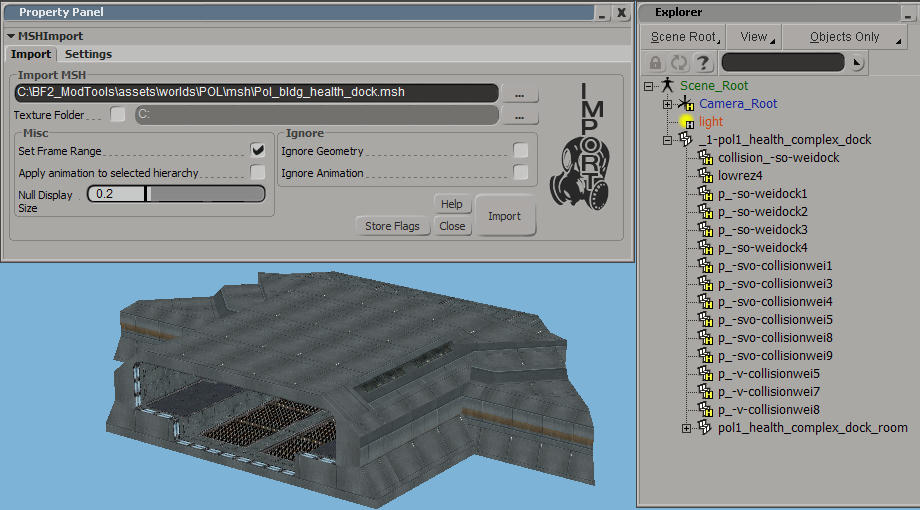
by AceMastermind
It works here:
Hidden/Spoiler:
Image
Softimage 7.5
XSI ZETools 1.3.0032

Re: XSI ZETools

Posted: Sun Nov 06, 2016 12:00 pm
by ANDEWEGET
I made some changes that weren't part of a release/had no version number bump which caused this. So the 0032 release still worked, but if you downloaded the repo directly you'd have this error.

Update 1.3.16

This should fix it however.

Re: XSI ZETools

Posted: Mon Nov 14, 2016 7:01 am
by Spiret
Having problems with importing RepSharpshooter's HD EP2 Clone - http://www.gametoast.com/viewtopic.php?f=64&t=17770
Hidden/Spoiler:
INFO (881, do_import): ==========================================
INFO (882, do_import): Starting import at 2016-11-14 14:56:32.931000.
INFO (883, do_import): .msh file path: C:\Users\Spiret\Desktop\HD\rep_inf_trooper.msh
INFO (901, do_import): Starting unpack.
INFO (498, unpack): Sizes: 8158 == 8160
INFO (498, unpack): Sizes: 7738 == 7740
INFO (498, unpack): Sizes: 4642 == 4644
INFO (498, unpack): Sizes: 5344 == 5344
INFO (33, __exit__): Finished unpack in 0 s 115000 ms.
ERROR (906, do_import):
Traceback (most recent call last):
File "C:\Users\Spiret\Autodesk\Softimage_2015\Addons\xsizetools-1.3.0033\Application\Core\zetimport.py", line 904, in do_import
self.msh = unpacker.unpack()
File "C:\Users\Spiret\Autodesk\Softimage_2015\Addons\xsizetools-1.3.0033\Application\Modules\msh2_unpack.py", line 180, in unpack
raise UnpackError('Unrecognized chunk {0} in MSHUnpack (can be a valid chunk but doesnt fit into this unpack level).'.format(hdr))
UnpackError: Unrecognized chunk UV1L in MSHUnpack (can be a valid chunk but doesnt fit into this unpack level).

Re: XSI ZETools

Posted: Mon Nov 14, 2016 10:40 am
by ANDEWEGET
Update 1.3.17

This should fix it.

Re: XSI ZETools

Posted: Thu Dec 08, 2016 8:30 pm
by Marth8880
Transforms of collision primitives are incorrect when they're a child of a collision primitive that is also a child of another collision primitive.

Example of a simple hierarchy depicting what I mean

--collision primitive (correct SRT)
----collision primitive (correct SRT)
------collision primitive (incorrect SRT) <--

Pol1_bldg_radar_main02.msh, imported with the latest version (1.3.0034):
Hidden/Spoiler:
Image
EDIT:

The scale and rotation values actually appear to import fine, but the translation values are still hugely offset.

Re: XSI ZETools

Posted: Tue Dec 13, 2016 9:43 am
by ANDEWEGET
Could you check if there's a difference between cubes and cylinders/spheres? As in does it change if any/all of the parents are cube primitives?
I can't test right now.

Re: XSI ZETools

Posted: Mon Jan 02, 2017 9:13 am
by Anakin
I made a simple 5-Edge Polygon and exported it with ZETools. I don't know what version it was and i cannot reproduce, since my XSI is broken again. But maybe you can reproduce.

I took the poly-painter (N) and made one 4 edge, one 5 edge and one 6 edge polygon to test my viewer. But for the 5 and 6 edge the tool says the file is broken. I took a look at it in an hexeditor:
...S_T__R_P____________________C_L__1_L
...5354 5250 0E00 0000 0500 0000 434C 314C 0000 0000

So as you can see the file says STRP is size 14, but it isn't, it is size 6 and the data is wrong, too.

4-edge polygons are no problem.

Re: XSI ZETools

Posted: Mon Jan 02, 2017 10:33 pm
by AceMastermind
Anakin wrote:I made a simple 5-Edge Polygon and exported it with ZETools.
ZETools only supports tris and quads.

Re: XSI ZETools

Posted: Sun Jan 22, 2017 6:20 pm
by clonetrooper163
So i wanted to try editing a mesh for this game and this is my first time and when i go to import any model this happens,Also does this tool support the importing of animations cause i also want to edit some of the animations.
Hidden/Spoiler:
Image
Hidden/Spoiler:
[code]Last 15 log lines:


INFO (643, build): Starting chain builder(51 Models).
INFO (521, build_null): Building DummyRoot as null(originally null).
DEBUG (620, set_transform): Model transform: Pos(0.0, 0.0, 0.0), Rot(-0.0, -0.0, -0.0, 1.0), Scl(1.0, 1.0, 1.0)
DEBUG (627, set_transform): Set local transform for DummyRoot1 to:
Position: 0.0, 0.0, 0.0;
Rotation: 0.0, 0.0, 0.0;
Scale: 1.0, 1.0, 1.0.
INFO (196, build): Finished building DummyRoot in 0s 83000ms.
INFO (338, build_geo): Building sv_clonetrooper as polymesh(originally geodynamic).
DEBUG (470, get_vertex_positions): Retrieved 229 vertex positions.
INFO (33, __exit__): Retrieved vertices in 0s 0ms.
INFO (33, __exit__): Retrieved faces in 0s 1000ms.
INFO (33, __exit__): Built polygon mesh in 0s 6000ms.
INFO (33, __exit__): Processing normals in 0s 11000ms.
INFO (33, __exit__): Built chain in 0 s 333000 ms.


Traceback:


Traceback (most recent call last):
File "<Script Block >", line 84, in importbutton_OnClicked
File "C:\Users\Derrick\Autodesk\Softimage_Mod_Tool_7.5\Addons\XSIZETools\Application\Core\zetimport.py", line 873, in import_
self.do_import()
File "C:\Users\Derrick\Autodesk\Softimage_Mod_Tool_7.5\Addons\XSIZETools\Application\Core\zetimport.py", line 926, in do_import
self.chain = builder.build()
File "C:\Users\Derrick\Autodesk\Softimage_Mod_Tool_7.5\Addons\XSIZETools\Application\Core\zetimport.py", line 652, in build
item = builder.build()
File "C:\Users\Derrick\Autodesk\Softimage_Mod_Tool_7.5\Addons\XSIZETools\Application\Core\zetimport.py", line 189, in build
self.build_geo()
File "C:\Users\Derrick\Autodesk\Softimage_Mod_Tool_7.5\Addons\XSIZETools\Application\Core\zetimport.py", line 369, in build_geo
self.process_normals()
File "C:\Users\Derrick\Autodesk\Softimage_Mod_Tool_7.5\Addons\XSIZETools\Application\Core\zetimport.py", line 389, in process_normals
self.set_normals(0, self.make_normals())
File "C:\Users\Derrick\Autodesk\Softimage_Mod_Tool_7.5\Addons\XSIZETools\Application\Modules\softimage.py", line 107, in set_normals
prop = self.get_normal_props()[index]
File "C:\Python27\lib\site-packages\win32com\client\__init__.py", line 465, in __getattr__
raise AttributeError("'%s' object has no attribute '%s'" % (repr(self), attr))
AttributeError: '<win32com.gen_py.Softimage|XSI Object Model Library v1.5.PropertyCollection instance at 0x432981696>' object has no attribute '__getitem__'[/code]

Re: XSI ZETools

Posted: Sun Jan 22, 2017 6:31 pm
by giftheck
Try "Ignore animation" when importing a model. Also the settings tab has a few settings you can play around with. With that, I usually only have "Weld boundary edges" and "triangulate" ticked.

You can import animations and export them using this tool.

Re: XSI ZETools

Posted: Sun Jan 22, 2017 7:57 pm
by clonetrooper163
ggctuk wrote:Try "Ignore animation" when importing a model. Also the settings tab has a few settings you can play around with. With that, I usually only have "Weld boundary edges" and "triangulate" ticked.

You can import animations and export them using this tool.
Well i tried that and i still get the same error.

Also you know what the grenade throwing animation name is?

Re: XSI ZETools

Posted: Tue Jan 24, 2017 8:10 am
by ANDEWEGET
I can import the same model just fine, but this is with Softimage 2015.
Do you have the latest version installed?
Does anyone else have this problem with Mod Tool 7.5?
Re: XSI ZETools

Posted: Tue Jan 24, 2017 8:22 am
by giftheck
ANDEWEGET wrote:I can import the same model just fine, but this is with Softimage 2015.
Do you have the latest version installed?
Does anyone else have this problem with Mod Tool 7.5?
No, I'm using Mod Tool 7.5 and I've never had issues with it.

Re: XSI ZETools

Posted: Wed Apr 05, 2017 11:28 pm
by Gogie
Overall I have to say Ande... This tool is absolutely amazing...

I gave up on modding years ago because I hadn't had an exporter, and ever since this has come out I've found myself unable to put modding down.

I definately owe all my recent success to you and this project of yours. Phenomenal work keep it up.

A few issues I've noticed: Bump / Specular (flag 28) seems to have some... unexpected results ingame (this is work aroundable by lowering specular value via bumpmaps alpha cannel) or by just using a specular map (and the check box) and render flag 27, so I've made due with it.

And cloth collisions don't seem to work (although we can kind of work without them by using cloth odf parameters, its just not the same)

I've also noticed classical methods of integrating collisions no longer works (I use the method posted on the Github where you use the -svbot- tage accordingly for its type) but I noticed primitive collisions no longer work via odf (example TerrainCollision = "P_Sphere")

Over all dispite these issues ive found it easy to work with and potentially a betteri nterface than the original. Good Job man keep up the good work.