Page 1 of 1
Making a SWBF2 gun in XSI Modtools?
Posted: Mon Jan 01, 2007 8:20 am
by -(DW)-Arc9[E]
Can someone tell me how to make a gun for SWBF2 in XSI Modtools?
I checked
http://www.thereisnotry.net/html/xsi_wp1.html but that dosent work when im in the middle of page 2 where i have to "split some edges"
I kept looking but i cant find Poly.Mesh>Split Edges/subdivide
RE: Making a SWBF2 gun in XSI Modtools?
Posted: Mon Jan 01, 2007 12:33 pm
by minilogoguy18
its because mod tools doesnt have all the same tools in it as the full version of XSI, try using the knife tool which is the "[" key or add edge tool which is the "\" key
RE: Making a SWBF2 gun in XSI Modtools?
Posted: Mon Jan 01, 2007 6:25 pm
by -(DW)-Arc9[E]
ok thanks. But do i do the same thing with the knife tool which is said in the guide?
[EDIT]How do i use the knife tool?
[EDIT2]How do i use extrude in XSI? Im more used to 3dsMax8
Posted: Wed Jan 03, 2007 1:02 am
by Syth
Mod tools has subdivide, its under Model - Modify - Polymesh
Theres a bunch of really usefull tools in that area
Posted: Wed Jan 03, 2007 8:57 am
by -(DW)-Arc9[E]
Ok thank you. But i have ANOTHER(good grief!) problem! i cant seem to be able to select edges and polys and verts in xsi
Posted: Fri Jan 05, 2007 7:42 pm
by minilogoguy18
T, Y, U and I are all secondary shape selection tools, and with the knife tool if you just wanna cut certain polygons just select the polygon and use the tool on it, best to do it in one of the orthographic views.
Posted: Fri Jan 05, 2007 8:11 pm
by -(DW)-Arc9[E]
how do i set my gun to 0,0,0? Do i have to amke an odf file,make a new curoscant map and put it on it or sumthin to make it tripple zero?
Posted: Fri Jan 05, 2007 8:14 pm
by minilogoguy18
0,0,0 is just a point of origin where all 3 planes intersect, simple math.
Posted: Sat Jan 06, 2007 6:25 pm
by Qdin
lol - think of a 3-dimensional coordination system

Posted: Sat Jan 06, 2007 6:30 pm
by -(DW)-Arc9[E]
*looks in translation book*
Euh...the book dosent show what you're saying.Can someone tell me how to set it to 0,0,0?
Posted: Sat Jan 06, 2007 6:43 pm
by Fusion
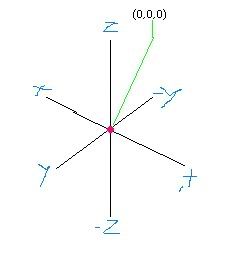
See the red dot in the center? That's (0,0,0)
Posted: Sat Jan 06, 2007 6:44 pm
by -(DW)-Arc9[E]
But how do i set it there?
Posted: Sat Jan 06, 2007 7:48 pm
by minilogoguy18
move the model there the best you can and then click on transform>freeze all transforms with the model selected then freeze the model to get rid of the center operator.