Ok, here the Luke model parameters:
stock - 797points, 1200 triangles
previous version - 810 points, 1214 triangles
new version - 813 points, 1214 triangles
Well, seems the stock, have different count of triangles, so, thats could be just an import issue.
For juggernaut, difference looks more serious:
(there is no stock one)
previous version - 12304 points, 11596 triangles
new version - 13349 points, 11596 triangles
About 1st person hands... After I import, and then export them, (even with no any changes), I can't see them in game. I see only floating gun. Well, I guess, they suppose to be animated, but I didn't spot any "colorful points" when import them. Perhaps, they are imported with removed envelope, and then just drop down in game...
Re: XSI ZETools
Posted: Sat Nov 30, 2013 9:37 am
by ANDEWEGET
Where do you get those point/triangles information from? I guess from the Mesh viewer?
First person hands aren't weighted, they are just separate objects (hands, arms) which move with the bones. And wasn't there a problem with having custom FP meshes for SBWF1?
Re: XSI ZETools
Posted: Sat Nov 30, 2013 3:27 pm
by sereja2
ANDEWEGET wrote:Where do you get those point/triangles information from? I guess from the Mesh viewer?
Sure thing... Actualy, SWBFViewer.
ANDEWEGET wrote:
And wasn't there a problem with having custom FP meshes for SBWF1?
No, I just test it for SWBF2, and got the same result.
Re: XSI ZETools
Posted: Sun Dec 01, 2013 1:59 pm
by AceMastermind
sereja2 wrote:About 1st person hands... After I import, and then export them, (even with no any changes), I can't see them in game. I see only floating gun. Well, I guess, they suppose to be animated, but I didn't spot any "colorful points" when import them. Perhaps, they are imported with removed envelope, and then just drop down in game...
Your 1st person geometry will be invisible ingame if you don't key the bones prior to export. I mentioned that before in this post.
Re: XSI ZETools
Posted: Sun Dec 01, 2013 6:54 pm
by sereja2
Ah, I see my mistake now. I just need to check Export Animation, when export 1st person hands.
Re: XSI ZETools
Posted: Sat Dec 07, 2013 7:18 pm
by Deviss
how i unlock template for modify it on xsi softimage??
Re: XSI ZETools
Posted: Sat Dec 07, 2013 8:37 pm
by ANDEWEGET
You don't, you just import one of the stock .msh files.
Re: XSI ZETools
Posted: Sat Dec 07, 2013 8:39 pm
by Deviss
ANDEWEGET wrote:You don't, you just import one of the stock .msh files.
but i need unlock the skeleton for to use it on enveloping my custom twilek model :S
Re: XSI ZETools
Posted: Sun Dec 08, 2013 6:34 am
by noMatt
for custom units download the skeleton provided by psych0fred
Re: XSI ZETools
Posted: Sun Dec 08, 2013 8:29 am
by Deviss
noMatt wrote:for custom units download the skeleton provided by psych0fred
psych0fred hasn't Aayla skeleton in .xsi format for to use to envelope unit
Extended that once meant for debugging msh <> txt feature a bit. Softimage is not necessary at all for that feature but I can make fast and nice UIs with it (compared to Tkinter, the only standard lib GUI toolkit anyways), so whatever.
It can preserve the data from shadow meshes (SHDW) and might preserve cloth in the future so it may be useful if you want to edit a .msh which has cloth in it.
Re: XSI ZETools
Posted: Wed Dec 11, 2013 2:50 pm
by tirpider
That is cool.
I have a little program that busts up a msh into chunks and can reassemble them. I may make it work with your txt files as well because txt is so much easier to edit than hex.
Re: XSI ZETools
Posted: Thu Dec 12, 2013 7:35 am
by ANDEWEGET
The txt files are in JSON format, so the language you're using probably already has a parser for that.
I've written down some information about the structure, if anyone ever wants to mess with it: http://schlechtwetterfront.github.io/xs ... 2text.html
It's not complete yet and there's some specific stuff in there (like 'geobone' and 'bone' being the same model type in the .msh, but handled differently by my .msh library) which might need explanation.
Cloth now should be able to be preserved, I didn't test it a lot though. I'll try to finalize that soon and add animations.
Re: XSI ZETools
Posted: Thu Jan 02, 2014 5:46 pm
by MandeRek
Forgive my noobness; I've pmed ANDE but understand that he is busy atm (or inactive). I'm trying to install this but his side won't help me a lot either. I got both python and C++ installed (never worked with python before) and then placed the folder in the Addon folder of XSI... but nothing changes in XSI?
Can someone clearify a bit, please? I'ld love to use this instead of my old sloppy 5.11
Re: XSI ZETools
Posted: Thu Jan 02, 2014 11:59 pm
by sereja2
MandeRek wrote:Forgive my noobness; I've pmed ANDE but understand that he is busy atm (or inactive). I'm trying to install this but his side won't help me a lot either. I got both python and C++ installed (never worked with python before) and then placed the folder in the Addon folder of XSI... but nothing changes in XSI?
Can someone clearify a bit, please? I'ld love to use this instead of my old sloppy 5.11
There is actualy 2 different Addons folder, in different directories. Make sure, you put it in to the correct one:
Also, last versions of ZETools folders, need to be renamed as XSIZETools.
Re: XSI ZETools
Posted: Fri Jan 03, 2014 5:36 am
by ANDEWEGET
One more day and I could have replied!
Didn't have internet since the 23rd, sorry. Depending on which version you have you have to check if python was installed correctly (until Softimage 2011) and if you put ZETools in the correct folder.
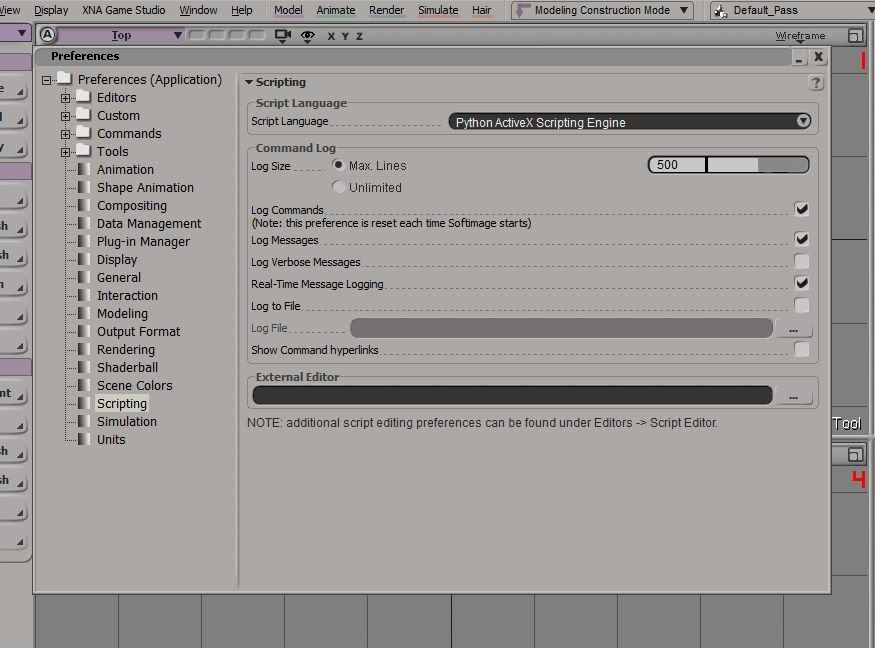
If python is installed correctly it should look like this:
Hidden/Spoiler:
And the folder is as sereja said.
If both of those seem to be correct, check the script editor (scroll button on the bottom of the screen) for any red text (errors).
Re: XSI ZETools
Posted: Tue Jan 14, 2014 10:31 pm
by zwyx1234
Hello all. Im wondering if how to properly envelope, weight, and export a unit mesh with ZETools. Mainly the exporting part. There are tutorials but they use different rigs then what ZETools can import when you import a unit model, such as the rebel soldier. I have tried unsucessfully and I end up with one of two results:
1) The mesh exports fine, but the game crashes. The error log says it cannot find the geometry.
2) The mesh exports fine, but ingame, nothing on the unit moves. It looks like a prop that glides across the ground.
This is done with default settings upon export.
In conclusion: Can someone point me in the right direction for properly enveloping, weighting, and exporting a unit mesh, in such a way that applies to ZETools?
Re: XSI ZETools
Posted: Wed Jan 15, 2014 9:35 am
by noMatt
OK first off all if the game crash press the "check sel" button (with your root selected). Often you have to triangulate it. And for the anim issue, try to double check the guidelines
Re: XSI ZETools
Posted: Thu Jan 16, 2014 8:13 pm
by zwyx1234
Thanks NoMatt. However, after a day and half without internet, I figured out my mistakes, and got it working.
Re: XSI ZETools
Posted: Sat Feb 08, 2014 5:58 am
by agentsmith38
Greetings, I've been having some problem with the tools. I'm not quite sure what but I keep getting this error when trying to export/import
Hidden/Spoiler:
# ERROR : Traceback (most recent call last):
# File "<Script Block >", line 362, in MSHExport_Execute
# import softimage
# ImportError: No module named softimage
# - [line 361 in C:\Users\Scott Pilgrim\Softimage\Softimage_7.5\Addons\XSIZETools\Application\Plugins\XSIZETools.py]
# ERROR : OLE error 0x80020101
Application.MSHExport()
I've tried reinstalling pywin and python, and I've placed the tools in the correct Addon folder. I even tried Softimage 2013 but still nothing. Also I should mention an older version of the tools did work, I think it was build 1.1. The version I try to install now is 1.2. Any help or enlightenment on this issue would be great. Thanks