Page 1 of 2
Help on Tordarian (one of my maps)
Posted: Wed Apr 26, 2006 10:02 pm
by Tohron
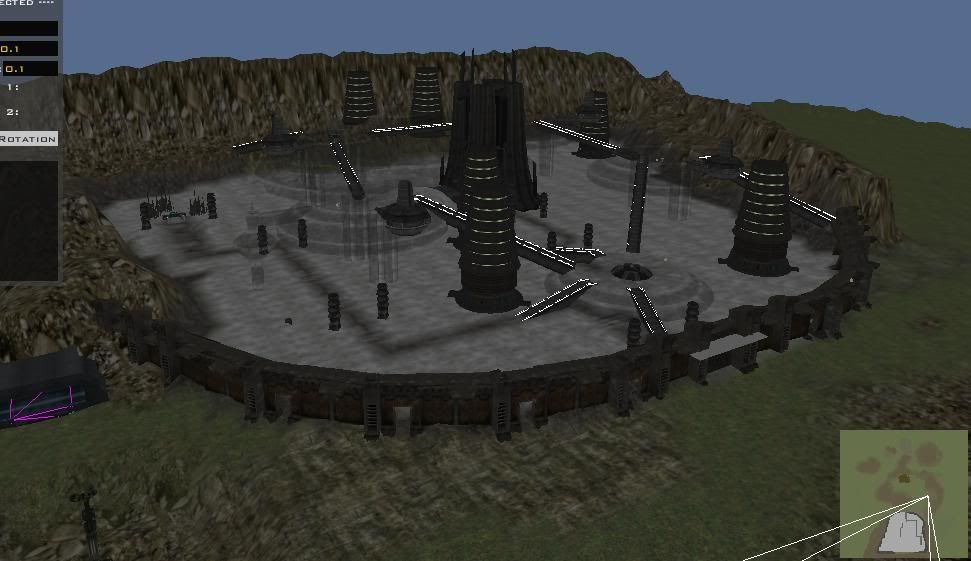
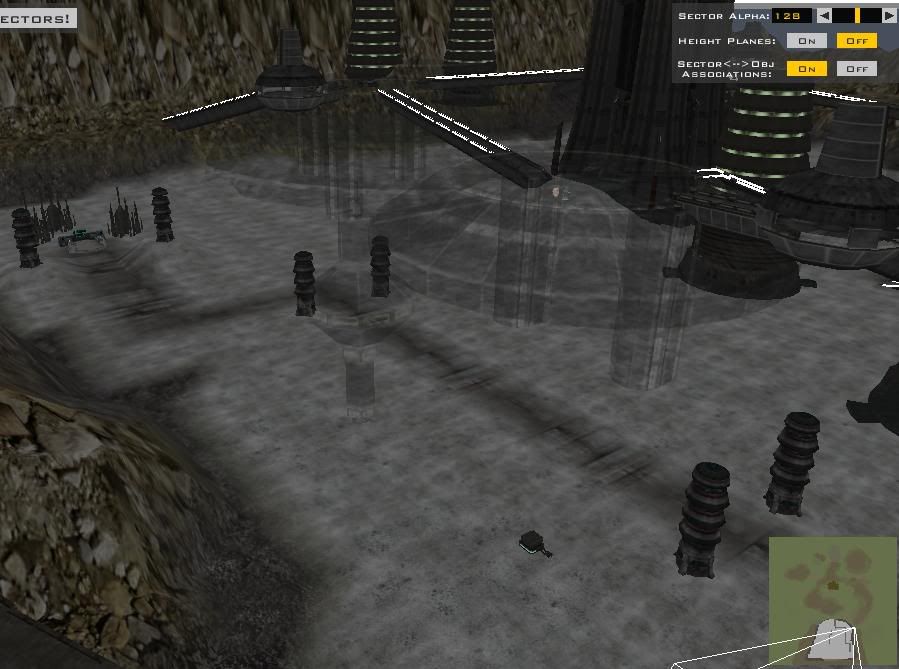
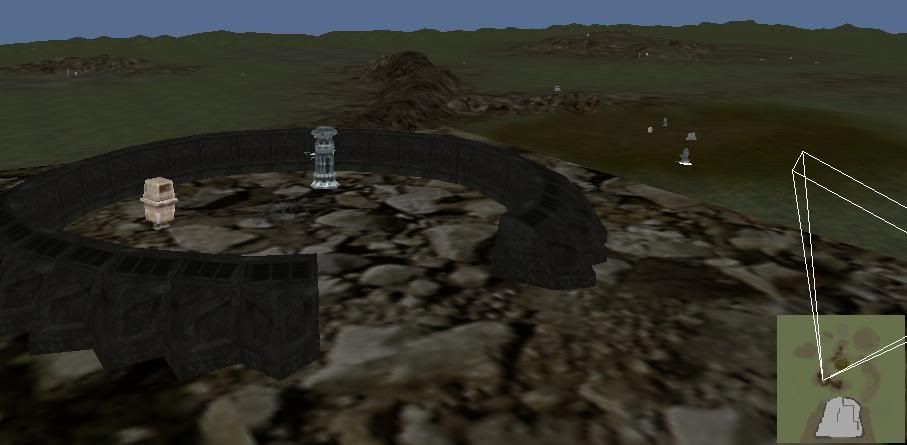
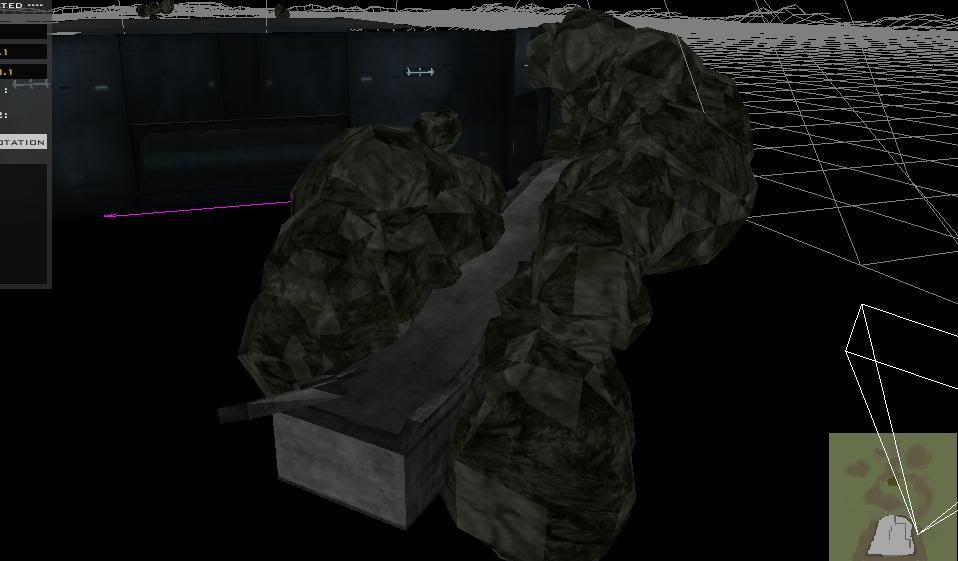
Since help seems to be drying up, I've decided to show some proof that I'm at least a decent modder (I think) before asking questions. Here are some images of Tordarian, where the Republic is attacking a CIS supply base.
Supply Base- Full view:
http://i82.photobucket.com/albums/j252/ ... llview.jpg
Supply base- Partial view:
http://i82.photobucket.com/albums/j252/ ... alview.jpg
Surrounding terrain (note the turrents):
http://i82.photobucket.com/albums/j252/ ... dscape.jpg
Partially completed underground tunnel:
http://i82.photobucket.com/albums/j252/ ... mplete.jpg
Underground entrance off of energy tower:
http://i82.photobucket.com/albums/j252/ ... trance.jpg
Now for the questions:
1. I am trying to spawn two ATTEs in the upper-middle region of the map. I've placed and titled two vehicle spawn points, given them a control zone from CP 3, and updated the LUA with the ID of the ATTE under the Republic side, set the 3x2 walker memory pool to 3 (under instruction) and set up a memory pool for a Commandwalker, again setting the quantity to 3. Neither spawns. Is it that something more must be done because they are mobile command posts?
2. I want to add a variety of turrents to this map, and the 2 standard laser turrents I placed do appear (although they start out destroyed, which I do not want) however, the remote rocket turrents and Hoth dish turrent I placed do not appear at all. The LUA section for Turrent ID has been updated with both of their names, and I think there is enough memory pool space for all of them (I have the MountedTurrent quantity set to 60) yet they do not appear. What am I doing wrong?
3. This one should be rather simple: how do I get lights I place to show up in game?
Thanks for reading!
RE: Help on Tordarian (one of my maps)
Posted: Wed Apr 26, 2006 10:16 pm
by PvtParts
give me a screenshot of the vehicle spawns (what all you have entered in each field)
and post your lua.
for lights, do a search (hint: for obvious effect, make them directional)
turrets, not sure. you must have the tur side in your map, you must also have them loaded under the tur side in your lua.
to place them, simply browse to the tur side and go into odf, then place the turret in your map. make sure your not placing the _unbilt version.
RE: Help on Tordarian (one of my maps)
Posted: Wed Apr 26, 2006 10:45 pm
by Teancum
1-Yes, make sure you fill in both ATK and DEF values in your vehicle spawns.
3-Dunno
3-I'm not sure what you mean. If you create lights in the 'lights' section it should show up in game. Make sure before you save in ZeroEdit, hit 'image' then 'burn terrain' and it will burn the shadows into the terrain.
RE: Help on Tordarian (one of my maps)
Posted: Wed Apr 26, 2006 10:46 pm
by drummerzoid1
put lights in the common layer and burn the terrain
Re: RE: Help on Tordarian (one of my maps)
Posted: Wed Apr 26, 2006 11:25 pm
by Tohron
PvtParts wrote:turrets, not sure. you must have the tur side in your map, you must also have them loaded under the tur side in your lua.
How do you add the turrent side into your map? Do you just mean placing them as objects?
Also, in reference to the post about the ATTEs, I don't think I filled the DEF value - I'll try that.
Thanks a lot for the posts, everyone!

Posted: Thu Apr 27, 2006 12:25 am
by PvtParts
What i mean is go into data_XXX\Sides and make sure tur is there ( it is by default but still check)
To place them ingame, go to object, place, and browse to data_XXX\Sides\tur\odf and select the turret you want.
Remember to list whichever turrets you place like this:
ReadDataFile("SIDES\\tur.lvl;tur, (not sure if thats what it looks like)
"tur_bldg_geoturret") (put all turret odf's you use in your map here; my apologies for vagueness, im assuming you know what your doing, plus its 1 o clock and im working on homework.)
Posted: Thu Apr 27, 2006 12:50 am
by Penguin
or if you don't want to have a 33 MB folder that you only use a few things from,
delete it,
go into assets/sides/tur/odf and place the the turrets you want in ZeroEditor, mark down the names.
go into data_ABC/common/scripts/ABC/ and open ABCc_con OR ABCg_con (depened on what era your using)) go down to
ReadDataFile("dc:SIDE\\tur.lvl",
and remove the dc: part from it.
then add the turrets names you used in the map below that line.
then go into C:\Program Files\LucasArts\Star Wars Battlefront II\Game Data\addon\ABC\DATA\_lvl_pc\SIDE and delete tur/lvl
Posted: Fri Apr 28, 2006 4:43 am
by Guest
ZE-pics are nice. Very neaty work.
Posted: Fri Apr 28, 2006 9:44 am
by Tohron
Okay...
Well, my map is now having a loading screen crash again. Here's what I did:
-I corrected what I thought was a mistake in the Commandwalker memory pool line. It now reads:
SetMemoryPoolSize ("CommandWalker", 6)
The "6" value was something I changed (from a three), something I also did with the 3x2 walker count.
-I thought that since all the turrents start out destroyed, maybe the reason some arn't showing up is that they can't be accessed for repairs. So I elevated them all a bit above the terrain.
-(this did not contribute to my first crash, and is probably not the culprit) I looked in the Geonosis map and saw that the ATTE spawn there didn't use a control zone/cp. So I deleted the control zone and unassigned the two ATTE spawns I had. I also modified the fields that were filled in according to the Geonosis map.
And thanks for the compliment, JK514.
Posted: Fri Apr 28, 2006 2:21 pm
by Teancum
Do you have the CD or DVD version of the game? If you have the CD run BF2_modtools.exe, as it generates an error log.
Posted: Fri Apr 28, 2006 6:04 pm
by Tohron
Teancum wrote:Do you have the CD or DVD version of the game? If you have the CD run BF2_modtools.exe, as it generates an error log.
Unfortunately, I have the DVD version.
Edit: Okay, negative on that I
do have the CD version

However, so far it (the modtools.exe) also crashes on the Tordarian loading screen without saying why, and neither does it give any reason why all of the command posts on my other map dissappeared from the spawn map after I added water. Is there something you must do to get an error log?
Also, if it helps the process of elimination, the munge process was near-flawless, with only one corner discontinuity warning and no errors.
Posted: Sat Apr 29, 2006 9:30 am
by Tohron
So... does no replies mean no solutions? How do you go about adding commandwalkers? Has anyone tried it successfully?
Posted: Sat Apr 29, 2006 10:01 am
by Teancum
As far as the CP's not appearing, it's a layer error. Is this only for Conquest or all gametypes?
Posted: Sat Apr 29, 2006 10:17 am
by Tohron
Teancum wrote:As far as the CP's not appearing, it's a layer error. Is this only for Conquest or all gametypes?
Well, Conquest is the only gametype that map is for, so... yeah.
Posted: Sat Apr 29, 2006 3:15 pm
by Tuskenjedi
Hey, why don't you put your map in the WIP section. Everyone I know personnally looks there to help people with stuff.
Posted: Sat Apr 29, 2006 8:35 pm
by Tohron
Tuskenjedi wrote:Hey, why don't you put your map in the WIP section. Everyone I know personnally looks there to help people with stuff.
WIP section? I don't really know what you're referring to. Could you give a link?
Posted: Sat Apr 29, 2006 8:53 pm
by Penguin
you only allowed 16 command posts, this includes vehicles. if you have more then 16 it will crash upon loading
Posted: Sat Apr 29, 2006 9:45 pm
by Tohron
Penguin wrote:you only allowed 16 command posts, this includes vehicles. if you have more then 16 it will crash upon loading
Nope, I have 6 standard command posts, and I have a feeling that I need to add data on two more (one for each ATTE) If this is indeed the case how do I go about doing that a.k.a. which files do I need to modify and what do I need to change?
Posted: Sun Apr 30, 2006 10:02 am
by Tohron
Why exactly is no one replying? Is it because nobody can think of a solution? And Tuskenjedi mentioned a WIP section. Does anyone know what he's talking about?
Posted: Sun Apr 30, 2006 2:58 pm
by Tohron
Someone, please give a useful reply! I looked back at the beginning of this thread, at the three questions I asked, and virtually NONE of them have been truly answered. My game now crashes as a result of my doubtless incomplete attempts to make turrents and ATTEs work. And my lights continue not to function.
Here is the TORc_con LUA file, from the beginning, to the end of the memory pools. Can anyone figure out something I missed? Can anyone give other files I may need to modify for what I desire in my map to work? I find it hard to believe that NOBODY has ever added non-laser turrents or commandwalkers successfully.
-- load the gametype script
ScriptCB_DoFile("ObjectiveConquest")
ScriptCB_DoFile("setup_teams")
-- REP Attacking (attacker is always #1)
REP = 1;
CIS = 2;
-- These variables do not change
ATT = REP;
DEF = CIS;
function ScriptPostLoad()
--This defines the CPs. These need to happen first
cp1 = CommandPost:New{name = "cp1"}
cp2 = CommandPost:New{name = "cp2"}
cp3 = CommandPost:New{name = "cp3"}
cp4 = CommandPost:New{name = "cp4"}
cp5 = CommandPost:New{name = "cp5"}
cp6 = CommandPost:New{name = "cp6"}
--This sets up the actual objective. This needs to happen after cp's are defined
conquest = ObjectiveConquest:New{teamATT = ATT, teamDEF = DEF,
textATT = "game.modes.con",
textDEF = "game.modes.con2",
multiplayerRules = true}
--This adds the CPs to the objective. This needs to happen after the objective is set up
conquest:AddCommandPost(cp1)
conquest:AddCommandPost(cp2)
conquest:AddCommandPost(cp3)
conquest:AddCommandPost(cp4)
conquest:AddCommandPost(cp5)
conquest:AddCommandPost(cp6)
conquest:Start()
EnableSPHeroRules()
end
---------------------------------------------------------------------------
-- FUNCTION: ScriptInit
-- PURPOSE: This function is only run once
-- INPUT:
-- OUTPUT:
-- NOTES: The name, 'ScriptInit' is a chosen convention, and each
-- mission script must contain a version of this function, as
-- it is called from C to start the mission.
---------------------------------------------------------------------------
function ScriptInit()
ReadDataFile("ingame.lvl")
SetMaxFlyHeight(200)
SetMaxPlayerFlyHeight (200)
SetMemoryPoolSize ("ClothData",20)
SetMemoryPoolSize ("Combo",50) -- should be ~ 2x number of jedi classes
SetMemoryPoolSize ("Combo::State",650) -- should be ~12x #Combo
SetMemoryPoolSize ("Combo::Transition",650) -- should be a bit bigger than #Combo::State
SetMemoryPoolSize ("Combo::Condition",650) -- should be a bit bigger than #Combo::State
SetMemoryPoolSize ("Combo::Attack",550) -- should be ~8-12x #Combo
SetMemoryPoolSize ("Combo::DamageSample",6000) -- should be ~8-12x #Combo::Attack
SetMemoryPoolSize ("Combo::Deflect",100) -- should be ~1x #combo
ReadDataFile("sound\\yav.lvl;yav1cw")
ReadDataFile("SIDE\\rep.lvl",
"rep_inf_ep3_rifleman",
"rep_inf_ep3_rocketeer",
"rep_inf_ep3_engineer",
"rep_inf_ep3_sniper",
"rep_inf_ep3_officer",
"rep_inf_ep3_jettrooper",
"rep_hover_fightertank",
"rep_hero_anakin",
"rep_walk_atte",
"rep_hover_fightertank",
"rep_hover_barcspeeder")
ReadDataFile("SIDE\\cis.lvl",
"cis_inf_rifleman",
"cis_inf_rocketeer",
"cis_inf_engineer",
"cis_inf_sniper",
"cis_inf_officer",
"cis_inf_droideka",
"cis_hero_darthmaul",
"cis_tread_hailfire",
"cis_hover_aat")
ReadDataFile("dc:SIDE\\tur.lvl",
"tur_bldg_laser",
"tur_bldg_guided_rocket",
"tur_bldg_hoth_dishturrent",
"tur_bldg_tower")
SetupTeams{
rep = {
team = REP,
units = 20,
reinforcements = 150,
soldier = { "rep_inf_ep3_rifleman",9, 25},
assault = { "rep_inf_ep3_rocketeer",1, 4},
engineer = { "rep_inf_ep3_engineer",1, 4},
sniper = { "rep_inf_ep3_sniper",1, 4},
officer = {"rep_inf_ep3_officer",1, 4},
special = { "rep_inf_ep3_jettrooper",1, 4},
},
cis = {
team = CIS,
units = 20,
reinforcements = 150,
soldier = { "cis_inf_rifleman",9, 25},
assault = { "cis_inf_rocketeer",1, 4},
engineer = { "cis_inf_engineer",1, 4},
sniper = { "cis_inf_sniper",1, 4},
officer = {"cis_inf_officer",1, 4},
special = { "cis_inf_droideka",1, 4},
}
}
SetHeroClass(CIS, "cis_hero_darthmaul")
SetHeroClass(REP, "rep_hero_anakin")
-- Level Stats
-- ClearWalkers()
AddWalkerType(0, 4) -- special -> droidekas
AddWalkerType(1, 0) -- 1x2 (1 pair of legs)
AddWalkerType(2, 0) -- 2x2 (2 pairs of legs)
AddWalkerType(3, 6) -- 3x2 (3 pairs of legs)
local weaponCnt = 800
SetMemoryPoolSize("Aimer", 75)
SetMemoryPoolSize("AmmoCounter", weaponCnt)
SetMemoryPoolSize("BaseHint", 1024)
SetMemoryPoolSize("EnergyBar", weaponCnt)
SetMemoryPoolSize("EntityCloth", 32)
SetMemoryPoolSize("EntityFlyer", 32)
SetMemoryPoolSize("EntityHover", 32)
SetMemoryPoolSize("EntityLight", 200)
SetMemoryPoolSize("EntitySoundStream", 4)
SetMemoryPoolSize("EntitySoundStatic", 32)
SetMemoryPoolSize("MountedTurret", 32)
SetMemoryPoolSize("Navigator", 128)
SetMemoryPoolSize("Obstacle", 1024)
SetMemoryPoolSize("PathNode", 1024)
SetMemoryPoolSize("SoundSpaceRegion", 64)
SetMemoryPoolSize("TreeGridStack", 1024)
SetMemoryPoolSize("UnitAgent", 128)
SetMemoryPoolSize("UnitController", 128)
SetMemoryPoolSize("Weapon", weaponCnt)
SetMemoryPoolSize ("CommandWalker", 6)
SetMemoryPoolSize ("EntityHover", 4)
SetMemoryPoolSize("MountedTurret", 90)
SetSpawnDelay(10.0, 0.25)
--ReadDataFile("dc:TOR\\TOR.lvl", "TOR_conquest")
ReadDataFile("dc:TOR\\TOR.lvl", "TOR_conquest")
SetDenseEnvironment("false")
I hate to shout, but despite over an entire page of discussion, my initial questions remain unanswered. All I have achieved is getting my map to crash again. I know you're all trying to help, but can't someone see what I am not doing or doing wrong?