

Texturing a sphere

How to create models in XSI and other 3D applications and make them work in Battlefront 1 & 2. Post models, tips for application usage and share anything XSI, 3DMax, SketchUp, etc.

Moderator: Moderators

Post Reply
User avatar
[TFA]Padawan_Fighter
High General
High General
Posts: 806
Joined: Wed Mar 25, 2009 3:37 pm
Projects :: Ha - as if I will ever get back to them
Games I'm Playing :: SWBF2 ARK EliteDngrs
xbox live or psn: No gamertag set
Location: Lost at sea

Texturing a sphere

Post by [TFA]Padawan_Fighter »

Hey,

So this isn't exactly an XSI/3ds/modeling program problem, so much as a texturing problem. You guys seem to be the best people to talk to.

I'm adding a planet to a program called Celestia, and it's starting to look really fine, but I overlooked one thing: The poles.

I really don't know how to stretch/modify/etc images around the poles so it would work correctly, and especially not since I have a continent that goes under a part of the image. I'm not sure where to put it and how to stretch it. Let me show you:
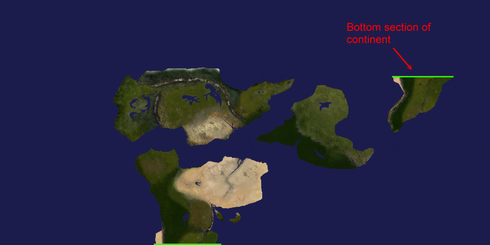
Image

Any idea what to do? I posted this on the Celestia forums as well, but I couldn't understand their sciencey explanations, and some of the solutions were programs that used the command prompt to modify images, and I had no idea how to do that either. I was hoping you guys could give me some simple explanation how to do this?

User avatar
DarthD.U.C.K.
Master of the Force
Master of the Force
Posts: 6027
Joined: Wed Sep 27, 2006 11:05 am
Location: Duckburg, Germany

Re: Texturing a sphere

Post by DarthD.U.C.K. »

how does this program work? can you modify UVs and export models?
assuming i have an image of the poles this is how i would do it:
i would create a smooth sphere in xsi and unwrap it like the planetmodel (if you cant convert the original model).
then i would create a copy of the sphere, and give it new textureprojection(s) so that the poles are correctly positioned. then use ultimapper to transfer the texture from the second sphere to the first one. this way the poles will be positioned parfectly and undistorted and you can easily include them in the original texture.
User avatar
AceMastermind
Gametoast Staff
Gametoast Staff
Posts: 3285
Joined: Mon Aug 21, 2006 6:23 am
Contact:

Re: Texturing a sphere

Post by AceMastermind »

I have no experience with Celestia, but here's a sphere textured with your image(edited).

[TFA]Padawan_Fighter wrote:I posted this on the Celestia forums as well, but I couldn't understand their sciencey explanations, and some of the solutions were programs that used the command prompt to modify images, and I had no idea how to do that either...
How about a link to the discussion?

EDIT: Found it!
User avatar
[TFA]Padawan_Fighter
High General
High General
Posts: 806
Joined: Wed Mar 25, 2009 3:37 pm
Projects :: Ha - as if I will ever get back to them
Games I'm Playing :: SWBF2 ARK EliteDngrs
xbox live or psn: No gamertag set
Location: Lost at sea

Re: Texturing a sphere

Post by [TFA]Padawan_Fighter »

DarthD.U.C.K. wrote:how does this program work? can you modify UVs and export models?

Celestia isn't a modeling program. It's an astronomy program, where you are able to visit all the known celestial bodies of the universe. It's possible to create addons for the program as well.

Creating a planet is relatively simple. Unless you tell it to use a specific model, it'll just give you a stock sphere, with the same rectangular texture map.
AceMastermind wrote:I have no experience with Celestia, but here's a sphere textured with your image(edited).
It looks pretty nice, I just need to find a way around that pinch around the poles. Also, as you can see in my original image, I want the southernmost tip of the southernmost continent to reach down to the back of the planet. But that's not nearly as important as actually finding a way to stretch the image near the poles.
User avatar
DarthD.U.C.K.
Master of the Force
Master of the Force
Posts: 6027
Joined: Wed Sep 27, 2006 11:05 am
Location: Duckburg, Germany

Re: Texturing a sphere

Post by DarthD.U.C.K. »

[TFA]Padawan_Fighter wrote: Also, as you can see in my original image, I want the southernmost tip of the southernmost continent to reach down to the back of the planet.
modify the uv in a modeling program.
[TFA]Padawan_Fighter wrote:But that's not nearly as important as actually finding a way to stretch the image near the poles.
i explained got to do exactly that in my first reply. or did i misunderstand something?
User avatar
[TFA]Padawan_Fighter
High General
High General
Posts: 806
Joined: Wed Mar 25, 2009 3:37 pm
Projects :: Ha - as if I will ever get back to them
Games I'm Playing :: SWBF2 ARK EliteDngrs
xbox live or psn: No gamertag set
Location: Lost at sea

Re: Texturing a sphere

Post by [TFA]Padawan_Fighter »

DarthD.U.C.K. wrote:
[TFA]Padawan_Fighter wrote: Also, as you can see in my original image, I want the southernmost tip of the southernmost continent to reach down to the back of the planet.
modify the uv in a modeling program.
[TFA]Padawan_Fighter wrote:But that's not nearly as important as actually finding a way to stretch the image near the poles.
i explained got to do exactly that in my first reply. or did i misunderstand something?
Yeah, I know...sorry. I'm just having a bit of trouble understanding. Some of the terms I don't get, like 'unwrapping' and stuff. I don't want to waste your time asking what every single thing means, though.
FragMe!
Gametoast Staff
Gametoast Staff
Posts: 2244
Joined: Sat May 13, 2006 12:34 am
Projects :: Not sure keep changing my mind.
Games I'm Playing :: F1 and SWBF
xbox live or psn: No gamertag set
Location: Origin name GT_FragMe
Contact:

Re: Texturing a sphere

Post by FragMe! »

Have a look in the XSI help file for Implicit Projection.
It will show how to make it so you do not get the deformation at the top and bottom of the sphere.
That may get the mapping you are looking for.

If this is not truley XSI related then what you may want to do is try something like the default texture in XSI, the colored squares with letters and numbers, apply it in the other program and see how it deforms and adjust your planet texture accordingly.
Post Reply